Support, Optimize, Upgrade or Reimplement Your AX Environment

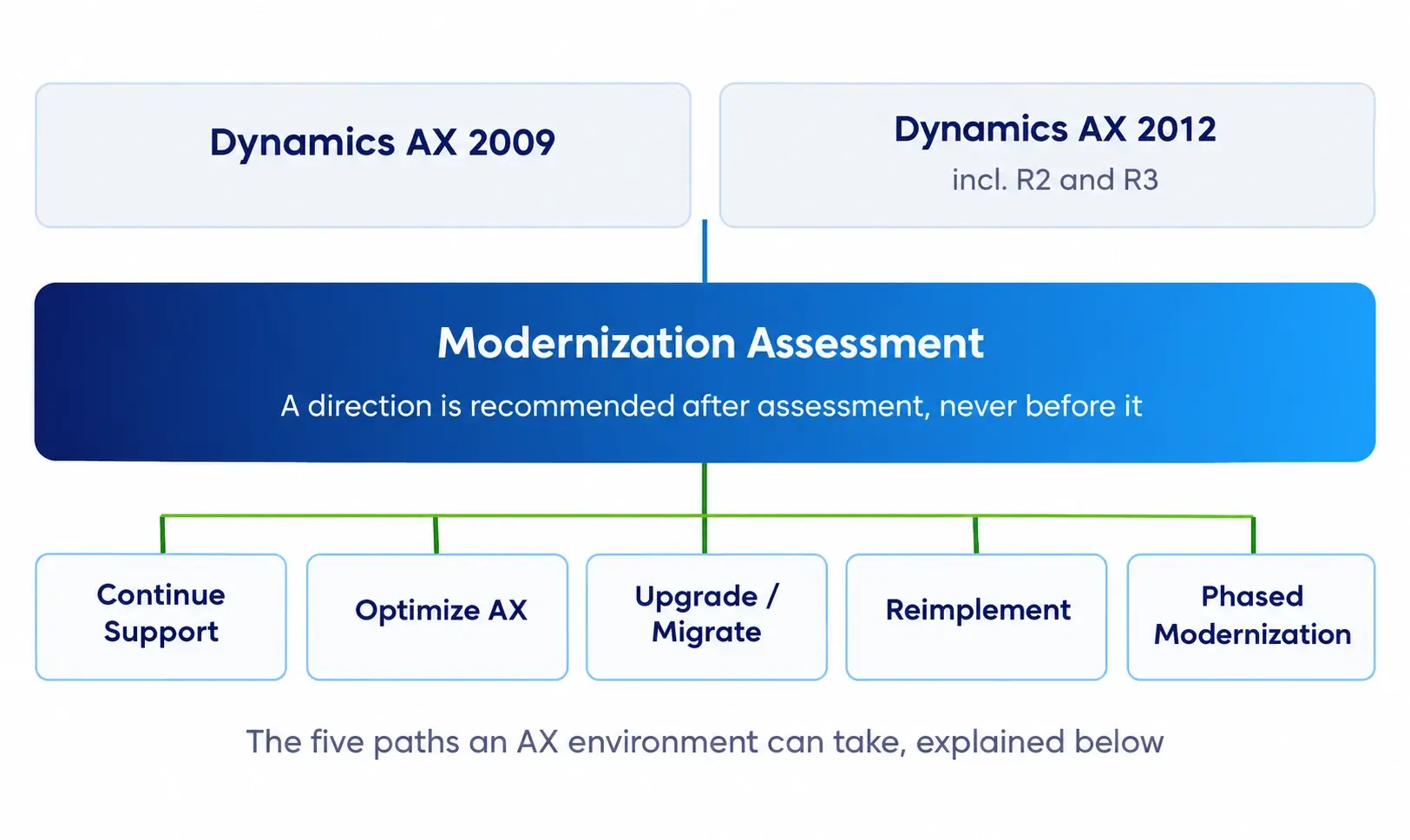
Dynamics AX upgrade is not automatically the next step. Some organizations need stability and better support. Others need targeted fixes before any migration conversation makes sense. Some are ready to move, but only in stages. The right path depends on your environment and not on a vendor's preference. DynaTech recommends a direction after assessment, never before it.

The Five Paths

Continue Support
When it fits

AX meets current business needs; no immediate change capacity or budget

What we assess

Operational stability, open issues, support risks, skills availability

Likely next step

Managed AX support with a periodic review of modernization timing

Optimize AX
When it fits

Performance, process or reporting problems are the real issue, not the platform

What we assess

Technical debt, customizations, batch and performance issues, reporting gaps

Likely next step

Targeted remediation while a migration roadmap is defined separately

Upgrade / Migrate
When it fits

AX no longer supports business change; processes are broadly sound

What we assess

Version and environment, X++ code, ISVs, integrations, data scope, extension strategy

Likely next step

A structured migration to Dynamics 365 with defined scope

Reimplement
When it fits

Processes have drifted, customizations are heavy, or the original design no longer fits

What we assess

Business process fit, customization rationale, data relevance, organizational readiness

Likely next step

Fit-to-standard design with a fresh Dynamics 365 build

Phased Modernization
When it fits

Change capacity, budget or operational risk rules out a single cutover

What we assess

Scope sequencing, entity and site priority, integration dependencies, interim architecture

Likely next step

A staged roadmap with the first phase scoped and costed

What Shapes the Decision

  • Operational Stability
  • Technical Debt
  • Customizations And X++
  • Business Change
  • Data
  • Integrations
  • Cloud Strategy
  • Organizational Readiness

There is no universal Microsoft Dynamics AX Upgrade path. An assessment gives you the evidence to determine whether to support, optimize, upgrade, reimplement, or modernize your system in phases.

dynamics-ax-modernization-decision-factors

Microsoft Dynamics AX Support Services for AX 2009 and AX 2012

Your AX environment may be stable today, but support requirements do not stop with day-to-day issue resolution. DynaTech provides Dynamics AX support services for organizations operating on AX 2009 and AX 2012, including R2 and R3 deployments where applicable. We offer functional, technical, and managed support under one team with no requirement to commit to a migration to get it.

dynamics-ax-functional-support
Functional Support

Day-to-day process and configuration support across the modules the business depends on:

  • Finance, including period close, reconciliation and reporting issues
  • Procurement and sourcing
  • Inventory and warehousing
  • Production and manufacturing processes
  • Supply chain planning and execution
  • User queries, configuration changes and process guidance
dynamics-ax-technical-support
Technical Support

Development and platform support for the layer beneath the processes:

  • Incident management with defined response and resolution handling
  • Service-level-based support arrangements
  • Enhancement and small-change delivery
  • Environment monitoring and proactive issue identification
  • Documentation of undocumented customizations and processes
  • Knowledge transfer to internal teams
dynamics-ax-managed-support-services
Managed Support

Structured ongoing support for organizations that need predictability rather than ad-hoc help:

  • Incident management with defined response and resolution handling
  • Service-level-based support arrangements
  • Enhancement and small-change delivery
  • Environment monitoring and proactive issue identification
  • Documentation of undocumented customizations and processes
  • Knowledge transfer to internal teams

One Partner for Every Stage of Your AX Journey

Your organization may not be ready for a Dynamics AX to Dynamics 365 migration today. That does not mean the roadmap should stop. DynaTech supports your AX environment while helping you prepare for the next stage when the business is ready.

01

Support & Stabilize

Resolve functional and technical issues, maintain customizations, and keep critical AX processes running.

You are here if: support is reactive, internal knowledge has thinned, or issues keep returning.

02

Assess & Plan

Review your AX version, X++ code, customizations, data, integrations, ISVs, reporting, and business priorities.

You are here if: modernization is agreed in principle but the scope, route and sequence are not.

03

Migrate & Modernize

Plan the move to D365 F&SCM, modernizing processes, data, integrations, and reporting along the way.

You are here if: the decision is made and the program needs delivery capability.

04

Scale & Optimize

Extend the modernized environment with analytics, automation, AI, and ongoing managed services.

You are here if: Dynamics 365 is live but not yet delivering what the business case promised.

The starting point should match where your business actually is today,
not where a generic migration roadmap says it should be. Discuss your current AX environment and the modernization stage that fits your business.

Dynamics AX 2009 and AX 2012 Migration Paths

Your AX version shapes the migration approach. AX 2009 and AX 2012 have different technical starting points, customization patterns, and data considerations.

AX 2009 to Dynamics 365 Migration

An AX 2009 to Dynamics 365 migration typically requires a reimplementation-led approach, with the focus placed on current business processes, data, integrations and required capabilities rather than simply carrying the legacy implementation forward.

Assessment covers
Processes Customizations Data Integrations Reporting User readiness

Organizations typically start with an environment and options assessment before defining migration scope.

AX 2012 Upgrade to Dynamics 365

An AX 2012 upgrade to Dynamics 365 may offer more continuity, but the right approach depends on the existing implementation.

Assessment covers
AX version X++ code Extensions ISVs Data Integrations Testing and cutover

DynaTech determines what should be retained, rebuilt, replaced, or redesigned as part of the AX 2012 to Dynamics 365 upgrade.

Upgrade, Reimplement, Phase, or Hybrid

There is no universal AX to D365 migration route. The assessment determines the approach for your environment.

Dynamics AX to Dynamics 365 Migration Services

Moving off AX is not a data transfer. It is a decision about which parts of a decade-old environment still earn their place. To migrate Dynamics AX to Dynamics 365 properly, the assessment has to come first: business processes, customizations, X++ code, ISV solutions, integrations, reports and historical data.

What a Dynamics AX to Dynamics 365 Migration Covers

Moving off AX is not a data transfer. It is a decision about which parts of a decade-old environment still earn their place. To migrate Dynamics AX to Dynamics 365 properly, the assessment has to come first: business processes, customizations, X++ code, ISV solutions, integrations, reports and historical data

Workstream Scope
Solution planning Target architecture, scope definition, phasing, risk and dependency mapping
Fit-to-standard Where standard Dynamics 365 capability covers the requirement, and where it genuinely does not
Configuration and development Environment setup, configuration, extensions and required custom development
Data migration Profiling, cleansing, mapping, trial loads, validation and reconciliation
Integration rebuild EDI, banking, warehouse devices, ecommerce, logistics and third-party interfaces
Testing Data validation, integration testing, UAT, performance and security testing
User readiness Role-based training, documentation and adoption support
Cutover and go-live Rehearsal, final migration, deployment and production validation
Stabilization Hypercare, issue resolution and transition into managed services

Low-Risk Migration Approach with DynaTech

Migration risk concentrates in a few predictable places. A Microsoft Dynamics AX migration run as defined workstreams surfaces during assessment and planning, when scope can still change, rather than during build, when it cannot. DynaTech's structured AX-to-D365 migration approach helps identify risks, dependencies and scope decisions early, before they become late-stage implementation issues.

Low-Risk Migration Approach with DynaTech

Our Dynamics AX to Dynamics 365 Migration Approach

A structured AX to D365 migration keeps technical, data, and business decisions connected from discovery through go-live.

01

Discover

Assess AX, processes, customizations, data, ISVs, and integrations.

02

Strategize

Define the migration route, target architecture, scope, and priorities.

03

Design

Align processes with D365 standard capabilities and identify required changes.

04

Prepare Data

Define data scope, mapping, cleansing, transformation, and validation.

05

Modernize

Rebuild required X++ customizations and update integrations.

06

Test

Validate processes, data, integrations, security, and business scenarios.

07

Go Live

Rehearse cutover, migrate approved data, and transition to production.

08

Stabilization & Managed Services

Resolve post-go-live issues and continue with support and optimization.

Dynamics AX Data Migration to Dynamics 365

A successful data migration from AX 2012 to Dynamics 365 starts with deciding what the new environment actually needs.

Data discovery and preparation

DynaTech reviews data ownership, quality, dependencies, and business relevance. The process includes profiling, cleansing, mapping, and transforming AX data for the D365 environment.

Migration scope can include:

  • Master data
  • Open transactions
  • Financial balances
  • Inventory
  • Fixed assets
  • Selected historical records

The final scope is agreed based on business, reporting, regulatory, and operational requirements.

dynamics-ax-data-discovery-preparation

Migration validation

Trial migrations help identify data issues before cutover. DynaTech validates migrated data, reconciles key balances and records, and prepares the final migration for production. Audit and traceability requirements are considered throughout the process.

dynamics-365-data-migration-validation

What happens to historical AX data?

Not every historical record needs to enter the D365 transaction system. Where appropriate, older data can remain accessible through archiving or reporting solutions, reducing unnecessary migration volume while preserving access to required history. Discuss which AX data should move to D365, remain accessible, or be archived.

dynamics-ax-historical-data-archiving

What changes beyond the ERP?

The move to D365 also requires planning for the cloud environment, role-based user experiences, integrations, security, and update governance. These considerations should be addressed as part of the target architecture rather than after implementation. Explore DynaTech's Dynamics 365 Finance services and Dynamics 365 Supply Chain Management services for detailed capabilities.

These capabilities are complementary to a D365 modernization program, not mandatory components of every migration. DynaTech identifies where they add practical value based on the organization's processes, data, and priorities.

DynaTech evaluates these business processes alongside your AX configuration, customizations, integrations, data, and reporting requirements to help define the appropriate support or modernization path.

Why Choose DynaTech for Dynamics AX and Dynamics 365?

DynaTech combines Dynamics AX and Dynamics 365 expertise with capabilities across data, analytics, automation, integration, AI, and managed services. This gives organizations one team to support the current environment and plan what comes next.

Built to Support Complex Microsoft Modernization

100 +

Happy Clients

Experience supporting organizations across different business and operational environments.

500 +

Expert Minds

Access to cross-functional expertise spanning ERP, data, analytics, automation, integration, and AI.

150 +

Global Projects

Experience delivering technology initiatives across global organizations and complex business requirements.

Frequently Asked Questions About Dynamics AX Support and Migration

What Dynamics AX versions does DynaTech support?

DynaTech supports organizations running Dynamics AX 2009 and AX 2012, including applicable AX 2012 R2 and R3 environments. Support can cover functional issues, X++ customizations, integrations, workflows, reports, performance, and ongoing enhancements. The appropriate support model depends on your AX version, environment, business processes, and technical requirements.

Is Microsoft Dynamics AX still supported?

The support and lifecycle status of a specific Dynamics AX version depends on the version and Microsoft’s current lifecycle terms. Organizations should verify the applicable status for their deployment before making modernization decisions. DynaTech can assess the current AX environment and help determine appropriate support and modernization options.

Can an organization continue using AX 2009 or AX 2012?

Organizations may continue operating their existing AX environment based on their technical condition, business requirements, support arrangements, and applicable Microsoft lifecycle considerations. Continuing with AX does not necessarily mean migration must happen immediately. DynaTech can assess the environment and recommend whether continued support, optimization, or modernization is appropriate.

What is the difference between Dynamics AX and Dynamics 365?

Dynamics AX is an on-premises ERP that Dynamics 365 succeeded. Dynamics 365 Finance and Dynamics 365 Supply Chain Management are cloud services with a different development model, based on extensions rather than the over-layering used in AX. They receive regular updates from Microsoft, use role-based interfaces, and connect natively with Power BI, Power Platform and Microsoft Fabric.

What is the best path from AX 2012 to Dynamics 365?

An AX 2012 upgrade to Dynamics 365 has more technical continuity than AX 2009, so a structured upgrade is viable in many cases. But heavy customization, significant process drift or ISV solutions without a Dynamics 365 equivalent can make reimplementation the sounder route. The assessment determines which applies to you.

Can AX 2009 migrate to Dynamics 365?

Yes. An AX 2009 to D365 upgrade is generally a reimplementation rather than a technical upgrade. This is because the architecture, data model, and development framework have all changed. Migration process starts with process discovery instead of code conversion, so a decade of workarounds doesn't get carried forward automatically.

Should we upgrade, reimplement or optimize AX?

It depends on different aspects like: operational stability, technical debt, customization depth, planned business change, volume and quality of data, integration complexity, cloud strategy and organizational readiness. Two businesses on the same AX version regularly reach different conclusions. Our Dynamics AX consulting approach is to assess these first and recommend a direction afterwards.

Can X++ customizations be migrated?

Existing AX 2012 customizations need to be assessed rather than assumed to move unchanged. Microsoft provides code-upgrade capabilities to help migrate AX 2012 application code and metadata, but customizations that rely on legacy patterns such as over layering may need to be refactored using supported extension approaches. DynaTech first determines whether each customization is still required, whether standard Dynamics 365 functionality can replace it, and what must be redesigned or rebuilt.

What happens to AX ISV solutions?

It varies by vendor. Some offer a direct Dynamics 365 version, some have no equivalent, and a few have left the market. Where there's no direct path, go for an alternative on AppSource or check whether standard Dynamics 365 capability now covers what the add-on was doing. Licensing terms often differ from the AX arrangement. Hence, it's worth examining during assessment rather than mid-project.

What AX data can be migrated to Dynamics 365?

Master data, open transactions, financial balances, inventory positions and fixed assets normally move. Historical transactions move selectively, by agreed scope. Data migration from AX 2012 to Dynamics 365 begins with profiling what you actually have, since quality and duplication issues are usually more extensive than expected on an environment of that age.

How are integrations, workflows and reports handled?

Each is assessed individually. Integrations like EDI, banking, warehouse devices, logistics, and eCommerce are rebuilt against current APIs that don't support original technology. Workflows are reviewed to see whether they belong to Dynamics 365 or are better built in Power Platform. Reports are rationalized rather than recreated wholesale, since most AX environments carry far more reports than anyone runs.

Can historical AX data remain accessible?

Yes, and it usually doesn't need to live in Dynamics 365 to be. A read-only archive of the AX environment, an export into a reporting layer, or migrating a defined number of prior periods all keep history available for audit and reference. Which fits depends on your retention obligations and how finance actually uses older data.

How long does an AX-to-D365 migration take?

Duration depends on various things like scope, customization depth, the quantity of entities and sites, data volume, integration count, and your internal capacity to support the program. Published averages aren't much use, because the range across real projects is wide. The assessment gives you an approximate timeline depending on your environment.

What factors affect migration cost?

Mostly, scope. Customizations retained, historical data volume, number of integrations, ISV replacement requirements, testing level, etc. Cost tends to be driven more by decisions about what you want to carry forward rather than by the migration itself. This is why scope rationalization during assessment is the most effective lever available.

Does DynaTech provide support after go-live?

Yes. Stabilization and hypercare follow go-live directly, covering issue resolution, adoption support and performance. That transitions into a managed services arrangement handling updates, enhancements, monitoring, and optimization.

How can Fabric and Power Platform support D365 modernization?

Microsoft Fabric is relevant when reporting requires data from systems beyond the ERP, it provides a governed place for that data with agreed definitions. Power Platform covers workflow automation, approvals and role-specific apps, and can reduce migration scope where an existing customization is better rebuilt as low-code than as a Dynamics 365 extension. Neither is mandatory for migration.

Understand Your Dynamics AX Environment and the Right Next Step

Most organizations operating on AX know roughly what they have. Fewer have a current picture of what it would take to move, or whether moving is the right call this year. The Dynamics AX Modernization Assessment gives you that picture.

Get In Touch Get In Touch

Get In Touch