
D365 APIs
Transform your Dynamics 365 experience now! Elevate efficiency, enhance collaboration, and innovate effortlessly with our advanced API solution. Seamlessly integrate and unlock unparalleled potential. Unleash the power of integrated excellence to transform your business today.

Harness the Power of Integration with D365 APIs
Businesses struggle to achieve seamless integration and streamlined processes. Collaboration becomes cumbersome as data exchange between systems becomes manual and time-consuming. Decision-making is hindered by a lack of real-time insights, impacting the ability to respond swiftly to dynamic market changes. Without the efficiency of APIs, data accuracy and consistency become challenging to maintain, leading to potential errors and delays. Overall, the absence of Dynamics 365 APIs limits the organization's agility and hampers its ability to harness the full potential of this platform for comprehensive business transformation.
DynaTech empowers your business with seamless connectivity by offering custom Microsoft Dynamics 365 APIs tailored to your unique needs.
Effortless Integration
Effortless Integration
Seamlessly integrate your systems with Dynamics 365 APIs for smooth data flow.
Real-time Insights
Real-time Insights
Make informed decisions with up-to-the-minute data and insights from Dynamics 365 APIs.
Enhanced Collaboration
Enhanced Collaboration
Break down data silos, fostering collaboration across departments in real-time.
Customization and Scalability
Customization and Scalability
Tailor Dynamics 365 APIs to your needs, ensuring flexibility and scalability.
Automation of Processes
Automation of Processes
Increase operational efficiency by automating routine tasks through Dynamics 365 APIs.
Optimized Customer Experience
Optimized Customer Experience
Deliver exceptional customer interactions by leveraging Dynamics 365 APIs for personalized service and relationship-building.
Business Process Flow
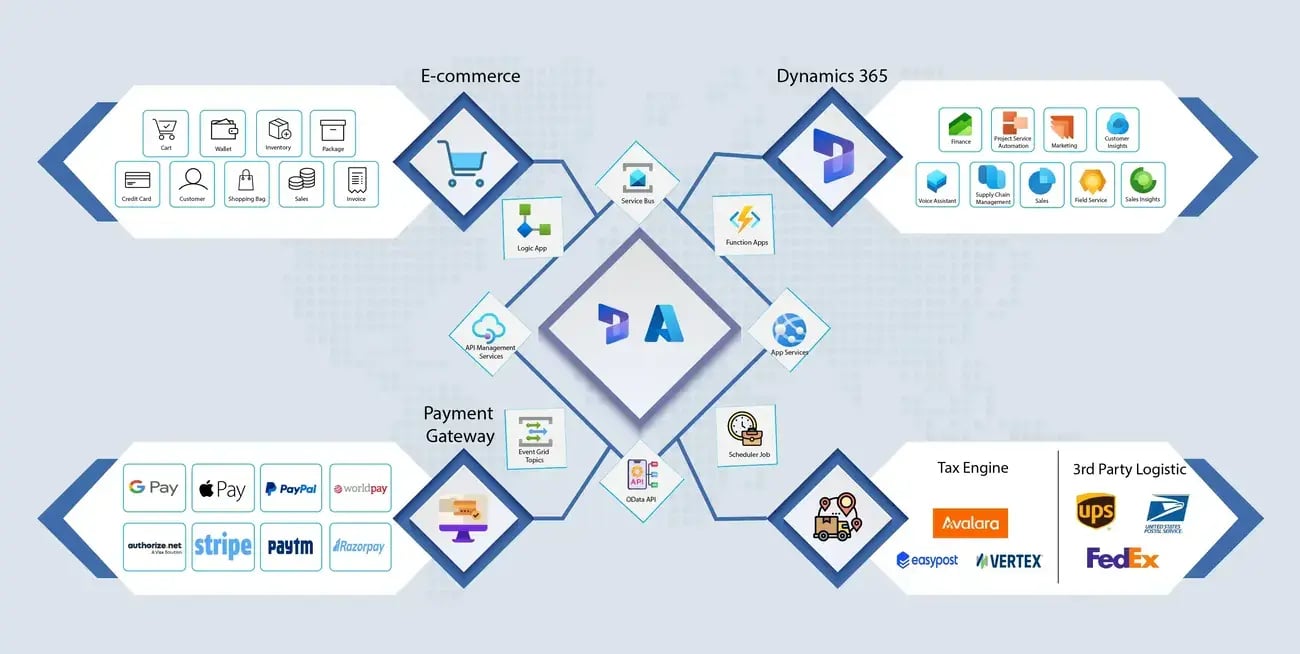
Tools and Technology
Dynamic Integration Suite
Connect and synchronize your business processes with our Dynamic Integration Suite. Harness the power of Dynamics 365 CRM APIs to ensure a fluid exchange of data, fostering efficiency and coherence across your entire ecosystem.
Scalability Assurance Module
Our Microsoft Dynamics 365 APIs come equipped with a Scalability Assurance Module, allowing your integration to evolve seamlessly with your business growth. Easily expand operations without compromising on performance or efficiency.
Intelligent Data Mapping Toolkit
Navigate the complexities of data integration effortlessly with our Intelligent Data Mapping Toolkit that empowers you to map and transform data between different systems, ensuring accuracy and consistency throughout your processes.
Real-Time Event Notification System
Stay informed and responsive with our Real-Time Event Notification System. Receive instant alerts and updates, enabling proactive decision-making based on the most current information available through Dynamics 365 APIs.
Sales Insights
Enable your sales team to make intelligent decisions with our Microsoft Dynamics 365 for Sales API. Unlock valuable customer data, enhance lead management, and optimize sales strategies for unprecedented success.
Smart Search Engine
Navigate your data effortlessly with our Smart Search Engine, seamlessly integrated into Dynamics 365 APIs. Accelerate productivity by quickly locating information, ensuring that your team has the right data at their fingertips.
No-Code App Development
Transform ideas into reality with our No-Code App Development. Microsoft Dynamics 365 integration APIs make app creation accessible to all, allowing you to develop custom applications without requiring extensive coding expertise.
Intelligent Analytics Dashboard
Make data-driven decisions with our Microsoft Dynamics 365 REST APIs. Visualize key metrics, uncover trends, and derive actionable insights for strategic planning, business optimization, and high-end results.
Dynamic Integration Suite
Connect and synchronize your business processes with our Dynamic Integration Suite. Harness the power of Dynamics 365 CRM APIs to ensure a fluid exchange of data, fostering efficiency and coherence across your entire ecosystem.
Scalability Assurance Module
Our Microsoft Dynamics 365 APIs come equipped with a Scalability Assurance Module, allowing your integration to evolve seamlessly with your business growth. Easily expand operations without compromising on performance or efficiency.
Intelligent Data Mapping Toolkit
Navigate the complexities of data integration effortlessly with our Intelligent Data Mapping Toolkit that empowers you to map and transform data between different systems, ensuring accuracy and consistency throughout your processes.
Real-Time Event Notification System
Stay informed and responsive with our Real-Time Event Notification System. Receive instant alerts and updates, enabling proactive decision-making based on the most current information available through Dynamics 365 APIs.
Sales Insights
Enable your sales team to make intelligent decisions with our Microsoft Dynamics 365 for Sales API. Unlock valuable customer data, enhance lead management, and optimize sales strategies for unprecedented success.
Smart Search Engine
Navigate your data effortlessly with our Smart Search Engine, seamlessly integrated into Dynamics 365 APIs. Accelerate productivity by quickly locating information, ensuring that your team has the right data at their fingertips.
No-Code App Development
Transform ideas into reality with our No-Code App Development. Microsoft Dynamics 365 integration APIs make app creation accessible to all, allowing you to develop custom applications without requiring extensive coding expertise.
Intelligent Analytics Dashboard
Make data-driven decisions with our Microsoft Dynamics 365 REST APIs. Visualize key metrics, uncover trends, and derive actionable insights for strategic planning, business optimization, and high-end results.