
Pre-Deployment Strategic Planning
Automated Security & Access Governance for Dynamics 365
A Dynamics 365 security tool that gives you complete visibility into user roles, permissions, and license usage. Prevent unauthorized access and compliance risks on the go.
DynaTech’s solution automates Dynamics 365 access control, detects SoD conflicts, simplifies role management, and improves license optimization across your ERP environment.
Schedule a Security Tool Demo
Why Security Governance Is Essential for Dynamics 365
Dynamics 365 manages sensitive financial, operational, and customer data across the business firm. But as enterprises scale, security complexity grows quickly due to :
• Increase in user access across teams
• Customizations, integrations, and dynamic workflows
• Multiple roles and layered permission structures
• Evolving regulatory and audit requirements
• Frequent system updates and functional changes
Without automated governance, organizations face:
• Excessive or unauthorized access
• Segregation‑of‑duties (SoD) conflicts
• Compliance issues and audit risks
• Inefficient license usage and unnecessary costs
• Less visibility into roles and permissions
Automated Dynamics 365 security governance enables faster risk identification and stronger access control across your ERP environment. It also reduces any kind of operational burden on IT and audit teams.

Intelligent Security Governance for Dynamics 365
DynaTech D365 Security Tool renders real‑time insights into user access, roles, permissions, license usage, etc. across your Dynamics 365 environment. It enables security and audit teams to detect risks faster and also simplify governance workflows.
Built for enterprise‑scale environments, the tool strengthens access governance through:
- Comprehensive visibility into user roles, permissions, and security layers
- Automated segregation‑of‑duties (SoD) conflict detection and risk alerts
- License usage monitoring to optimize spend
- Centralized audit‑ready reports for compliance and internal reviews
- Streamlined security role management for simplified administration
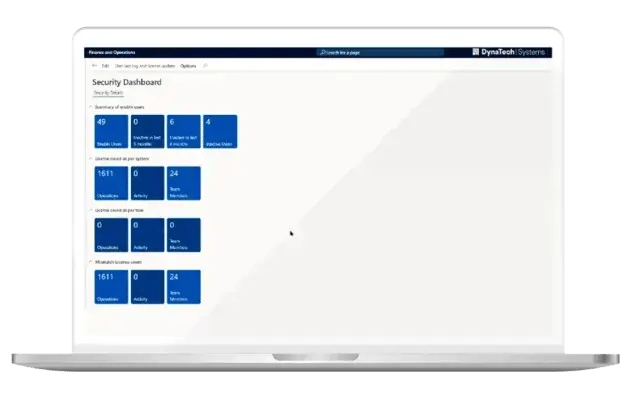
By consolidating security intelligence into one unified dashboard, DynaTech’s Security Tool helps organizations reduce manual effort and maintain stronger access governance with ease.

AI‑Assisted Security Insights
The DynaTech Security Tool seamlessly integrates with Microsoft’s AI and Copilot‑driven analytics to escalate real‑time monitoring and decision‑making within your Dynamics 365 security framework.
AI‑assisted intelligence helps teams:
- Spot unusual or high‑risk role assignments
- Detect access anomalies faster
- Summarize security insights for quicker triage
- Highlight potential segregation‑of‑duties risks
Above mentioned capabilities support security analysts and SOC teams by accelerating investigations and strengthening access governance.
Secure and Compliant AI Usage
AI‑enabled insights within the DynaTech Security Tool operate under strict enterprise governance and Microsoft‑aligned security frameworks. This ensures safe and compliant usage across your Dynamics 365 environment.
This includes:
- Role‑based access controls
- Strict adherence to internal security policies
- Data protection and privacy measures
- Alignment with Microsoft Purview
AI is used solely to enhance monitoring and analytics. On the other hand, all access decisions remain governed by established enterprise policies. This ensures full human oversight.
Core Capabilities of the DynaTech Security Tool
Role & Permission Visibility
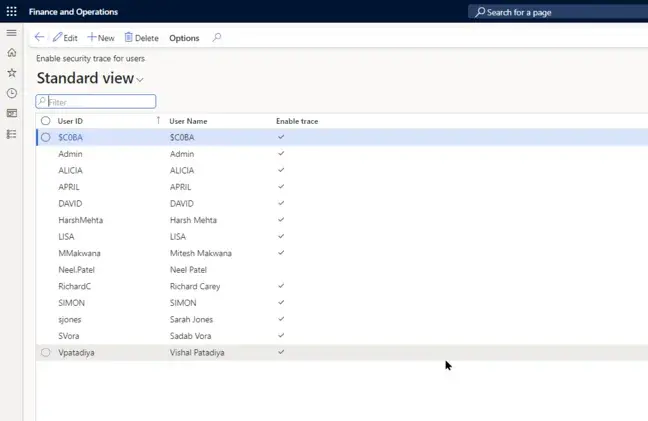
Gain complete visibility into user roles, permissions, and access layers across your Dynamics 365 environment. This helps administrators quickly identify excessive or misaligned permissions and maintain proper access control.
Segregation of Duties (SoD) Conflict Detection
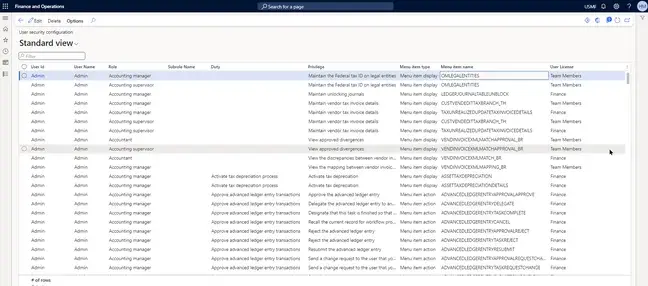
Automatically detect roles and tasks that create segregation‑of‑duties conflicts. This tool highlights potential SoD violations early and helps organizations strengthen internal controls and stay audit‑ready.
License Monitoring & Optimization
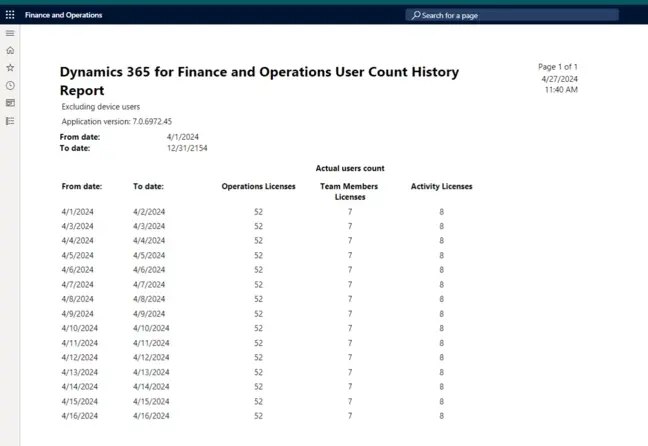
Track user license assignments and usage patterns to uncover optimization opportunities. Reduce unnecessary licensing costs while ensuring every user maintains the access they need.
Automated Security Reporting
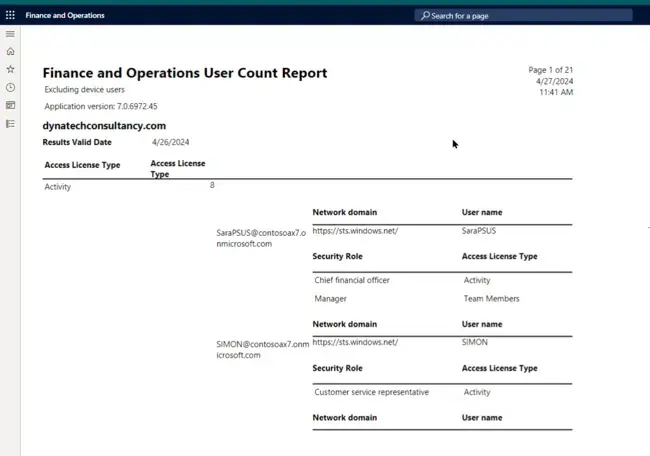
Generate clear, audit‑ready reports for compliance checks, governance reviews, and internal assessments. These insights improve transparency and support continuous security oversight.
Simplify Security Administration with Automation
Managing security manually across large Dynamics 365 environments can be complex and resource‑intensive. DynaTech’s Security Tool automates core governance processes, enabling organizations to:
- Continuously monitor user access
- Detect security risks in real time
- Streamline and simplify role management
- Strengthen compliance monitoring
- Reduce routine administrative effort
By automating these essential tasks, IT and security teams can maintain strong and consistent governance without adding operational overhead, ensuring a more secure and well‑managed ERP environment.

Built for the Microsoft Business Application Ecosystem
The DynaTech Security Tool is purpose‑built for Microsoft enterprise environments. It supports security management across:

- Dynamics 365 Finance & Operations
- Dynamics 365 Customer Engagement Apps
- Power Platform
- Azure Integrations
Dynamics 365 Finance & Operations
Protect financial processes, supply chain operations, and sensitive transactional data with unified role and access visibility.

Dynamics 365 Customer Engagement Apps
Monitor access across Sales, Customer Service, Field Service, and Marketing to maintain clean permission structures and prevent unauthorized access.

Power Platform
Track and manage permissions across Power Apps, Power Automate, and Power Pages, ensuring secure development and automation environments.
Azure Integrations
Maintain secure access for connected services such as Logic Apps, APIs, and external integrations within the Microsoft cloud ecosystem.

Dynamics 365 Finance & Operations
Protect financial processes, supply chain operations, and sensitive transactional data with unified role and access visibility.
Dynamics 365 Customer Engagement Apps
Monitor access across Sales, Customer Service, Field Service, and Marketing to maintain clean permission structures and prevent unauthorized access.
Power Platform
Track and manage permissions across Power Apps, Power Automate, and Power Pages, ensuring secure development and automation environments.
Azure Integrations
Maintain secure access for connected services such as Logic Apps, APIs, and external integrations within the Microsoft cloud ecosystem.
Security Governance Across Key Industries
The DynaTech Security Tool supports organizations across industries where ERP access governance and data protection are critical. Its Dynamics 365–focused security capabilities help reduce risk and strengthen internal controls in highly regulated and operationally complex sectors.
Manufacturing
Protect production planning, financial controls, supplier data, and end‑to‑end supply chain operations with continuous access monitoring.
Consumer Goods, Distribution & E‑Commerce
Secure order management workflows, pricing structures, and high‑volume transactional data across distributed environments.
Healthcare & Life Sciences
Support compliance with healthcare regulations while safeguarding patient‑related data, lab systems, and operational records.
Project‑Based Services
Ensure secure access to project financials, resource data, costing information, and operational workflows.
Associations & Membership Organizations
Protect member information, financial transactions, event systems, and fundraising workflows through controlled, transparent access governance.
Manufacturing
Consumer Goods, Distribution & E‑Commerce
Healthcare & Life Sciences
Project‑Based Services
Associations & Membership Organizations
Security Insights That Drive System Improvement
Strong security governance often uncovers broader opportunities to enhance ERP performance and operational efficiency. As organizations mature their access governance, they frequently extend into complementary optimization initiatives, including:
• Dynamics 365 Performance Benchmarking
• Managed Services & Continuous Monitoring
• AI‑Driven QA Testing
• Fabric‑based Data & Analytics Modernization (IQ++ Program)
• AI‑Ready Data Platform Enablement
DynaTech helps organizations move beyond basic security administration. We help you transform insights from the Dynamics 365 Security Tool into a pathway for a fully optimized, governed, and future‑ready enterprise platform.


Benefits of Automated Security Governance
• Clear visibility into all Dynamics 365 roles and permissions
• Reduced compliance gaps and audit risks
• Faster detection of access issues and SoD conflicts
• Lower analyst workload through automated insights
• Improved SOC efficiency for ERP access monitoring
• Quicker audit preparation with ready‑to‑use reports
• Optimized Dynamics 365 licensing costs
• Simplified role and access management
• Stronger security monitoring and reporting
• Reduced administrative overhead for IT teams
Strengthening Security Across Enterprise Systems
For most enterprises, managed services have become the foundation for broader transformation initiatives. Once operational stability, performance control, and governance are established, organizations typically extend into targeted modernization programs.
Organizations adopting automated security governance typically achieve:
• Reduced security risks and unauthorized access
• Better compliance with internal policies and regulatory standards
• Faster security audits and streamlined reporting
• Lower administrative effort in managing user roles and permissions

Take Control of Security Governance in Your Dynamics 365 Environment
Strengthen access control, reduce compliance risks, and streamline security operations with the DynaTech Security Tool.

Frequently Asked Questions (FAQs)
How to protect an organization's data?
Securing your enterprise data starts with precise control over who can access what, and when. With DynaTech's Dynamics 365 Security Tool, you gain centralized control of roles, permissions, and audit trails in real time. Our tool enforces least-privilege access, blocks unauthorized changes, and ensures compliance with enterprise security frameworks, helping you protect sensitive data across all modules of D365 F&O.
How can I manage access and security roles without adding to the cost?
Standard role management in Dynamics 365 Finance & Operations often demands extensive manual configuration or costly third-party services. DynaTech's Security Tool for Dynamics 365 F&O streamlines this process with a no-code interface, automated rule enforcement, and customizable templates - dramatically reducing time and effort. With built-in tools for D365 F&O security management, you minimize dependency on consultants and avoid hidden licensing costs.
Why upgrade from standard security tools in D365 F&SCM?
Standard tools offer limited controls. Our Security Tool for Dynamics 365 F&O brings advanced features like real-time risk scoring, user behavior analytics, and cross-module monitoring. This helps in delivering stronger, proactive Microsoft Dynamics 365 fraud protection personalized for enterprise needs.
Why choose DynaTech for your Dynamics 365 Security Tool?
DynaTech is a top-tier Microsoft Solutions Partner with deep expertise in D365 F&O security management. Our Security Tool for Dynamics 365 F&O is flexible, scalable, and built for compliance. It offers proactive threat detection, detailed audit logs, and seamless Dynamics integration — helping you stay secure without added complexity.
Does DynaTech's Security Tool offer more than D365 audit logs?
Yes. Our Security Tool for Dynamics 365 F&O goes beyond standard audit logs with features like custom rules, real-time alerts, role change tracking, and layered access controls. It also offers clear visual reports, helping your team detect and respond to threats faster.
Which D365 F&O versions are supported?
Our Dynamics 365 Security Tool supports all Microsoft-supported versions of D365 Finance & Operations, with full compatibility for the latest updates per Microsoft's LCS lifecycle.
What key security challenges does it address?
The tool addresses multiple high-risk areas, including:
- Excessive privilege assignments
- Lack of visibility in role changes
- Gaps in audit logging and compliance tracking
- Insider threats and unauthorized data access
- Manual security configurations that create vulnerabilities
Automation and detailed governance are built in, and they transform your D365 F&O security management framework.
What specific risks does the tool help mitigate?
Our solution is designed to mitigate both internal and external risks. These include:
- Role creep and segregation-of-duty violations
- Data manipulation by unauthorized users
- Credential misuse and fraud attempts
- Audit failures due to incomplete logging
By aligning with Microsoft Dynamics 365 fraud protection principles, the tool gives you a robust shield against emerging security threats.
How does the tool enhance D365 F&O security?
It enhances security by embedding intelligent access governance, automating role audits, and alerting teams to suspicious behaviors. Unlike default configurations, our Security Tool for Dynamics 365 F&O offers advanced rule-based triggers, comprehensive audit logs, and seamless reporting dashboards - empowering IT teams to enforce security policies proactively and effectively.
100 + Happy Clients
150 + Projects
350 + Tech Talent
5 + Countries