
Most finance and operations teams running Dynamics 365 are carrying a quiet, persistent burden. Not a broken system, not a bad implementation. Just volume. Hundreds of sales orders processed manually each week. Purchase requisitions routed through the same three-step email chain they have been for years. Finance controllers pulling data from F&O modules that could answer their questions in seconds, if only someone had time to build the right query.
This is the problem that AI in ERP systems are designed to solve, and it is the problem DynaTech has spent the last two years solving for clients across finance, manufacturing, and retail.
The adoption of AI agents for business automation is no longer a future concept; it's a necessity for teams handling high transaction volumes. While many organizations explore general Dynamics 365 use cases, the real competitive advantage lies in deep, functional execution.
This blog explores how AI-powered ERP solutions are specifically transforming the day-to-day work with the Finance and Operations Copilot Agent, the Sales Order Creation Agent, and the Purchase Requisition Agent. Not what they are in theory, but what they actually do, how they connect to your existing D365 environment, and why that matters for your team specifically.
What Makes These Agents Different from Built-In Copilot
Before getting into the individual agents, one clarification is worth making, because it is a question DynaTech hears in almost every initial conversation.
Microsoft’s Dynamics 365 Finance Copilot is a genuine capability. It lets users ask natural language questions, surface Copilot summaries, and navigate certain tasks through a conversational interface. If you have Power Platform Integration enabled and the right licensing in place, you already have access to it.
But built-in Copilot is a generalist. It operates across the entire F&O surface without deep knowledge of your approval hierarchies, your procurement categories, your legal entity structure, or your specific data model. It is, by design, a starting point.
DynaTech's AI agents for business automation are built using Copilot Studio, connected to your D365 environment via the Dynamics 365 ERP Model Context Protocol (MCP) server, and trained with instructions that reflect your actual business logic. The difference in practice is the difference between an assistant who knows what Dynamics 365 can do and one who knows what your Dynamics 365 instance does, who approves what, where exceptions get flagged, and what the output should look like.
Both have a place. But only one of them can replace a manual process end to end.
Agent 1: F&O Agent
The problem it solves
Finance teams in mid-to-large organisations running D365 F&O deal with a particular kind of friction that rarely shows up in project retrospectives. It is not a failure. It is the cumulative cost of tasks that take three minutes each, repeated forty times a day.
Here is what that looks like day to day:
- A controller needs a cash position summary for a specific legal entity
- A finance manager wants to know which vendor invoices have been sitting in the approval queue for more than five days
- An operations lead is trying to understand whether a variance flagged in the financial report is a data entry issue or a real exposure
What the agent does
- Query and action in one step. A controller can ask: "What is the outstanding balance on vendor account V-4421 across all legal entities?" Integrating AI in finance and accounting allows controllers to query the relevant data from Dynamics 365, surface the answer, and, if configured, trigger the next action directly, whether that is generating a payment proposal or sending a summary to the AP team.
- Continuous exception monitoring. Finance teams can configure the agent to flag conditions across the general ledger, accounts payable, or reporting modules on a schedule:
- When a reconciliation gap exceeds a defined threshold, the agent raises it
- When an invoice approval is overdue, the agent notifies the relevant owner
- Issues that would otherwise sit unnoticed until a manual review are surfaced proactively
How it works technically
- Built in Copilot Studio using the Dynamics 365 ERP MCP server as its data and logic backbone
- In DynaTech's implementation experience, Claude Sonnet has outperformed GPT-4.1 as the orchestration model for this architecture
- Layered with instructions specific to your organisation's terminology, reporting structure, and approval logic
- No custom code required
- Does not sit outside your D365 environment or create a parallel data layer
- Works with what is already there, extending the system's capability rather than duplicating it
This is one of the most requested Enterprise AI use cases in mid-to-large organisations today because it removes the click-tax of manual reporting.
Who benefits
- Finance Controllers and Directors gain on-demand access to financial data without navigating F&O menus or relying on a Business Analyst to run queries
- Manufacturing Operations Teams use it to monitor production-related financial variances in real time
- Retail Finance Managers use it to track period-end positions across high-transaction environments where manual reconciliation is particularly time-consuming
By using AI in ERP systems, teams shift from data gathering to strategic analysis, extending the native capabilities of the Dynamics 365 Finance Copilot environment.
Agent 2: Sales Order Agent
The problem it solves
Sales order entry is one of the most well-understood inefficiencies in ERP-using organisations, and also one of the most persistent. The reasons it persists are practical:
- Incoming orders arrive as emails, PDFs, scanned forms, and occasionally photographs of handwritten purchase orders
- The format varies by customer
- The data is rarely clean
- Someone has to interpret it, look up the customer and product master data, validate pricing, and enter the order into D365
McKinsey's research on B2B sales automation notes that companies applying automation to order processing have reduced order-to-confirmation time from two to three days down to one to two hours. That compression is not theoretical for DynaTech's clients. This is a prime example of high-impact Dynamics 365 use cases where the agent handles the variation in input formats like PDFs or photos without failing.
What the agent does
The Sales Order Creation Agent monitors a designated mailbox, a Teams channel, or both. Regardless of format, the agent:
- Reads the incoming order, whether a structured email, attached PDF, Excel file, or scanned document
- Extracts the relevant data fields: customer, product codes, quantities, requested delivery dates, and pricing references
- Validates them against your D365 master data
- Creates the sales order in your F&O environment
- When data maps cleanly: The order is created and the relevant sales or operations contact is notified.
- When there is an exception: The agent flags the specific issue to the right person rather than failing silently or creating an incorrect order. Examples include:
- product code that does not exist in the catalogue
- quantity that triggers a credit limit check
- delivery date that conflicts with current lead times
- Full audit trail maintained. Every action the agent takes, every order it creates, and every exception it raises is logged in D365 in the same way a human user's actions would be. Finance and compliance teams have complete visibility into what was created, when, and based on which input.
How it works technically
- Built on Azure OpenAI's document understanding capability for unstructured input extraction
- Integrated with D365 through Copilot Studio and Power Automate connectors
- The MCP server provides real-time access to customer master data, product catalogues, pricing agreements, and inventory availability
- Validation logic configured to reflect your specific policies: credit thresholds, product substitution rules, and approval requirements for orders above a defined value
This is not a rigid rules engine. It does not break when a PDF is formatted differently from the template you gave it. The Azure OpenAI layer handles variation in input structure, which is what makes it practical in environments where customers do not follow a standard ordering format.
Who benefits
- Sales Operations and Inside Sales Teams in manufacturing and retail see the most direct time saving from removing manual entry across high order volumes
- Retail Operations Managers running multi-channel businesses benefit from the consistency and speed of order creation across channels
- Sales and Marketing Directors benefit from the reduction in order errors that reach fulfilment, with a direct impact on customer satisfaction scores and reorder rates
Achieving AI sales order automation, Dynamics 365 requires moving beyond simple OCR to intelligent data validation. In manufacturing, sales automation AI ERP projects have shown a significant reduction in order-to-confirmation time.
Agent 3: Purchase Order Agent
The problem it solves
The process is defined. The controls are there for good reasons. The problem is the friction at each handoff point:
- Requesters submit incomplete PRs because they do not know which procurement category to use or which vendor is preferred for a given item
- Procurement agents spend time correcting those inputs before they can route for approval
- Approvers receive PR notifications without enough context to approve confidently, so they ask questions, adding a day to the cycle
- Finance teams deal with PRs that exceed budget but were approved by managers who did not check against the current committed spend
DynaTech's analysis across several manufacturing and finance clients found that the average PR cycle time, from initial submission to approved PO, ranged between four and nine days, with a meaningful proportion of that time attributable to back-and-forth corrections that automated validation could eliminate entirely.
What the agent does
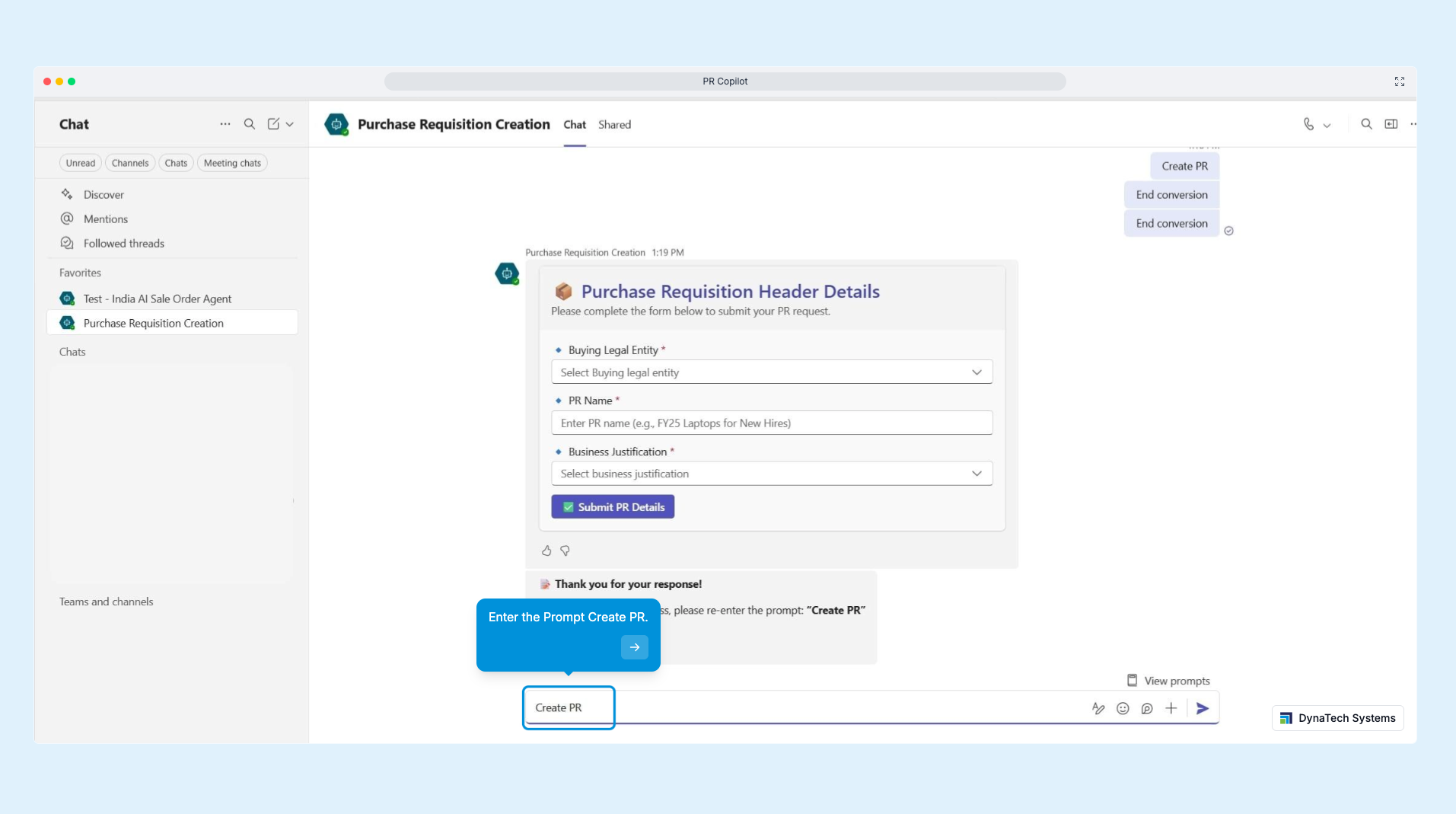
The purchase requisition automation D365 agent addresses three distinct failure points in the existing PR process.
1. Assists requesters at the point of submission
Using natural language input through Teams, a requester describes what they need. The agent then:
- Translates the request into a properly formatted PR
- Assigns the correct procurement category
- Selects the preferred vendor based on historical purchasing data
- Pulls an estimated cost from the vendor master
This eliminates the most common reason PRs come back for correction before they even reach procurement review.
2. Performs automated compliance validation before routing
Before the PR moves to the approval queue, the agent checks it against:
- The requester's budget authority
- The department's committed spend against current period budget
- Any procurement policy rules applicable to the category or vendor
If the PR would breach a budget threshold, the agent flags it to the finance manager before it reaches the approver, not after.
3. Automates downstream steps once approval is granted
When a PR is approved, the agent:
- Creates the corresponding purchase order in D365
- Issues it to the vendor
- Sets up tracking against expected delivery
- Notifies the relevant parties
No procurement agent needs to perform these steps manually. The result is a PR process where human judgment is applied where it genuinely matters: at approval and exception review, not at data entry and format correction.
How it works technically
- Connects to D365 Supply Chain Management's procurement and sourcing module via the MCP server
- Has access to vendor master data, procurement category structures, budget ledger entries, and approval workflow configurations within your existing F&O environment
- Approval routing follows the rules already defined in D365's workflow engine, so the agent works with your existing controls rather than around them
- Natural language intake handled through Copilot Studio's conversational layer
- Structured output to D365 managed through Power Automate flows that trigger on agent actions
- Every action is logged against the requester's user account, maintaining the audit trail that procurement compliance requires
For organisations that have already configured D365's purchasing policy rules to automatically generate POs from approved PRs, the agent extends this by adding the pre-submission validation layer that the native policy engine does not provide.
Who benefits
- Finance Directors and Controllers in organisations where procurement compliance is a recurring audit concern benefit most directly; the automated budget validation layer addresses the gap between what the approval policy says and what actually gets approved in practice
- Procurement Managers in manufacturing businesses with high PR volumes, typically those managing indirect materials, maintenance, and capital expenditure, see the largest time saving from eliminating the correction loop at submission
- Operations and Plant Managers who submit PRs as part of running their departments but find the system cumbersome benefit from the natural language intake option, which requires no navigation of D365's procurement menus.
What Deploying These Agents Actually Looks Like
One of the questions DynaTech gets most often, from IT managers and project sponsors alike, is whether implementing these agents requires significant changes to an existing D365 environment. The concern is understandable. ERP systems in manufacturing and finance organisations carry years of configuration, customisation, and integration that teams are rightly cautious about disturbing.
The answer is that these agents are additive by design. They connect to your existing D365 instance through the MCP server and Power Automate connectors. They work with your existing workflow configurations, approval hierarchies, and procurement policy rules. They do not create a parallel data layer or require schema changes to your environment.
Deployment follows a structured five-phase process: discovery and process review, integration with your D365 APIs and Dataverse, agent customisation to reflect your terminology and business rules, user acceptance testing with your finance or procurement team, and production release. For straightforward implementations, the complete process runs between eight and twelve working days.
The agents are deployed within your Microsoft Azure tenant. Your data does not leave your environment. Security roles and permission boundaries in D365 apply to the agent's access in the same way they apply to a human user. If a user does not have access to a particular module or legal entity, the agent operating on their behalf does not have that access either.
Dynamics 365 AI Use Cases: The Return Is Measurable, Not Theoretical
DynaTech builds these agents for clients who have specific, documented operational problems and need a specific, measurable improvement. The conversations that lead to implementation are not about AI in general. They are about a procurement team that is processing 400 requisitions per month with three people, or a finance function spending 25 hours per week on data extraction that the system should be able to do automatically, or a sales operation losing two percent of orders to entry errors that manual review catches too late.
The agents described in this piece address those problems directly. They are production-tested, running in live D365 environments across finance, manufacturing, and retail clients. They are not prototypes or proof-of-concept builds demonstrated in sandboxes.
If you are running Dynamics 365 Finance and Operations and any of the three processes described here resemble something your team deals with regularly, a 30-minute technical conversation with DynaTech's team costs nothing and will tell you quickly whether an agent deployment makes sense for your environment.