

 23 Jan 2026
At some point in 2026, many Dynamics 365 F&SCM users will open the system and find they can no longer log in. Not because their role was removed. Not because the system is down. But because a license was never assigned where Microsoft now expects it to be.
That scenario is no longer hypothetical. Microsoft is moving Dynamics 365 Finance and Supply Chain Management to an enforced licensing and security model where access is continuously validated against assigned security roles and license entitlements in the Microsoft 365 Admin Center.
The Dynamics 365 F&SCM Licensing & Security Enforcement rollout makes one thing clear: licensing gaps that were previously tolerated, overlooked, or addressed during renewals will now translate into real access blocks. Understanding what has changed and how telemetry is used to review license usage and role alignment is now an operational requirement, not a compliance exercise.
How D365 F&SCM Licensing Worked Until Now?
Until recently, licensing in Dynamics 365 F&SCM was largely advisory rather than enforced.
In practical terms, this meant that organizations could:
- Create users directly in Dynamics 365 F&SCM
- Assign one or more security roles
- Allow users to continue accessing the system
Even if the corresponding Dynamics 365 license was not explicitly assigned in the Microsoft 365 Admin Center.
License compliance was typically reviewed only at specific points in time:
- During enterprise agreement renewals
- During formal Microsoft audits
- Through manual estimates or spreadsheet-based assessments
While this approach worked during early cloud adoption, it introduced significant blind spots as environments grew more complex, particularly when:
- Users were assigned multiple roles
- Security roles were customized
- Users accessed multiple workloads across Finance, Supply Chain, Commerce, or Project Operations
The result was a gap between what users could technically do and what they were licensed to do.
Deprecated Licensing Reports in Dynamics 365 F&SCM
As part of this transition, Microsoft has deprecated several legacy license-related reports within Dynamics 365 F&SCM. These reports are no longer reliable and should not be used for licensing decisions, renewals, or audits.
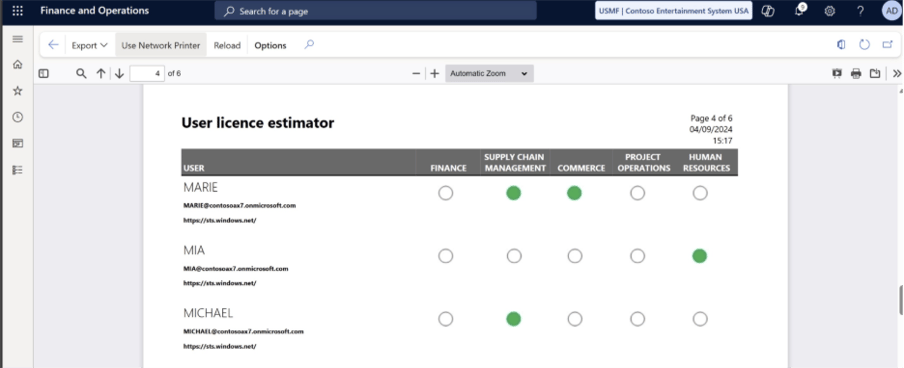
User License Estimator
Previously used to estimate licenses based on assigned roles, this report relies on legacy logic that does not align with the new role-based enforcement model, making automated license usage audits essential for accurate license tracking and optimization. As a result, it can significantly misrepresent actual license requirements.
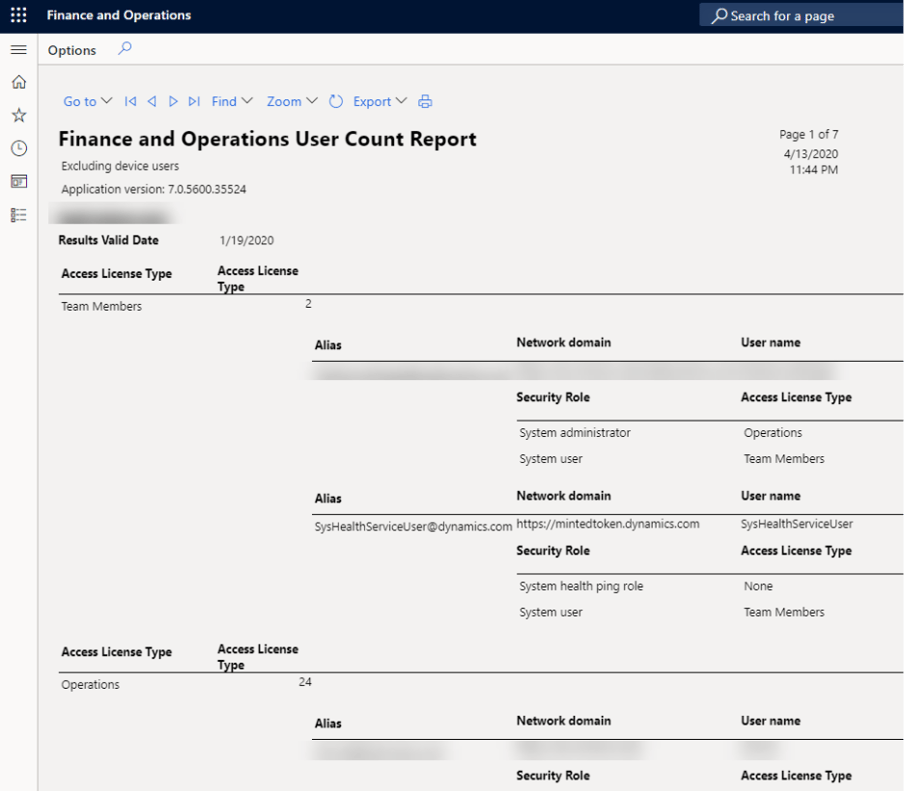
User License Count
This report provided a snapshot of license counts but was based on outdated role-to-license mappings. It is no longer valid for compliance or enforcement scenarios.
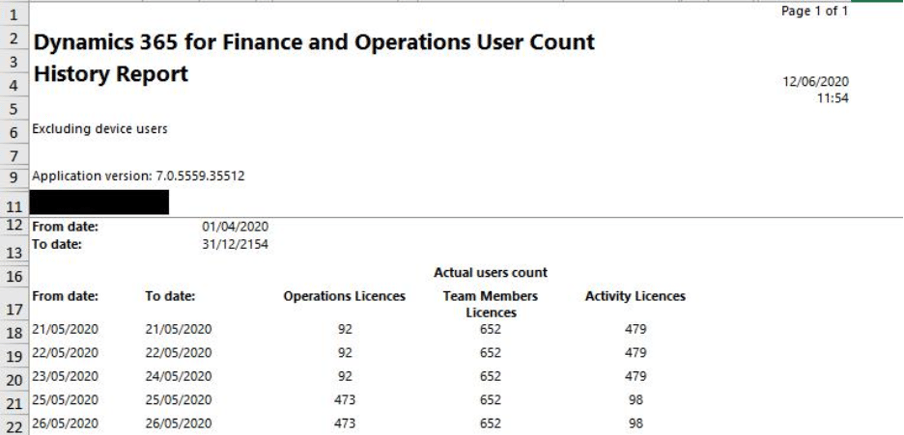
User License Count History
Historical license trends may still appear useful, but they no longer support real-time validation or enforcement. Microsoft’s focus has shifted from historical tracking to current-state compliance.
Menu Item–Wise License View
Licensing is no longer evaluated at the menu or form level. Menu-based analysis often underestimates license requirements and fails to account for combined permissions across roles.
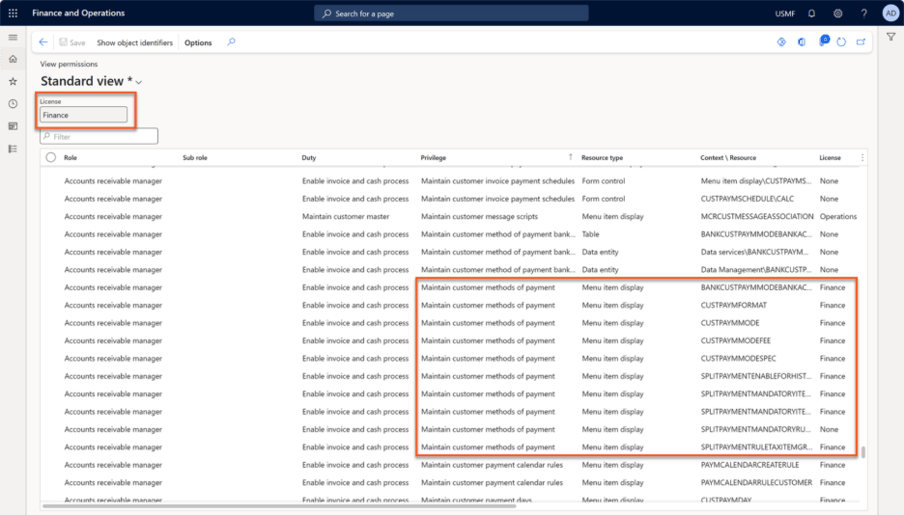
Role-Wise License View
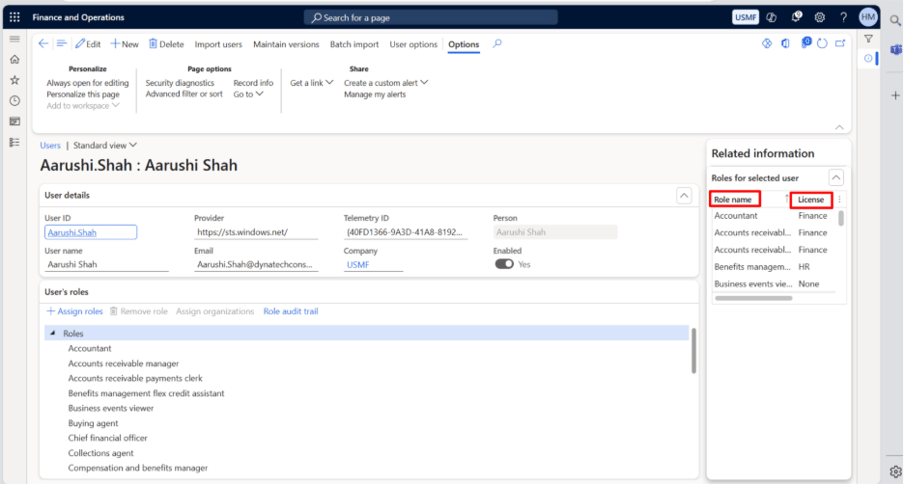
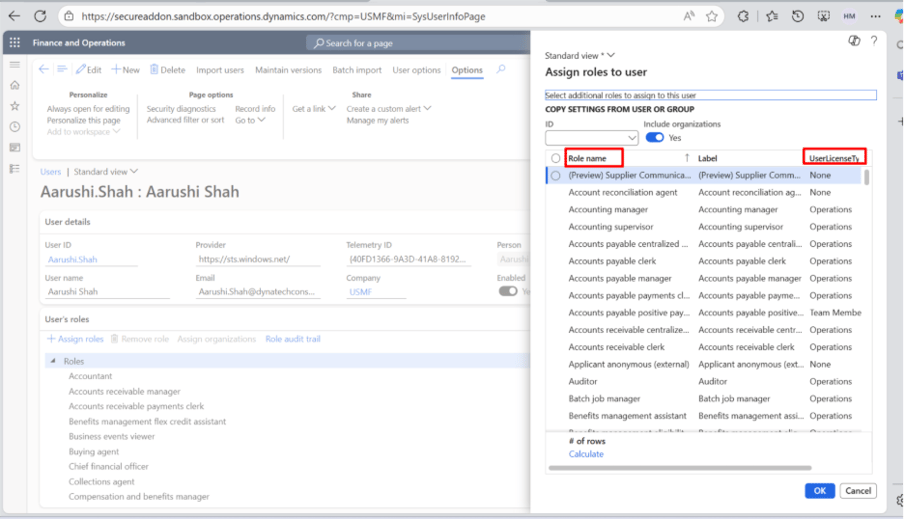
Evaluating licenses role by role does not reflect how users actually operate in the system. Microsoft now calculates licensing based on effective access , not individual roles in isolation.
Shift Away from LCS
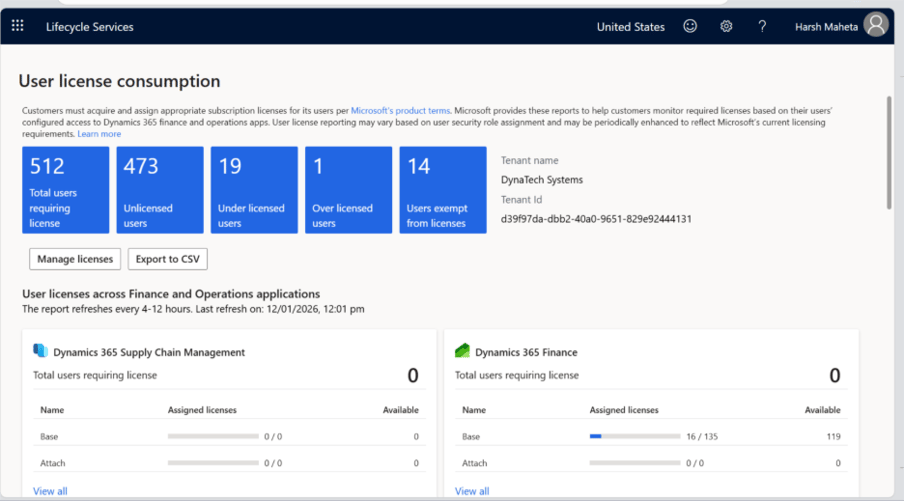
Microsoft is gradually moving license reporting away from Lifecycle Services (LCS) and consolidating it into the Power Platform Admin Center (PPAC) to provide a unified, cross-platform administrative experience.
The New Licensing Reporting Framework
Under the new model, licensing governance for Dynamics 365 F&SCM is built on three core pillars:
- User Security Governance (USG)
- Power Platform Admin Center (PPAC)
- Microsoft 365 Admin Center
Each tool plays a distinct role, and together they form the foundation for license enforcement.
For a deeper understanding of how Microsoft’s licensing models evolve across dynamics and platform layers, see our guide on the fundamentals of Power Platform licensing , which explains licensing logic, entitlements, and admin tooling that underpin modern compliance frameworks.
User Security Governance (USG): Explaining License Requirements
User Security Governance is a built-in reporting capability within Dynamics 365 F&SCM . Its primary purpose is to answer a critical question:
Why does a specific user require a particular license?
USG evaluates all security roles assigned to a user and determines the highest required license based on Microsoft’s role hierarchy.
For example:
- A user may have multiple roles assigned
- One of those roles may require a Commerce license
- Even if other roles are lower-level, the Commerce license becomes mandatory
USG makes this logic transparent by allowing administrators to drill down from:
- User → Role → Duty → Privilege
This level of visibility makes it easy to identify the exact permission or entry point that triggered a higher license requirement.
Power Platform Admin Center (PPAC): Compliance Visibility
While USG explains why a license is required, the Power Platform Admin Center is where organizations gain visibility into license consumption and compliance .
Within PPAC, administrators can:
- View total users requiring licenses
- Identify licensed vs unlicensed users
- See users with no license requirement
- Review license-wise counts across Finance, SCM, Commerce, and other workloads
PPAC also highlights license gaps, making it clear when required licenses are missing or when purchased licenses remain unused.
Detailed dashboards provide user-level insights, including:
- Required license
- Assigned license
- Missing or mismatched licenses
This enables proactive remediation before enforcement takes effect.
Microsoft 365 Admin Center: License Assignment and Enforcement
The Microsoft 365 Admin Center is where licensing is ultimately enforced.
All Dynamics 365 F&SCM licenses must be:
- Purchased
- Assigned
- Managed
within the Microsoft 365 Admin Center.
If a user’s required license (as determined by USG and reflected in PPAC) is not assigned here, access will eventually be blocked once enforcement begins.
This centralization ensures consistency across Microsoft workloads and removes ambiguity around where licensing decisions must be made.
Understanding the Enforcement Timeline
Microsoft is introducing enforcement through a phased approach tied to renewal cycles.
A typical timeline includes:
- Preparation Phase (T-90) : Organizations audit users, roles, and licenses ahead of renewal
- Notification Phase (T-30) : In-app notifications and admin alerts highlight license gaps
- Grace Period (Post-Renewal) : Final opportunity to assign missing licenses
- Hard Enforcement : Users without valid licenses are blocked from accessing F&SCM
This phased rollout gives organizations time to prepare, but it also makes it clear that enforcement is inevitable.
How to Manage Users Under the New Licensing Framework?
With the enforcement model now clear, the focus shifts to execution. Under the new Dynamics 365 F&SCM licensing framework, user access is valid only when user creation, role assignment, and license assignment are all completed correctly .
The scenarios below summarize the Microsoft‑recommended approach administrators should follow. Detailed steps are demonstrated in the accompanying videos.
Scenario 1: Adding a New User
Onboarding a new user now requires a coordinated process across Microsoft admin tools:
- Create the user in Microsoft 365 Admin Center , where the account is established in Microsoft Entra ID
- Import the user into Dynamics 365 F&SCM and assign the required security roles
- Review the license requirement in Power Platform Admin Center (PPAC) , based on assigned roles
- Assign the required license in Microsoft 365 Admin Center if it is missing
Only after all steps are completed does the user have compliant access to Dynamics 365 F&SCM.
Scenario 2: Modifying Licenses for Existing Users
When roles change, license alignment must be reviewed:
- Use PPAC to identify under‑licensed, over‑licensed, or unlicensed users
- Compare required licenses against assigned licenses
- Correct any mismatches in the Microsoft 365 Admin Center by removing incorrect licenses and assigning the required ones
This ensures ongoing compliance as user responsibilities evolve.
Scenario 3: Removing a User and Releasing Licenses
Proper offboarding is critical under enforced licensing:
- Disable the user in Dynamics 365 F&SCM to immediately revoke access
- Remove the assigned license in the Microsoft 365 Admin Center so it can be reused
Following this sequence keeps environments secure, compliant, and license usage optimized.
What Administrators Should Do Now?
To prepare for this new licensing model, organizations should:
- Review all active users and assigned security roles
- Use USG to understand true license requirements
- Reconcile PPAC insights with purchased licenses
- Correct under-licensed and over-licensed users
- Establish governance processes for user onboarding, role changes, and offboarding
Most importantly, licensing can no longer be treated as a periodic activity; it must become an ongoing operational discipline .
Why Can Licensing Governance No Longer Be Deferred?
The 2026 licensing changes remove the buffer that many Dynamics 365 F&SCM environments have relied on for years. Access, security roles, and license assignment are no longer loosely connected with activities; they are now evaluated together, continuously, and enforced.
For most organizations, the challenge is not understanding the tools involved. It is maintaining alignment over time, especially in environments with custom roles, evolving responsibilities, and frequent user changes. Without a disciplined approach, small mismatches can quickly turn into access issues or compliance exposure once enforcement is in place.
Licensing can no longer sit in the background until renewal time. Role changes, user movement, and access decisions now have immediate licensing impact. Organizations that connect these activities early will avoid the disruption others are likely to face.
How DynaTech Helps?
As Dynamics 365 F&SCM licensing moves toward strict enforcement, organizations need clear visibility into how user access, security roles, and licenses are connected. DynaTech’s Security Tool for D365 is designed to bring that clarity by helping teams manage access, reduce risk, and stay compliant as roles and responsibilities change.
Here’s what the DynaTech Security Tool empowers you to do:
-
Complete User, Role, and Access Visibility
See every user, every role, every permission live. Know who has access, why, and how it changes, all in one unified view.
-
Automated SoD Conflict Detection Across Entities
Spot risky role overlaps and hidden conflicts automatically before they turn into compliance issues.
-
Accurate License Requirement and Usage Insights
Understand which licenses are needed, which are wasted, and optimize in real time to cut costs and stay compliant.
-
Controlled Role Changes with Built-In Approvals
Role updates follow smart approval workflows, ensuring every change is tracked, auditable, and secure.
-
Automation for User Lifecycle and Access Management
Provision, update, or deactivate users automatically with Azure AD triggers less manual work, zero gaps.
-
Audit-Ready Reporting, Anytime
Generate instant, compliance-ready reports on access, inactivity, conflicts, and license usage always enforcement-ready.
-
Business Continuity Through Smart Delegation
Keep work flowing with automated delegation during leave or role transitions without compromising security.

