




250 +

Employees

~USD 334 M

Annual Revenue

2

Manufacturing Sites

OR-Tools

CP-SAT Engine

  • Overview

Vaccine Manufacturing & Supply Chain Planning

This mid-size biopharmaceutical company specializes in vaccine development and manufacturing — with Drug Substance production in Germany and Drug Product contract manufacturing in the United States. The Microsoft Dynamics 365 Finance implementation is complemented by a custom OR-Tools supply chain optimizer addressing complex DS-to-DP allocation constraints.

A mid-size biopharmaceutical vaccine manufacturer replaced manual, spreadsheet-driven supply chain planning with a custom Excel VSTO Add-In powered by Google OR-Tools CP-SAT constraint programming — integrated with Microsoft Dynamics 365 Finance for ERP-aligned planning.
Core Capabilities

Vaccine Manufacturing & Supply Chain Planning Capabilities

Vaccine Drug Substance Production Vaccine Drug Substance Production
Vaccine Drug Substance Production

DS lot manufacturing with batch-level tracking across European facilities — coordinated with the OR-Tools optimization tool for regulatory-compliant allocation.

Drug Product Contract Manufacturing Drug Product Contract Manufacturing
Drug Product Contract Manufacturing

DP batch execution at US contract manufacturing sites, with DS lot allocation coordinated centrally via the CP-SAT optimization engine.

Constraint-Based Allocation Optimization Constraint-Based Allocation Optimization
Constraint-Based Allocation Optimization

OR-Tools CP-SAT engine enforces hard regulatory limits: max 3 DS lots per DP batch, minimum 4-week lead time, and DS utilization maximization across the horizon.


Scenario Planning & Re-Planning Scenario Planning & Re-Planning
Scenario Planning & Re-Planning

One-click scenario re-runs when yield updates, batch delays, or CRO schedule changes occur — solving complex multi-period allocation in seconds.


D365 Finance ERP Integration D365 Finance ERP Integration
D365 Finance ERP Integration

Microsoft Dynamics 365 Finance integration for financial reporting, deferred revenue, AP automation, and ERP-aligned supply planning outputs.


Power BI Supply Visibility (Phase 2) Power BI Supply Visibility (Phase 2)
Power BI Supply Visibility (Phase 2)

Planned Power BI dashboards for DS/DP WIP trends, commercial demand alignment, and multi-site inventory analytics sourced from D365 Finance.

Business Functions

5 Core Business Functions Powering Biopharmaceutical Supply Planning

The organization's supply chain planning and financial operations are driven by five interconnected business functions — from DS-to-DP allocation optimization through scenario planning, D365 Finance ERP integration, treasury automation, and accounts payable processing.

01

Drug Substance-to-Drug Product Allocation

The custom Excel VSTO Add-In powered by Google OR-Tools CP-SAT automatically allocates DS lots to DP batches — enforcing the regulatory limit of no more than 3 DS lots per DP batch and a minimum 4-week lead time between DS availability and DP batch start. The optimizer minimizes DS waste across the full planning horizon.

02

Multi-Site Production Schedule Management

Planners consolidate DS production schedules from European facilities and DP production plans from US contract manufacturers within the Excel Add-In — with automated data parsing from multiple file formats (Excel and PDF). Updated schedules trigger immediate re-optimization via OR-Tools CP-SAT.

03

Scenario Planning & What-If Analysis

The tool supports saving, comparing, and switching between multiple planning scenarios — enabling rapid response to yield changes, batch delays, and demand fluctuations. What-if analysis that previously required hours of manual spreadsheet work now completes in seconds, supporting agile vaccine supply chain planning.

04

Microsoft Dynamics 365 Finance Integration

The planning tool is integrated with Microsoft Dynamics 365 Finance for ERP-aligned financial outputs — supporting revenue forecasting, deferred revenue recognition, and accounts payable automation. Secure access is managed via Microsoft Entra ID with role-based permissions for authorized supply chain planners.

05

Treasury & AP Automation in D365 Finance

The D365 Finance environment includes ISV-powered treasury automation for bank transaction management and accounts payable automation for vendor invoice processing — reducing manual Finance team overhead in the biopharmaceutical ERP environment.

Business Processes

From Demand Forecast to Compliant DS Allocation — Automated

Each supply planning cycle follows a structured process — from data consolidation and constraint-based allocation through scenario comparison, ERP-aligned financial output, and secure planner access — ensuring regulatory compliance and planning agility.

Input Data Consolidation Input Data Consolidation
Input Data Consolidation

DS schedules, commercial demand forecasts, and DP production plans loaded and parsed automatically by the Excel VSTO Add-In from multiple source formats.

Constraint-Based DS Allocation Constraint-Based DS Allocation
Constraint-Based DS Allocation

OR-Tools CP-SAT runs the allocation optimization — enforcing regulatory constraints and minimizing DS waste across all DP batches in the planning horizon.

Rapid Scenario Re-Planning Rapid Scenario Re-Planning
Rapid Scenario Re-Planning

Updated yield data or batch schedule changes trigger one-click re-optimization — producing a new compliant allocation plan in seconds.

ERP-Aligned D365 Finance Output ERP-Aligned D365 Finance Output
ERP-Aligned D365 Finance Output

Allocation outputs integrate with Microsoft Dynamics 365 Finance for financial reporting, supply forecasting, and revenue alignment.

Secure Planner Access (Entra ID) Secure Planner Access (Entra ID)_h
Secure Planner Access (Entra ID)

Role-based access via Microsoft Entra ID ensures only authorized biopharmaceutical supply chain planners can access and modify allocation plans.

Power BI Analytics (Phase 2) Power BI Analytics (Phase 2)
Power BI Analytics (Phase 2)

Power BI dashboards will provide DS/DP WIP trends, inventory levels, and commercial demand alignment for supply and commercial ops teams.

Technology Stack

D365 Finance with Custom Excel Optimization Backend

The technology landscape combines Microsoft Dynamics 365 Finance as the core ERP with a custom Excel VSTO Add-In powered by Google OR-Tools CP-SAT for supply planning optimization — secured via Microsoft Entra ID.

  • Microsoft Dynamics 365 Finance

    Core ERP · Financial Reporting · Forecasting

  • Microsoft Entra ID

    Role-Based Secure Access · Planner Authorization

  • Power BI (Phase 2)

    DS/DP WIP · Demand Alignment Dashboards

  • Excel VSTO Add-In (Custom)

    Supply Planning Interface · Custom Ribbon

  • Google OR-Tools CP-SAT

    Constraint Programming Optimization Engine

  • Treasury Automation Suite (ISV)

    Bank Transaction Management · D365 Finance

  • AP Automation (ISV)

    Vendor Invoice Automation · D365 Finance

  • Microsoft/Core

  • Third-Party/ISV Integration

Integrations

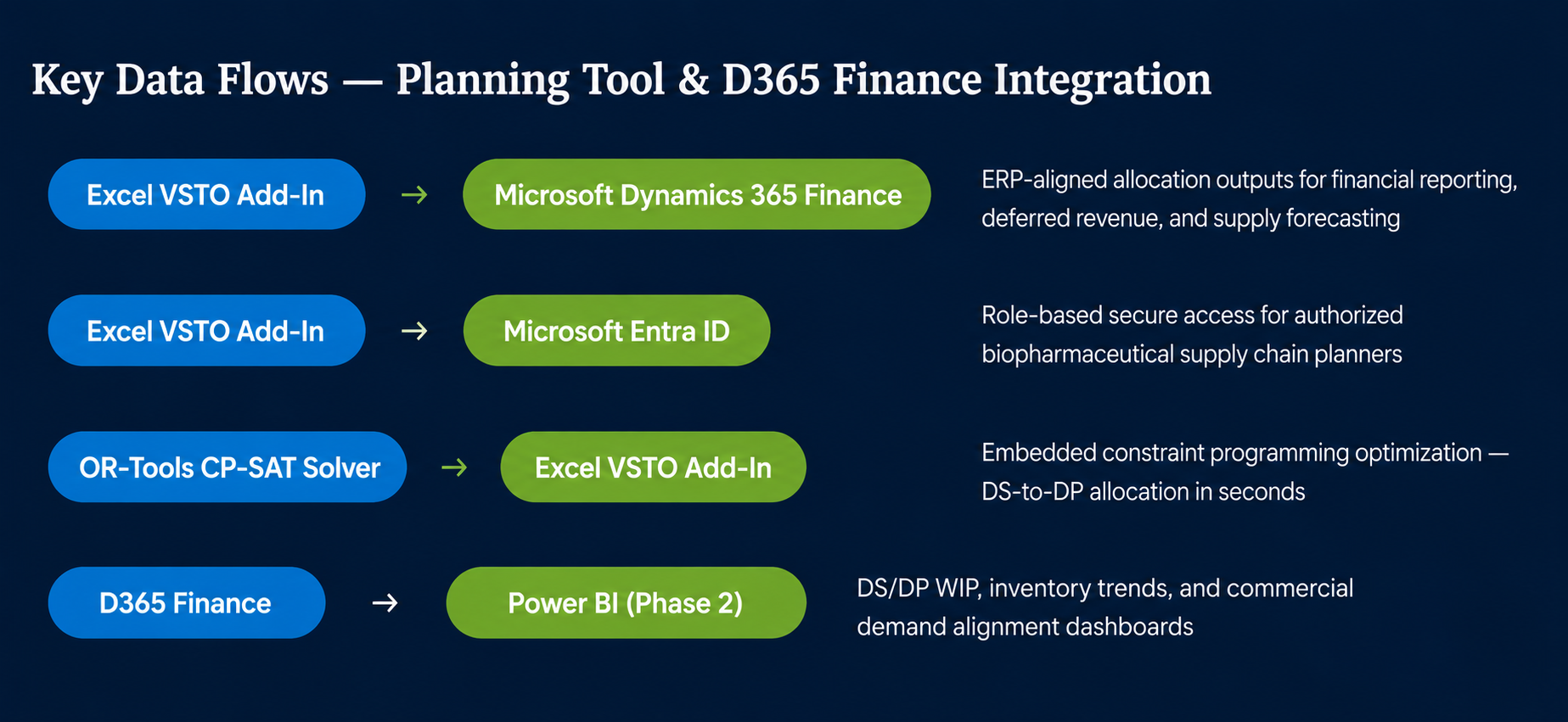
Excel Planning Tool Integrated with Microsoft Dynamics 365 Finance

The custom Excel VSTO Add-In integrates securely with Microsoft Dynamics 365 Finance via Microsoft Entra ID — ensuring ERP-aligned supply planning outputs flow into financial reporting and revenue forecasting. The OR-Tools CP-SAT solver runs embedded within the Add-In.

Integrations
Customizations & Extensions

Purpose-Built Supply Planning Solution for Vaccine Manufacturing

DynaTech Systems delivered a custom Excel VSTO Add-In with embedded OR-Tools CP-SAT optimization, automated data parsing, and scenario management — integrated with Microsoft Dynamics 365 Finance for ERP-aligned biopharmaceutical supply chain planning.

Optimization
Excel VSTO Add-In with Custom Ribbon

A custom Excel VSTO Add-In with a dedicated Ribbon interface and automated data parsing logic — enabling planners to consolidate DS schedules, DP production plans, and demand forecasts, then trigger one-click optimization.

Optimization
OR-Tools CP-SAT Allocation Engine

Google OR-Tools CP-SAT constraint programming solver embedded within the Excel Add-In — enforcing hard regulatory constraints (max 3 DS lots/DP batch, 4-week lead time) and minimizing DS waste across the planning horizon.

Automation
Multi-Format Data Parsing

Automated consolidation of planning inputs from Excel and PDF source formats — eliminating manual data re-entry and reducing preparation time before each optimization run.

Optimization
Scenario Save & Compare Framework

Scenario management capability allowing planners to save, name, compare, and switch between allocation scenarios — supporting rapid what-if analysis and re-planning without data loss.

Integration
Microsoft Dynamics 365 Finance Integration

Secure integration between the Excel planning tool and D365 Finance via Microsoft Entra ID — enabling ERP-aligned outputs for financial reporting, deferred revenue, and supply forecasting.

Optimize biopharmaceutical supply chain planning with Microsoft Dynamics 365 Finance?

Get In Touch Get In Touch

Get In Touch