


150 +

Customer Organizations

5 +

Azure Services

Multi

Stage Case Workflow

1

Unified Self-Service Portal

  • Overview

Industrial Environmental Equipment & Digital Operations

This industrial environmental equipment manufacturer serves clients across air quality control, water treatment, and energy transition sectors — delivering aftermarket spare parts and engineered systems globally. The Microsoft Dynamics 365 F&O and Power Pages implementation transformed self-service ordering, internal case management, and invoice distribution.

A leading industrial environmental equipment manufacturer transformed customer ordering, multi-stage internal case routing, and invoice management using Microsoft Dynamics 365 Finance & Operations and Power Pages — extending digital self-service to 150+ customer organizations globally.
Core Capabilities

Full-Spectrum Industrial Environmental Equipment & Digital Operations

Air Quality Control Equipment Air Quality Control Equipment_h
Air Quality Control Equipment

Industrial pollution control systems for gas, fume, and particulate management across manufacturing and energy sectors — managed through D365 F&O.

Water Treatment Systems Water Treatment Systems_h
Water Treatment Systems

Engineered water and wastewater treatment equipment for industrial and municipal applications — tracked end-to-end in Microsoft Dynamics 365 Finance & Operations.

Energy Transition Solutions Energy Transition Solutions_h
Energy Transition Solutions

Equipment supporting clean energy transition across industrial processes and utility-scale operations — with full D365 order and inventory management.

Aftermarket Spare Parts Aftermarket Spare Parts_h
Aftermarket Spare Parts

Aftermarket parts reordered via the D365-integrated portal using serial-number-to-BOM lookup through an Azure Data Factory pipeline.

Customer Self-Service Portal Customer Self-Service Portal_h
Customer Self-Service Portal

Power Pages portal enabling 150+ organizations to place orders, track status, and download invoices — integrated live with D365 F&O via Dual Write.

Multi-Stage Case Management Multi-Stage Case Management_h
Multi-Stage Case Management

D365 case workflow routing orders through Applications, Engineering, Production Routing, Purchasing, and Planning with automated transitions and audit trails.

Business Functions

5 Core Business Functions Powering Dynamics 365 F&O Operations

The organization operates five tightly integrated business functions across customer service, case management, spare parts, finance, and analytics — all consolidated on Microsoft Dynamics 365 Finance & Operations with a Power Pages customer portal and Azure integration services.

01

Customer Service & Self-Service Ordering

CSRs previously handled all order intake manually via phone, fax, and email. With the Microsoft Dynamics 365 F&O and Power Pages implementation, authenticated customers place orders directly via the portal — automatically creating Sales Orders in D365 through Dual Write synchronization, with real-time stock and trade-price lookups.

02

Multi-Stage Case Management Workflow

Every order is routed through a configurable D365 case workflow spanning Date of Acknowledgment, Applications, Engineering, Production Routing, Purchasing, and Planning. Cases auto-close on invoicing, auto-update on shipment confirmation, and enforce duplicate PO validation — providing full traceability across departments.

03

Spare Parts & BOM Management

A custom Azure Data Factory pipeline pushes Finished Goods Production BOM data into Dynamics 365 CRM. Customers search by pump serial number on the portal to view their specific equipment BOM and reorder aftermarket spare parts in real time — without contacting the company directly.

04

Invoice & Financial Management

Invoices generated in D365 Finance are automatically archived to Azure Blob Storage via a pipeline using D365 Business Events, Power Automate, and Azure Functions. Customers access invoice PDFs via one-click portal download — eliminating manual Finance team distribution entirely.

05

Analytics, WIP Visibility & Reporting

Power BI dashboards provide management with real-time visibility into work-in-progress, shipped orders, queue times, and cycle times per department — enabling data-driven SLA monitoring within the Dynamics 365 Finance & Operations environment.

Business Processes

From Portal Order to Invoice — Fully Automated in D365

Each customer order follows a D365-governed process flow — from portal self-service ordering through multi-stage internal routing, serial-number BOM lookup, invoice archival, and Power BI reporting — ensuring complete order-to-cash visibility.

Portal Order Placement Portal Order Placement
Portal Order Placement

Customers browse live D365 stock and pricing, then place orders that auto-create Sales Orders in D365 F&O via Dual Write — with zero CSR involvement.

Multi-Stage Case Routing Multi-Stage Case Routing
Multi-Stage Case Routing

Orders route through sequential departments with automated transitions, duplicate PO checks, and timestamped audit notes in Microsoft Dynamics 365.

Serial-Number BOM Lookup Serial-Number BOM Lookup
Serial-Number BOM Lookup

Customers search by equipment serial number to view finished goods BOM and reorder specific aftermarket parts via the Power Pages portal.

Invoice PDF Archival & Access Invoice PDF Archival & Access
Invoice PDF Archival & Access

Invoices auto-archived to Azure Blob Storage via Business Events + Power Automate — available for one-click download, eliminating manual Finance distribution.

Order Fulfillment Order Fulfillment_h
Order Fulfillment

Confirmed orders flow through D365 SCM with automated status updates reflected on the portal in real time for customer visibility.

Power BI WIP Reporting Power BI WIP Reporting
Power BI WIP Reporting

Live WIP, cycle time, and queue time analytics per department deliver management SLA visibility within the D365 F&O environment.

Technology Stack

A Microsoft-Led Architecture with Azure Integration

The technology landscape is anchored by Microsoft Dynamics 365 Finance & Operations, extended with Power Pages for self-service ordering, Dual Write for real-time CRM sync, and a comprehensive Azure integration stack for BOM pipelines and invoice archival.

  • D365 Finance & Operations

    Core ERP · Finance & Order Management

  • Dynamics 365 Sales (CRM)

    Customer & Order Staging

  • Microsoft Power Pages

    Customer Self-Service Portal

  • Dual Write

    Real-Time CRM ↔ D365 F&O Sync

  • Power Automate

    Event-Driven Workflow Automation

  • Power BI

    WIP & Cycle Time Dashboards

  • Azure AD B2C (MFA)

    Secure Portal Authentication

  • Azure Functions

    API Orchestration & Invoice Push

  • Azure Data Factory

    BOM Data Pipeline

  • Azure Data Lake

    BOM Data Storage

  • Azure Blob Storage

    Invoice PDF Archival

  • Microsoft/Core

  • Third-Party/ISV Integration

Integrations

A Connected Ecosystem Centered on Dynamics 365 F&O

Microsoft Dynamics 365 Finance & Operations serves as the central hub connecting the Power Pages portal, Dynamics 365 CRM, and all Azure cloud services. Dual Write provides real-time bidirectional sync between D365 Sales and D365 F&O. Azure Data Factory pipelines transfer BOM data for serial number lookups, while Azure Functions and Power Automate orchestrate invoice archival into Azure Blob Storage.
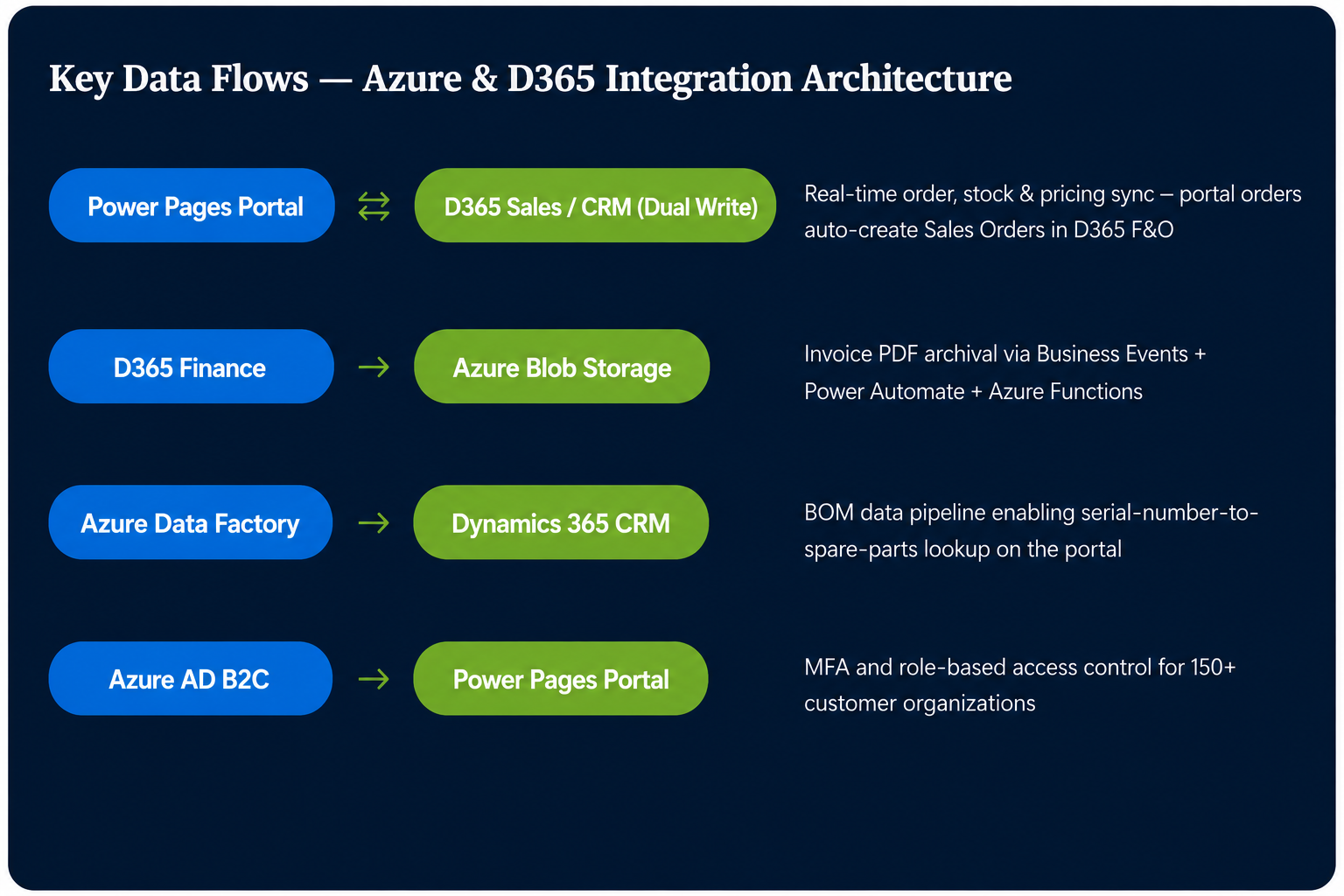

Integrations
Customizations & Extensions

Purpose-Built Solutions for Industrial Equipment Customer Operations

DynaTech Systems delivered targeted integrations, workflow customizations, and reporting extensions to address the organization's customer portal, order management, and invoice automation requirements on Microsoft Dynamics 365 F&O.

Integration
Serial-Number-to-BOM Azure Pipeline

An Azure Data Factory and Azure Data Lake pipeline transfers Finished Goods Production BOM data into Dynamics 365 CRM — enabling customers to search by pump serial number on the portal and reorder aftermarket spare parts directly.

Automation
Invoice Archival & Portal Delivery Pipeline

D365 Print Archive, Business Events, Power Automate, Azure Functions, and Azure Blob Storage combine to auto-archive invoice PDFs and surface them for one-click portal download — replacing manual Finance team distribution.

Automation
D365 Multi-Stage Case Management Workflow

Sequential case workflow in D365 F&O routes orders through DOA, Applications, Engineering, Production Routing, Purchasing, and Planning — with auto-closure on invoicing, auto-status on shipment, and duplicate PO validation.

Security
Azure AD B2C MFA Portal Authentication

Role-based portal access with multi-factor authentication for 150+ customer organizations, including individual contact-level access controls within each customer account.

Reporting
Power BI WIP & Cycle Time Dashboards

Custom Power BI workspace tiles provide management with live visibility into work-in-progress volumes and cycle times per department within the D365 F&O environment.

Automate customer ordering, case workflows, and invoice management on Microsoft Dynamics 365 F&O?

Get In Touch Get In Touch

Get In Touch