

 08 Oct 2026
A finance team does not need another chatbot. It needs an AI agent that can spot an exception, gather the supporting data, route the issue, and know when a human should take over.
That shift- from AI assisting people to AI coordinating work is already underway. McKinsey reports that 62% of organizations are experimenting with AI agents, although most are still far from scaling them across the enterprise. (McKinsey & Company) This is where AI-managed services for Dynamics 365 can become more than an IT support model: they can provide the governance, integration, monitoring, and continuous optimization needed to make agent teams useful inside ERP operations.
Why AI Agent Teams Matter in ERP
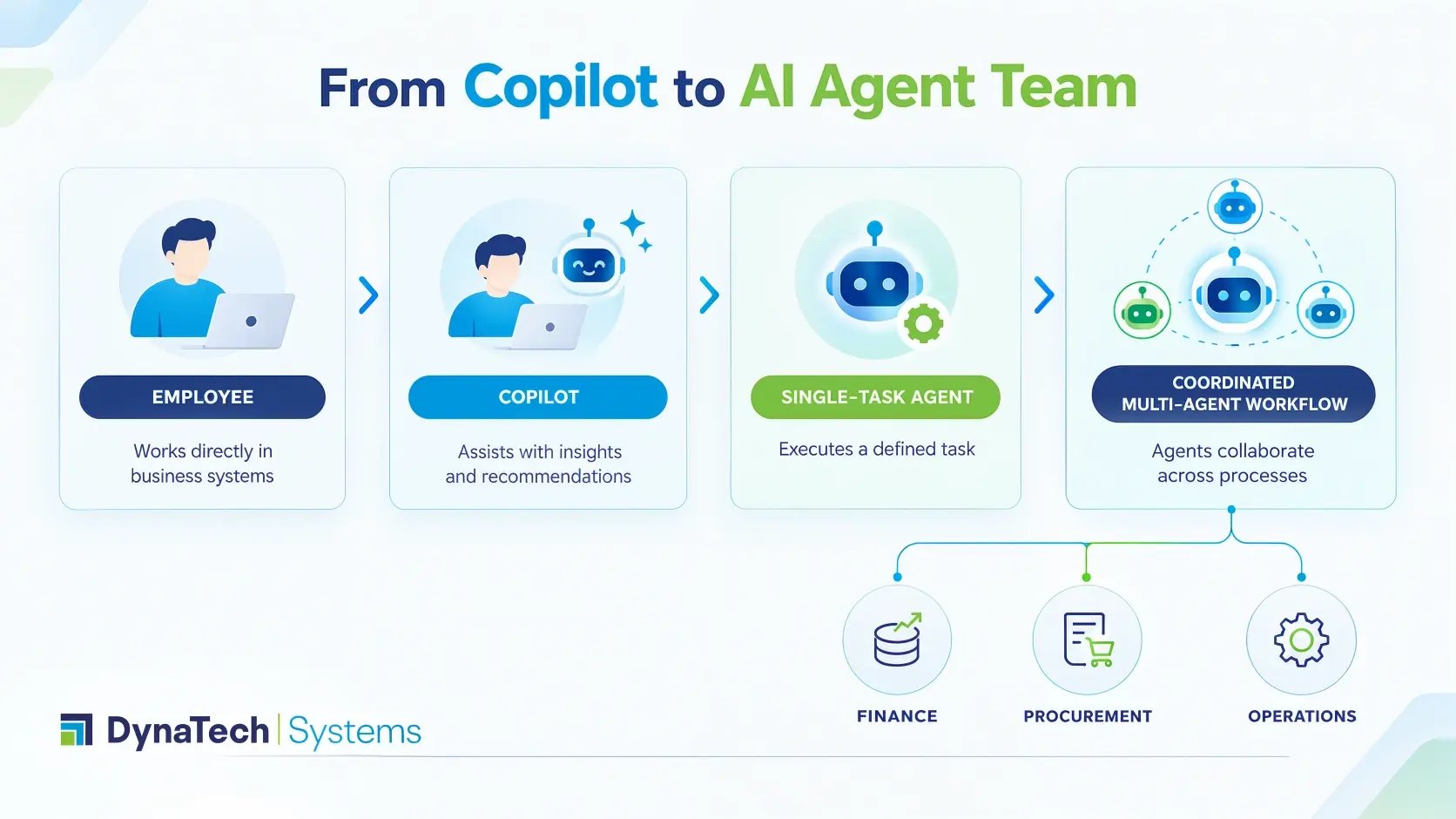
An individual AI agent can manage a defined task. An AI agent team goes a step further.
It’s kind of a group of specialized digital workers, each responsible for a particular part of a business process. One agent may analyze invoices. Another may check supplier information. A third may identify exceptions. A coordinating agent can then know what happens next.
For CEOs and business leaders, the value is not the number of agents deployed. It is the business process they improve.
For example:
Purchase-to-pay
Purchase request → Supplier validation → Purchase order → Invoice matching → Exception handling → Approval → Payment
Instead of automating one step, organizations can create agents around the complete workflow.
This also aligns with where enterprise AI is heading. Gartner predicts that 33% of enterprise software applications will incorporate agentic AI capabilities by 2028, up from less than 1% in 2024. (Gartner)
The implication is significant: AI agents are moving closer to the systems where business decisions and transactions actually happen.
Designing AI Agents for Finance, Procurement, and Operations
The strongest agent architectures start with business processes and not with a list of AI capabilities.
1. Finance: Agents that detect and resolve exceptions
Finance processes contain enormous volumes of structured data, rules, approvals, and recurring activities. That makes them natural candidates for agent-assisted workflows.
Potential AI agents for ERP can support activities such as:
- Account reconciliation and transaction matching
- Invoice validation
- Expense review
- Cash-flow analysis
- Collections prioritization
- Financial close support
- Variance investigation
- Exception identification
Consider a reconciliation workflow. Rather than simply producing a report showing mismatches, an agent could identify unusual transactions, collect related records, summarize the discrepancy, and send the exception to the appropriate finance professional.
The human still makes the judgment call where required. The agent handles the legwork.
Microsoft has also highlighted ERP agents for processes such as account reconciliation, expense management, and supplier communications. (Microsoft)
We have covered how these AI agents in Dynamics 365 for finance work in practice, including where they fit against existing close and reconciliation processes.
2. Procurement: Agents that coordinate supplier workflows
Procurement is rarely a single-system process. It can involve requisitions, supplier records, purchase orders, contracts, approvals, receipts, and communication.
An agent team can connect the following steps.
For Instance:
Procurement agent team
|
Agent |
Primary responsibility |
Business outcome |
|
Supplier Agent |
Validate supplier information and history |
Better supplier decisions |
|
Sourcing Agent |
Compare requirements and supplier options |
Faster sourcing |
|
PO Agent |
Check purchase orders against rules |
Fewer purchasing errors |
|
Invoice Agent |
Match invoices with orders and receipts |
Faster processing |
|
Exception Agent |
Identify mismatches and route them |
Less manual investigation |
|
Orchestrator |
Coordinate agents and escalate decisions |
End-to-end workflow visibility |
This is what separates ERP agent workflows from conventional automation. Instead of automating individual clicks, the organization automates the information and the decisions that move between connected steps. Building this out usually means custom AI agents in Dynamics 365 F&O rather than off-the-shelf capabilities, since each agent needs a responsibility scoped to your actual procurement rules.
3. Operations: Agents that respond to changing conditions
Operations teams deal with constant movement: inventory changes, delayed shipments, production constraints, supplier disruptions, service issues, and customer demand.
Within an AI agent team, the operations agent monitors business signals and identifies situations requiring attention. The same pattern applies upstream: a vendor onboarding automation agent can validate supplier records and surface gaps before they reach a purchase order.
For example, an agent might detect that:
- A critical component is below its expected inventory level.
- A supplier delivery is likely to affect production.
- A purchase order is overdue.
- A sales order may be affected by a supply constraint.
- A warehouse exception requires intervention.
The agent does not need to make every decision autonomously. In many cases, its job is to surface the right information early enough for a person to act.
That distinction matters.
AI Agent vs. Copilot vs. Automation
These concepts are often used interchangeably, but they serve different purposes.
|
Capability |
Best suited for |
Typical role |
|
Copilot |
Employee assistance |
Suggests, summarizes, generates |
|
Workflow automation |
Repetitive, rule-based processes |
Executes predefined actions |
|
AI agent |
Multi-step tasks requiring reasoning |
Plans and acts within defined boundaries |
|
Agent team |
Cross-functional workflows |
Coordinates multiple specialized agents |
Copilot for D365 can help users work with information inside Dynamics 365. But when the objective is to coordinate a multi-step process involving several systems, decisions, and exceptions, an agent-based architecture may be more appropriate. The practical middle ground for most teams is building secure AI agents with Copilot Studio, which keeps the governance model inside the Microsoft stack.
That does not mean every process needs agents.
In fact, Gartner recommends pursuing agentic AI where there is clear business value or ROI and warns that integrating agents into legacy systems can be technically complex. (Gartner)
The Role of AI Managed Services
Building an agent is only the beginning.
Once AI starts interacting with ERP data and business processes, organizations need to think about access, performance, monitoring, security, integration, governance, and continuous improvement.
This is where AI managed services can provide an operational layer around the agent ecosystem.
A mature service model should cover:
-
Design: Identify suitable processes and define agent responsibilities.
-
Integration: Connect agents with Dynamics 365, business applications, data platforms, and relevant APIs.
-
Governance: Define permissions, escalation rules, human approvals, and acceptable actions.
-
Monitoring: Track agent performance, failures, exceptions, and business outcomes.
-
Optimization: Refine prompts, workflows, rules, integrations, and agent behavior as processes change.
-
Support: Provide ongoing technical and functional support instead of treating the agent deployment as a one-time project.
This model is particularly relevant for organizations already investing in Dynamics 365 managed services. The same partner that understands the ERP environment can help connect AI initiatives to the operational processes running inside it.
Why the operating model matters
McKinsey's 2025 research found that 23% of respondents said their organizations were scaling an agentic AI system somewhere in the enterprise, while another 39% were experimenting with AI agents. (McKinsey & Company)
The gap between experiments and scale is the real challenge.
An enterprise can create an impressive proof of concept and still struggle to move it into production. Data quality, integration dependencies, unclear ownership, security controls, and changing business rules can quickly become bottlenecks.
AI managed services address the less glamorous, but essential, work required after the demo.
Build the Right Agent Strategy
DynaTech helps organizations connect Dynamics 365, Azure, Power Platform, data, automation, and AI into practical business solutions. Our approach spans consulting, cloud, coding, and ongoing customer support so AI initiatives can evolve beyond isolated pilots.
A Practical Blueprint for Building an Agent Team
Business leaders do not need to begin with ten agents.
Start with one process where the cost of manual coordination is visible.
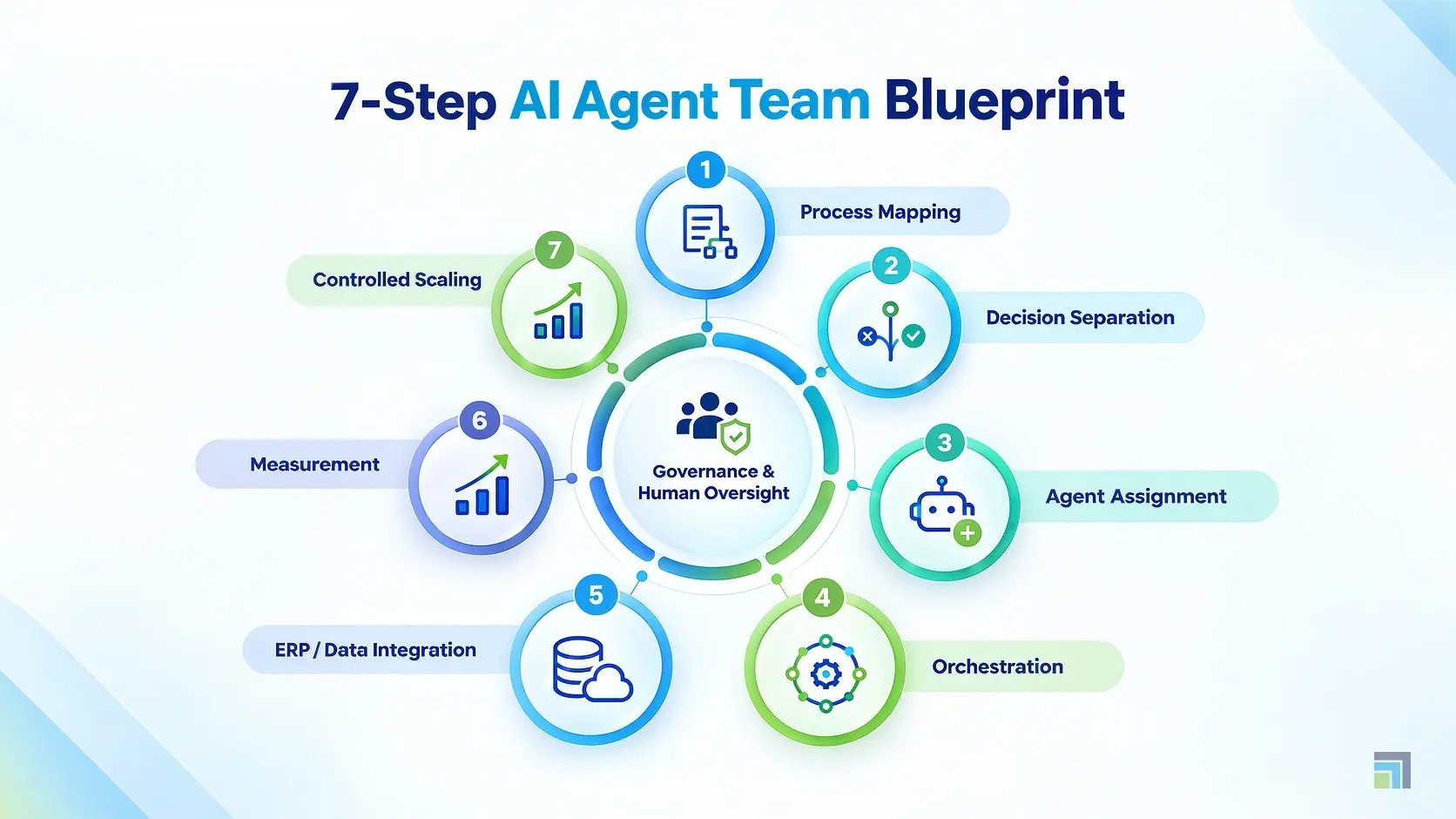
A practical approach looks like this:
1. Map the workflow
Document the actual process, including systems, approvals, exceptions, and human decisions.
2. Separate decisions from actions
Determine which activities can be automated and which require human approval.
3. Assign specialized agents
Give each agent a narrow responsibility rather than creating one oversized agent.
4. Establish an orchestrator
Define how agents communicate, pass information, and escalate exceptions.
5. Connect the ERP and data layer
Agents need reliable access to the information required to complete their tasks.
6. Measure business outcomes
Track metrics such as processing time, exception rates, manual effort, accuracy, and cycle time.
7. Expand carefully
Once one workflow demonstrates measurable value, extend the model to adjacent processes.
Microsoft Copilot Is Part of the Architecture and Not the Whole Strategy
Microsoft's ecosystem gives organizations several ways to introduce AI into business applications. Microsoft Copilot implementation services can help organizations identify where Copilot capabilities fit, while custom agents can address processes requiring more specialized orchestration. For orchestration at enterprise scale, Microsoft Foundry Agent Service provides the runtime and management layer those agents run on.
The key is not choosing between Copilot and agents.
It is deciding which type of intelligence belongs at which point in the workflow.
A user may need Copilot to summarize a customer record. An automated workflow may be enough to route an approval. An AI agent may be appropriate for investigating a complex exception involving several data sources.
The architecture should follow the business problem.
“To get real value from agentic AI, organizations must focus on enterprise productivity, rather than just individual task augmentation.” — Gartner (Gartner)
What CEOs Should Ask Before Using AI Agents
Before approving an agent initiative, leadership teams should ask five questions:
- What business outcome are we trying to improve?
- Is this process needed for AI, traditional automation, or both?
- What decisions should be taken by humans?
- Can our ERP and data environment support the required integrations?
- Who will monitor, govern, and enhance the agents after launch?
For organizations running Dynamics 365, the opportunity is especially interesting because finance, procurement, supply chain, customer service, and operational data already sit within connected business processes.
Conclusion
AI agent teams can change how finance, procurement, and operations work, but their value depends on how thoughtfully they are designed and managed. The goal is not to replace every human task with an autonomous system. It is to give people intelligent digital support for the repetitive, investigative, and coordination-heavy work that slows operations down.
AI-managed services provide the ongoing expertise needed to integrate, monitor, govern, and optimize those systems as the business evolves. As a Microsoft Solutions Partner, DynaTech combines Microsoft Dynamics 365 expertise with Azure, Power Platform, data, automation, and AI capabilities to help organizations move from isolated AI experiments toward measurable operational improvements.


