


 16 Oct 2026
Microsoft Fabric pricing can look complicated at first. The key is to separate licensing, compute capacity, and storage instead of treating Fabric as one flat subscription.
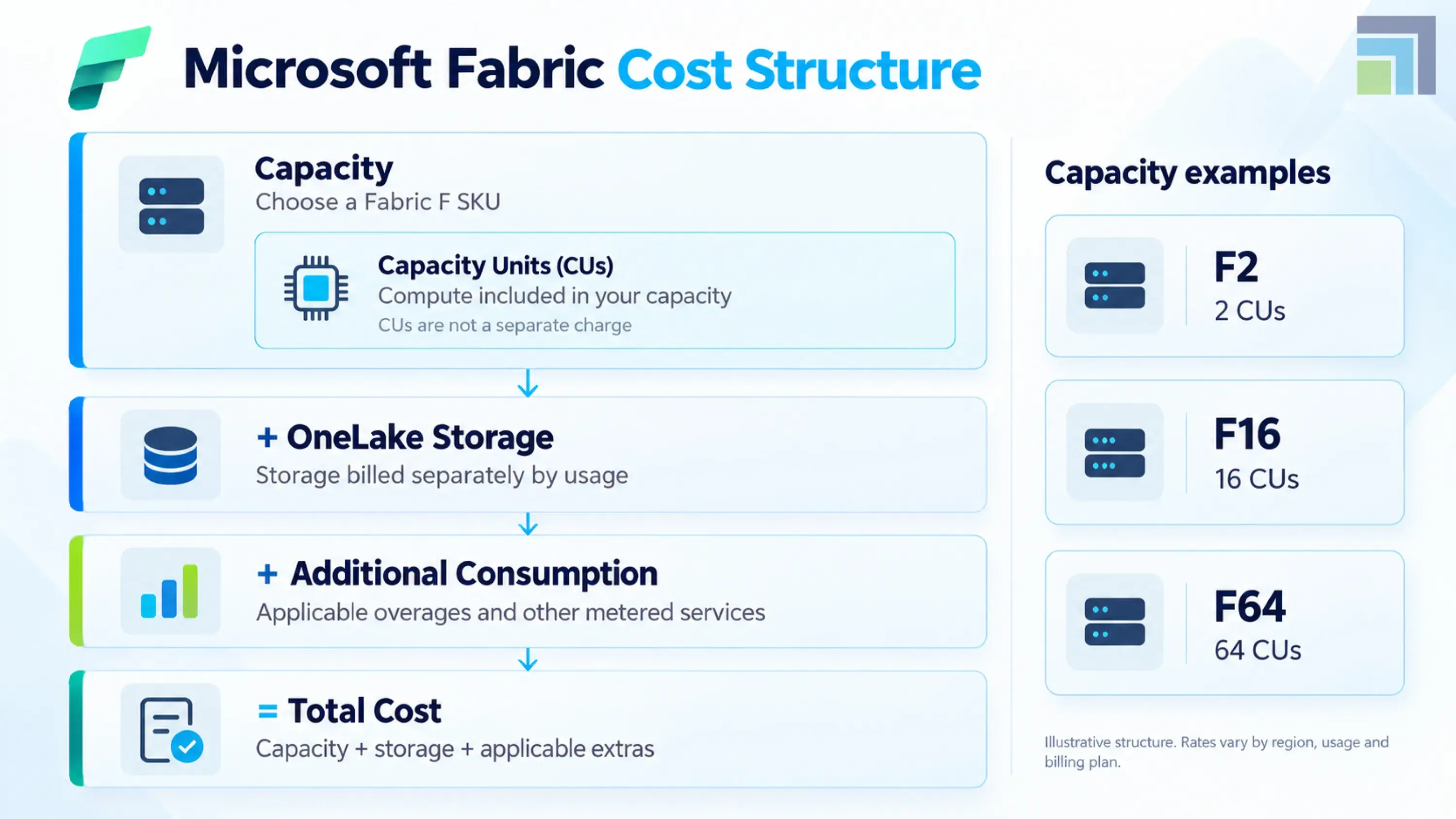
Microsoft Fabric uses F SKUs, with capacity measured in Capacity Units (CUs). You can pay as you go, reserve capacity for one or three years, and scale capacity based on workload requirements. Storage and certain additional services can add to the final bill.
That makes the right question less about “How much does Microsoft Fabric cost?” and more about “What capacity and licensing model fits our workload?”
Microsoft Fabric Pricing Model Explained
The Microsoft Fabric pricing model is developed around shared capacity. Instead of purchasing separate compute for every Fabric workload, a capacity provides a pool of computes, supporting workloads such as Data Engineering, Data Warehouse, Power BI, Real-Time Intelligence, and other Fabric experiences.
The following are practical cost components to consider:
- Fabric capacity: The primary compute cost. It is measured in CUs.
- OneLake storage: The amount of data stored in OneLake can incur storage charges.
- Additional consumption: Depending on your architecture, networking, SQL storage, Spark autoscale, or capacity overage can affect total spend.
This shared model is one reason Fabric can be impressive for organizations consolidating multiple analytics workloads.
As of mid-2026, Microsoft reports Fabric is serving more than 31,000 customers, two and a half years after general availability. At Ignite 2025, Microsoft put the figure at 28,000 customers, including 80% of the Fortune 500.
Fabric "remains the fastest-growing data platform in Microsoft's history." — Microsoft Azure Blog, June 2026
Microsoft Fabric Licensing Options
Microsoft Fabric licensing is easier to understand when you separate user licensing from capacity licensing.
The main options include:
|
Option |
Best suited for |
Key consideration |
|
Fabric free |
Individual exploration and limited use |
Not designed for enterprise-wide workloads |
|
Power BI Pro |
Power BI users and publishers |
Still relevant for many Power BI scenarios |
|
Fabric F SKUs |
Organizations running Fabric workloads |
Capacity-based Azure pricing |
|
Fabric reservation |
Predictable, sustained workloads |
1- or 3-year commitment |
|
Fabric trial |
Evaluation and proof of concept |
Microsoft currently offers a 60-day trial |
Microsoft recommends Azure F SKUs for Fabric capacity purchases. They are billed per second with a one-minute minimum, while reservations can provide lower effective pricing for committed usage.
One licensing detail is easy to miss: with F64 or larger, Power BI report consumers can view Power BI content without an individual Power BI Pro license, subject to Microsoft's licensing rules. Publishers still have licensing requirements. Which combination makes sense usually comes down to how the environment is designed in the first place; workload placement, capacity sharing, and tenant structure all affect which licences you actually need. Microsoft Fabric architecture services are typically where those decisions get settled before capacity is purchased.
Microsoft Fabric Capacity Pricing and SKUs
Microsoft Fabric capacity pricing is tied directly to the SKU you select.
F2 starts with 2 CUs, while larger capacities scale through F4, F8, F16, F32, F64, and beyond. Microsoft currently lists capacities extending to F2048 on its pricing page.
As an illustration, Microsoft's current pricing page shows the following monthly estimates for one pricing configuration:
|
SKU |
Capacity Units |
Pay-as-you-go* |
|
F2 |
2 |
$262.80/month |
|
F4 |
4 |
$525.60/month |
|
F8 |
8 |
$1,051.20/month |
|
F16 |
16 |
$2,102.40/month |
|
F32 |
32 |
$4,204.80/month |
|
F64 |
64 |
$8,409.60/month |
|
F128 |
128 |
$16,819.20/month |
*US East region, USD, pay-as-you-go, Source: Microsoft Fabric pricing.
Microsoft's pricing table is region- and currency-filtered, so your figures will differ. Actual pricing also varies by agreement type and purchase date; confirm in the Azure pricing calculator before budgeting.
The important point is not the F2 price itself. It is the scaling relationship. An F64 provides 64 CUs, compared with 2 CUs for F2. How much of that capacity you need depends less on the price list than on what the environment is being asked to do. A modern data lakehouse with Microsoft Fabric consolidates workloads that would otherwise sit on separate compute, which changes the sizing conversation entirely.
What are Microsoft Fabric Capacity Units (CUs)?
Microsoft Fabric capacity units are the measurement used to represent available compute power.
Think of CUs as the engine behind your Fabric workloads. Queries, pipelines, notebooks, semantic models, warehouse operations, and other activities consume compute based on the work they perform.
For Example:
- F2 = 4CUs
- F8 = 8 CUs
- F32 = 32 CUs
- F64 = 64 CUs
- F128 = 128 CUs
- F2048 = 2,048 CUs
Microsoft's capacity planning documentation uses a 30-second evaluation period when measuring consumption. Its guidance is to test workloads, review utilization in the Capacity Metrics app, and then adjust the SKU based on actual demand.
That is a better approach than choosing a capacity simply because another company uses F64.
How Much Does Microsoft Fabric Cost?
There is no single answer to how much Microsoft Fabric costs.
A small analytics team running workloads during business hours may have a very different cost profile from a global enterprise running continuous data engineering, warehouse, BI, and AI workloads.
Your estimate should consider:
Monthly Fabric cost = Capacity consumption + OneLake storage + applicable additional services
Microsoft also supports pausing and resuming F capacities. This can matter for development, testing, departmental analytics, or workloads that do not need to run continuously.
Microsoft Fabric Pay-As-You-Go Pricing vs. Reserved Capacity
Microsoft Fabric pay-as-you-go pricing works well when demand changes or you are still learning your workload profile. You pay for active capacity usage and can scale or pause capacity.
Reserved capacity makes more sense when usage is stable and predictable. Microsoft currently offers one- and three-year reservations, and its pricing page indicates savings of approximately 41% compared with pay-as-you-go under the applicable pricing configuration.
Reservations cover Fabric capacity usage. They do not cover storage or networking charges.
Which Should You Choose?
Because a Microsoft Fabric unified data platform runs data engineering, warehousing, BI, and real-time workloads against the same capacity, the decision should follow your overall consumption pattern rather than any single workload.
Use pay-as-you-go when flexibility matters.
Choose reservation when workloads are predictable enough to justify a longer commitment.
For many organizations, the sensible path is to start with measured consumption, optimize the workload, and only then consider a reservation.
What Additional Costs Should You Consider With Microsoft Fabric?
Capacity is not necessarily your entire Microsoft Fabric cost.
OneLake storage is billed separately based on stored data. Microsoft explains that OneLake does not charge a separate transaction fee in the same way some storage services do; its transactions consume Fabric capacity.
You should also examine:
- OneLake storage growth
- SQL storage and backup storage
- Spark autoscale, if enabled
- Capacity overage
- Networking, not billed yet. (Microsoft has said it will give at least 90 days' notice before billing begins, and charges will apply to data transfer based on the source and destination of each storage access)
- Power BI licensing requirements
- Data integration and external Azure services
- OneLake storage tier and retrieval charges
These costs become more important as your Fabric environment grows.
How to Optimize Microsoft Fabric Costs
The cheapest SKU is not always the cheapest architecture.
An F2 costs a fraction of an F8, but capacity is consumed by the work your environment actually does, not by the size you bought. If a pipeline refreshes a full dataset hourly when an incremental refresh would do, or a semantic model recomputes measures that could be pre-aggregated, that waste consumes CUs on any SKU. On a small capacity, it shows up faster as throttling, queued operations, and overage, and the usual response is to move up a SKU. You've now paid for the inefficiency permanently instead of fixing it once.
The reverse mistake costs more. Buying F64 for headroom means paying enterprise capacity rates for workloads an optimized F8 could carry. Either way, the SKU wasn't the real variable.
Start with workload measurement rather than guesswork.
Before sizing anything, run your actual workloads and watch what they consume. Microsoft's Capacity Metrics app reports CU usage against a 30-second evaluation window, so you can see which items are driving consumption and when peaks occur. That tells you two things a price list can't: whether your demand is spiky or sustained (which decides pay-as-you-go versus reservation), and whether your peaks come from genuine load or from a handful of fixable operations.
1. Monitor CU consumption.
Use the Fabric Capacity Metrics app to identify which workloads consume capacity.
2. Right-size your SKU.
Do not buy F64 because it provides comfortable headroom if your measured workload can operate effectively on a smaller capacity.
3. Pause non-production environments.
Development and testing environments may not need continuous capacity.
4. Control storage growth.
Review retained data, duplicate datasets, and unnecessary historical data in OneLake.
5. Consider reservations carefully.
Once usage becomes predictable, compare reservation economics with your actual consumption. Where consumption is driven by pipelines and data models carried over from older platforms, the fix is architectural rather than operational. Data and AI modernization services address the cause instead of absorbing it into a larger SKU.
6. Optimize workloads before scaling.
Poor queries, inefficient pipelines, unnecessary refreshes, and badly designed data models can create avoidable consumption.
7. Use OneLake storage tiers deliberately.
OneLake now supports hot, cool, and cold tiers. Cool and cold cost less per GB but add a per-GB retrieval fee that consumes capacity units when data is read. Microsoft's guidance is to load historical data directly into cool or cold rather than moving it later, since tier-change operations themselves incur charges.
Which Microsoft Fabric Pricing Option Is Right for Your Business?
A practical decision framework looks like this:
- Proof of concept: Start with a Fabric trial or small F SKU.
- Small departmental analytics: Consider lower F SKUs and monitor usage closely.
- Growing analytics environment: Size capacity around measured CU consumption.
- Enterprise BI and analytics: Evaluate F64 and above based on workload and Power BI requirements.
- Predictable enterprise workloads: Compare reservation pricing with historical consumption.
- Variable workloads: Keep pay-as-you-go flexibility and use scaling or pause/resume capabilities where appropriate.
Reviewing Microsoft Fabric implementation success stories from comparable environments is usually more informative than benchmarking against a capacity size another organization happened to buy.
The right Microsoft Fabric pricing model should follow your workload, not the other way around.
For organizations moving data from Dynamics 365, SAP, Oracle, e-commerce platforms, or other business systems into Fabric, architecture also has a direct impact on cost. Data movement, refresh frequency, storage design, semantic models, and workload distribution all influence the final economics.
This is where experienced Microsoft Fabric Services can help. DynaTech works across Fabric architecture, data engineering, integration, BI, MDM, and governance and AI-enabledanalytics to build environments around measurable business requirements rather than simply deploying capacity.
Conclusion
Microsoft Fabric pricing becomes much easier to understand once capacity, licensing, and storage are viewed separately. The F SKU determines your available compute, while workload behavior determines how effectively that capacity is used. Pay-as-you-go provides flexibility, while reservations can make sense for predictable usage. The biggest opportunity is often not buying more capacity, but designing the environment to use capacity efficiently. DynaTech, as a Microsoft Solutions Partner, helps organizations assess, architect, implement, and optimize Microsoft Fabric alongside Dynamics 365, Azure, Power BI, and other enterprise data platforms. If you are planning a Fabric rollout or questioning your current capacity costs, talk to DynaTech's Microsoft Fabric experts.


