

 22 Oct 2026
Introduction
A database and a warehouse may both speak SQL, but they solve very different business problems. That distinction matters when evaluating SQL Database vs Data Warehouse in Microsoft Fabric, especially when operational applications, enterprise reporting, and AI workloads are converging on the same data platform.
Microsoft Fabric SQL Database is positioned for transactional, application-oriented workloads, while Fabric Warehouse is designed for enterprise-scale analytics. The right choice depends less on which technology is “better” and more on what the workload needs to do.
At DynaTech, Microsoft Fabric architecture decisions are rarely treated as isolated technology choices. The starting point is the business workload: what needs to be transacted, what needs to be analyzed, where data should live, and how that data will ultimately support reporting, automation, and AI.
Fabric SQL Database vs Warehouse: The Core Difference
The simplest way to think about the Microsoft Fabric SQL Database vs Warehouse differences is this:
SQL Database runs the business. Fabric Warehouse analyzes the business.
SQL database in Microsoft Fabric is based on the Azure SQL Database engine and is designed as an OLTP database. Microsoft describes it as the home in Fabric for transactional workloads. Data is also automatically replicated into OneLake in an analytics-ready format, allowing it to participate in the broader Fabric ecosystem.
Fabric Warehouse, by contrast, is an enterprise-scale relational warehouse built on a data lake foundation. Microsoft specifically identifies star and snowflake schemas, curated data marts, and governed semantic models for BI as suitable scenarios.
That difference drives almost every architectural decision that follows.
|
Capability |
Fabric SQL Database |
Fabric Warehouse |
|
Primary role |
Operational/transactional database |
Enterprise analytics |
|
Workload |
OLTP |
OLAP |
|
Data pattern |
Current operational data |
Historical and analytical data |
|
Typical users |
Application developers, operational teams |
Data engineers, analysts, BI teams |
|
Modeling |
Relational/application-oriented |
Star, snowflake, dimensional |
|
Transactions |
Designed for transactional workloads |
Supports multi-table ACID transactions |
|
Analytics |
Operational analytics and downstream Fabric access |
Large-scale analytical queries and BI |
|
Power BI |
Suitable for application-level analytics |
Strong fit for enterprise reporting |
|
OneLake integration |
Automatically replicated to OneLake |
Native Fabric/OneLake foundation |
|
Best fit |
Applications and operational systems |
Enterprise data warehouse and reporting |
The important point is that these are complementary technologies, not necessarily competing ones.
What Is Fabric SQL Database?
Fabric SQL Database gives developers a familiar relational database environment inside Microsoft Fabric. It uses the same underlying SQL Database Engine as Azure SQL Database and supports standard SQL development patterns.
Consider an e-commerce application.
Customer orders, payment records, inventory reservations, addresses, and order-status updates are operational transactions. The system needs to insert, update, and retrieve individual records reliably.
That is where Fabric SQL Database fits.
Microsoft also automatically makes the SQL database data available in OneLake in a queryable format. This creates an interesting bridge between operational applications and analytics: the operational database can support the application while its data becomes available to Fabric's analytics experiences.
Fabric SQL Database use cases include:
- Transactional business applications
- Customer and order management applications
- Department-level operational systems
- Application-specific relational workloads
- Operational analytics
- Modern applications requiring SQL-based data storage
- Scenarios where operational data needs to feed Fabric analytics
From a DynaTech implementation perspective, Fabric SQL Database makes sense when the priority is operational data management. Applications such as customer portals, order management, or line-of-business solutions need reliable transaction processing first; analytics can then consume that operational data through the broader Fabric architecture.
What Is Fabric Warehouse?
A Fabric Data Warehouse is built for a different question:
“What does all this business data tell us?”
Instead of optimizing primarily for individual transactions, the warehouse is designed to analyze large volumes of structured and semi-structured business data. For a wider view of how these layers fit together, see how a modern data warehouse and lakehouse with Microsoft Fabric is structured.
Microsoft identifies star and snowflake schemas, curated corporate data marts, and governed semantic models as core Fabric Warehouse scenarios. It also separates storage and compute, allowing the platform to scale analytical workloads without managing traditional warehouse infrastructure.
For example, a manufacturer might bring together:
- D365 Finance & Operations transactions
- Production data
- Inventory movements
- Supplier information
- Sales history
- Forecasts
- Quality data
A Fabric Warehouse can organize that information into fact and dimension structures so business users can analyze production efficiency, inventory trends, supplier performance, and profitability.
Once the analytical layer is structured, Microsoft Power BI services can help transform governed Fabric data into business-ready dashboards, reports, and decision-support experiences for finance, operations, sales, and supply chain teams.
DynaTech typically approaches Fabric Warehouse as part of a broader enterprise data strategy rather than as a standalone reporting database. Data from ERP systems, CRM platforms, operational applications, and external sources needs to be brought together, structured, governed, and made accessible for analytics and AI.
The warehouse becomes particularly valuable when data from Dynamics 365, ERP systems, CRM platforms, operational applications, and external sources needs to be consolidated into a governed analytical layer for Power BI and advanced analytics, often using Azure Data Factory for enterprise data integration to move and orchestrate that data.
This broader approach connects data warehousing with business intelligence, data engineering, Power BI, and enterprise analytics. Organizations looking to build this capability can explore DynaTech's Business Analytics Solutions, which bring together data integration, data engineering, Power BI for Dynamics 365, data warehousing, governance, and advanced analytics.
Fabric Data Warehouse Use Cases
Common Fabric Data Warehouse use cases include:
- Enterprise BI and reporting
- Financial analytics
- Sales and revenue analysis
- Supply chain analytics
- Historical trend analysis
- Corporate data marts
- Dimensional data models
- High-volume analytical queries
- Power BI semantic models
- Cross-domain enterprise analytics
SQL Database vs Data Warehouse: Which One Should You Choose?
The answer becomes much clearer when the decision starts with the workload.
Choose Fabric SQL Database when:
The application is writing and updating operational data.
If users are creating orders, changing customer information, processing transactions, or updating application records, a transactional database is the natural fit.
It is also a strong option when developers need a familiar SQL environment while keeping the database closely integrated with Fabric.
Choose Fabric Warehouse when:
The organization needs a centralized analytical layer.
If the requirement is to combine years of sales, finance, supply chain, customer, or operational data and turn it into enterprise reporting, Warehouse is the stronger choice.
Fabric Warehouse is particularly appropriate when dimensional modeling, corporate data marts, governed BI, and large analytical queries are central to the architecture.
Choose both when:
This is where many enterprise architectures become more interesting.
There is no requirement to force every workload into one engine.
An organization could use Fabric SQL Database for an operational application, automatically replicate that data into OneLake, and then combine it with other enterprise sources in a Fabric Warehouse for broader analytics.
That architecture separates operational performance from analytical processing while keeping both workloads within the Fabric ecosystem.
This is where DynaTech's experience across Dynamics 365, Microsoft Fabric, Azure, and Power BI becomes particularly relevant. Organizations looking beyond a single workload can benefit from a broader Microsoft Fabric services strategy covering data engineering, integration, warehousing, governance, analytics, and AI readiness. DynaTech approaches Fabric architecture with these connected requirements in mind rather than treating each workload as a standalone implementation.

Assess Your Fabric Architecture
DynaTech helps organizations design Microsoft Fabric architectures across data engineering, data integration, data warehousing, MDM, and Power BI. Explore DynaTech Microsoft Fabric services to evaluate the right architecture for your workloads.
Microsoft Fabric SQL Database vs Warehouse: A Practical Example
Imagine a wholesale distributor operating across multiple regions.
Its customer portal needs to process:
- New customer registrations
- Product orders
- Order updates
- Payment information
- Shipping addresses
Those are transactional workloads. Fabric SQL Database can serve the application layer.
Now consider what the leadership team needs:
- Which regions are growing fastest?
- Which products have declining margins?
- What is the six-month inventory trend?
- Which customers have reduced purchasing frequency?
- How does fulfillment performance compare across warehouses?
Those are analytical questions. They are also the questions that typically end up on executive dashboards built on Fabric and Power BI, where regional growth, margin, and fulfillment performance are tracked together.
A Fabric Warehouse can combine operational data with historical sales, inventory, finance, and customer datasets to support those questions.
The architecture therefore becomes:
Applications → Fabric SQL Database → OneLake → Fabric Warehouse → Semantic Model → Power BI
That is more useful than asking which platform wins a generic SQL Database vs Data Warehouse comparison. Each hop in that chain depends on well-designed pipelines, which is covered in more depth in this guide to building ETLs with Microsoft Fabric.
Why OneLake Changes the Decision
One of Fabric's architectural advantages is that the two workloads do not have to exist as isolated islands.
SQL database data is automatically replicated into OneLake in an analytics-ready format. Fabric Warehouse also works on the shared Fabric data foundation, allowing data to move across Fabric experiences without recreating an entirely separate analytics ecosystem. How that shared data is then layered and refined is usually handled through medallion architecture in Microsoft Fabric.
Microsoft's own numbers show how broadly Fabric is being adopted. In its FY2025 Q3 earnings call, Microsoft reported more than 21,000 paid Fabric customers, up 80% year over year, and said more than 50% of Fabric customers use three or more workloads.
That matters because Fabric is increasingly being used as a platform rather than as a single analytics product.
“Fabric is perhaps the biggest launch of a data product from Microsoft since the launch of SQL Server.”
— Satya Nadella, Microsoft Build 2023, as quoted by Microsoft.
What About Performance and Cost?
Performance should not be evaluated simply by asking which component is faster.
The better question is: faster for what?
A transactional application benefits from an engine designed around operational queries and updates. A warehouse benefits from an analytical architecture designed to scan, aggregate, join, and analyze large datasets.
Fabric Warehouse also separates compute and storage, and Microsoft describes its distributed query processing and workload management as designed to provide scalable analytical performance without traditional infrastructure tuning.
Cost should be evaluated in the same way.
Look at:
- Query patterns
- Data volume
- Concurrency
- Refresh requirements
- Fabric capacity consumption
- Data movement
- Existing Microsoft investments
- Operational administration
- Expected growth
A technically cheaper component can become an expensive choice if it is forced to perform a workload it was not designed to handle. Organizations evaluating the platform itself rather than the workload often face a wider decision, covered here on choosing between Fabric and Snowflake.
There is also evidence that the broader Fabric investment can produce substantial economic value when deployed appropriately. A 2024 Forrester Total Economic Impact study commissioned by Microsoft modeled a 379% ROI over three years for its composite organization. This is a modeled business case, not a guaranteed return for every organization, so it should be treated as directional rather than a promise.
The Decision Framework
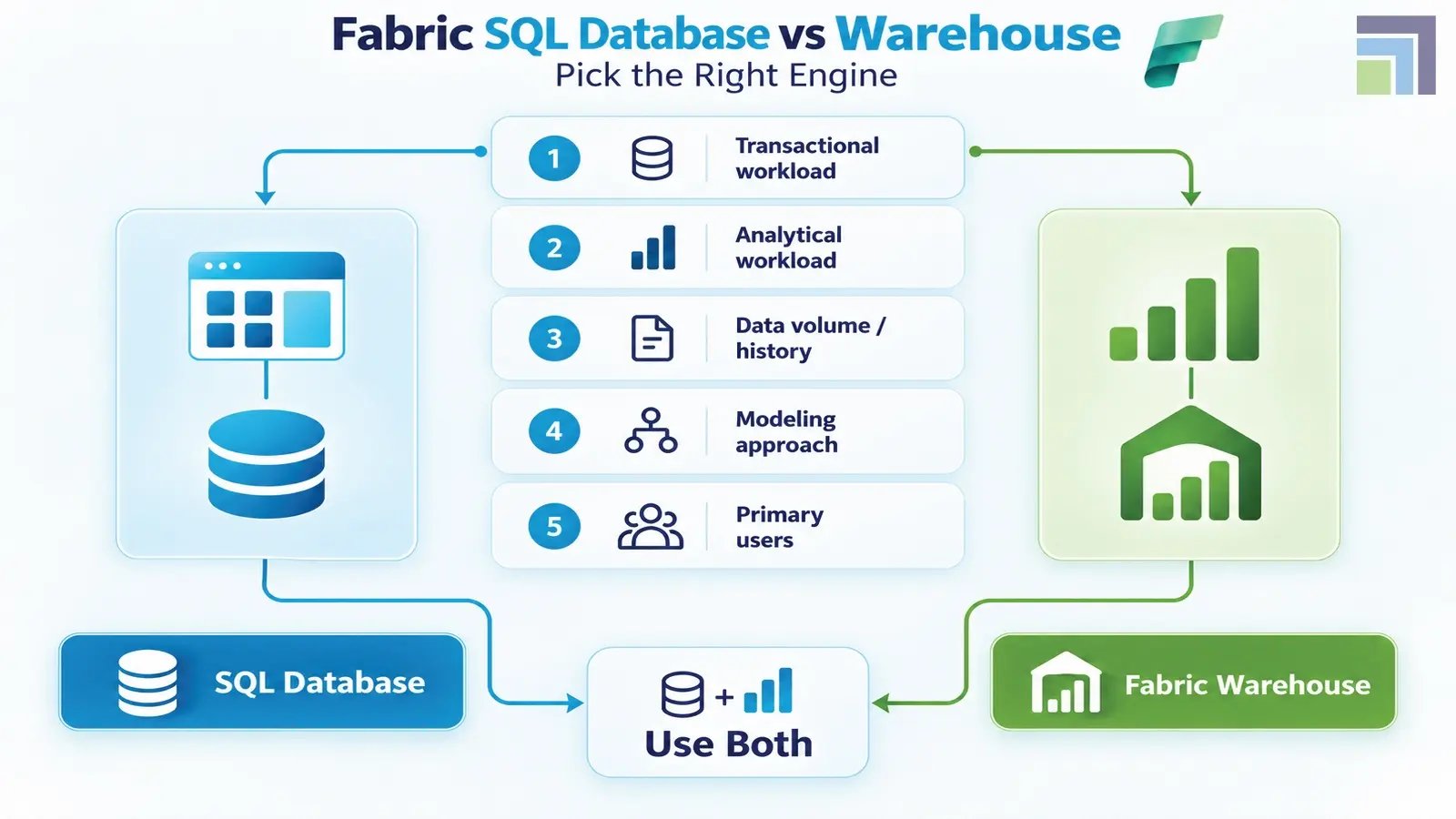
For organizations evaluating Microsoft Fabric Data Warehouse vs SQL Database, this five-question test is a practical starting point:
1. Is the workload primarily transactional?
→ Start with Fabric SQL Database.
2. Is the workload primarily analytical?
→ Evaluate Fabric Warehouse.
3. Does the organization need enterprise-wide reporting across multiple sources?
→ Fabric Warehouse becomes more compelling.
4. Does an application need a relational database?
→ Fabric SQL Database is the more natural fit.
5. Do both operational and analytical requirements exist?
→ Consider using both and connecting them through the Fabric data architecture.
For organizations still assessing the right architecture, Microsoft Fabric consulting services can help evaluate existing workloads, data sources, governance requirements, reporting needs, and future scalability before technology decisions are finalized.
Final Thoughts
The biggest mistake in a SQL Database vs Data Warehouse decision is treating the two as rival products.
They are optimized for different jobs.
Fabric SQL Database is the stronger fit when applications need transactional, relational data management. Fabric Warehouse is the stronger choice when the objective is enterprise analytics, dimensional modeling, governed reporting, and large-scale analysis.
For organizations building a broader Microsoft data strategy, the most effective architecture may not be SQL Database or Warehouse. It may be SQL Database and Warehouse, connected through OneLake and the wider Fabric ecosystem.
The right answer to SQL Database vs Data Warehouse is determined by workload, not product preference. Use Fabric SQL Database for operational data and application workloads, Fabric Warehouse for enterprise analytics, and consider both when the business needs a connected operational-to-analytical architecture.
The real opportunity is designing the Fabric environment around how the business actually uses data. As a certified Microsoft Dynamics 365 Partner, DynaTech's Microsoft experts can assess your existing data estate, identify the right Fabric workloads, and design an architecture aligned with performance, governance, scalability, and business outcomes.

