

 21 Aug 2026
In most Dynamics 365 implementations, the real complexity in a D365 architecture doesn’t come from the system itself. It comes from everything around it.
Planning tools, external platforms, data pipelines, and reporting layers all need to connect and stay in sync. This becomes even more critical in scenarios like o9 integration with Dynamics 365, where planning outputs are expected to flow directly into execution without delays or rework.
This is where the importance of well-structured Dynamics 365 integration services and a clearly defined D365 architecture becomes visible. When integration is not structured properly, issues show up quickly in the form of broken data flows, validation errors, and inconsistent results across systems.
Building a reliable D365 data integration architecture is not just about connecting systems. It is about making sure data moves correctly, gets validated at the right stages, and supports decisions without creating operational friction.
This is typically where DynaTech works with enterprise teams, designing integration architectures across Dynamics 365, planning systems like o9, and Azure-based data platforms to ensure these systems operate as a single, connected environment.
Why Legacy Integration Approaches Break in Dynamics 365 Environments
In a typical D365 architecture, traditional ERP integrations were designed around periodic data exchange. Batch uploads, flat file transfers, and loosely governed APIs were sufficient when business processes operated in predictable cycles.
However, in modern Dynamics 365 environments, these approaches break down quickly.
When dealing with complex ecosystems involving o9 integration with Dynamics 365, supply chain planning, finance operations, and customer engagement systems must operate in near real time. Any delay, inconsistency, or failure in integration directly impacts decision-making.
The problem becomes more visible in scenarios such as o9 supply chain integration D365, where planning outputs must seamlessly feed into execution systems. Without a structured integration architecture, organizations face:
- Data latency across systems
- Frequent reconciliation issues
- High dependency on manual intervention
- Increased exposure to data validation failures
This is why modern enterprises are moving toward structured, layered architectures that support intelligent data flow rather than isolated integrations.
In practice, this is where organizations begin re-evaluating their integration approach, often moving toward structured architectures supported by Dynamics 365 partners like DynaTech.
Core Components of an Enterprise Data Integration Architecture
A scalable D365 architecture is not a single system. It is a layered ecosystem designed to manage data, processes, and intelligence across the enterprise.
At a high level, this architecture consists of:
1. Business Application Layer
This includes Dynamics 365 Finance, Dynamics 365 Supply Chain Management, and Customer Engagement. These systems handle transactional operations and serve as the core execution engine.
2. Integration Layer
This is where structured communication happens through APIs, data entities, and middleware. It enables controlled data exchange between D365 and external systems such as o9.
3. Data Layer
A unified data foundation built using Azure services and Microsoft Fabric ensures that data is stored, transformed, and made accessible for analytics and reporting.
4. Intelligence Layer
This layer enables decision-making through analytics, AI models, and planning systems. It transforms raw data into actionable insights.
A well-defined D365 data integration architecture ensures that these layers operate cohesively, allowing enterprises to scale without compromising reliability.
Data Integration Architecture Patterns: DMF and API Framework in Dynamics 365
In a typical D365 DMF integration approach, the Data Management Framework (DMF) serves as the foundation for structured data movement within Dynamics 365 Finance and Operations environments. It enables controlled import and export of data through standardized data entities, ensuring consistency across systems.
DMF is particularly effective in scenarios that require:
- High-volume data movement across modules
- Structured data transformations aligned with business logic
- Controlled integration with external systems through staging layers
However, enterprise integration requirements rarely remain limited to batch-based processing. As organizations integrate platforms such as o9 with Dynamics 365, the need for more responsive and scalable data exchange becomes critical.
This is where D365 batch data APIs integration plays a central role. APIs enable external systems to interact directly with Dynamics 365, supporting controlled execution of data operations while maintaining system performance and integrity.
Key capabilities of this approach include:
- Trigger-based execution of data movement jobs
- Secure, API-driven communication between systems
- Scalable batch processing aligned with workload demands
- Reduced dependency on manual data handling
By combining DMF with API-based integration, organizations can build flexible frameworks that support both structured batch processing and more dynamic data exchange scenarios.
DynaTech applies this combined DMF and API-driven approach while designing integration frameworks for enterprise environments, ensuring that data movement remains aligned with business workflows and scalable across systems such as o9 and Dynamics 365. This approach also helps minimize disruptions during system changes and release updates.
Real-Time Data Integration Architecture: Flow and Ingestion Pipeline
In a typical o9 D365 architecture, data flows across multiple systems, each with its own structure and processing logic.
The integration process generally involves:
1. Data Extraction
Data is extracted from source systems such as o9 planning modules or external applications.
2. Data Ingestion
Using Azure Blob Storage or similar services, data is staged before being processed within D365 as part of a structured Dynamics 365 Azure Blob Storage integration approach.
3. Data Transformation
Data entities within D365 ensure that incoming data aligns with system requirements.
4. Data Processing
Validated data is committed to the system, triggering downstream processes.
This structured pipeline ensures that data flows are predictable, traceable, and scalable.
Without this approach, integration becomes fragile, especially when dealing with high-volume or high-frequency data exchanges.
Managing Data Validation Errors in Enterprise Integration Pipelines
Data validation and error handling are often treated as secondary concerns in integration design, but in large-scale Dynamics 365 environments, they are critical to system stability.
In enterprise implementations, Dynamics 365 data validation errors are not rare exceptions. They are recurring events that must be anticipated and managed as part of the integration architecture.
These errors typically arise from:
- Data format inconsistencies across source systems
- Missing or incorrectly mapped mandatory fields
- Referential integrity conflicts between related entities
- Violations of business rules embedded within Dynamics 365
Without a structured approach, these issues can disrupt data flows, delay processing, and create downstream inconsistencies across systems.
A well-designed enterprise D365 integration solution addresses this through:
- Pre-validation checks before data ingestion
- Structured error logging with classification based on severity
- Automated retry mechanisms for recoverable failures
- End-to-end audit trails to ensure traceability
DynaTech incorporates these validation and error-handling mechanisms directly into integration pipelines, ensuring that data issues are identified and resolved early without impacting operational workflows.
By embedding validation into the integration architecture, organizations can significantly reduce operational risk, improve data reliability, and maintain consistency across connected systems.
Azure Data Integration Architecture: Microsoft Fabric and the Data Layer
Once data is moved across systems through DMF, APIs, and integration pipelines, the next challenge is making that data usable. Integration alone does not solve the problem unless the data is consolidated, governed, and accessible for downstream processes.
Within a modern D365 architecture, Azure services support the integration layer by enabling scalable data ingestion, storage, and pipeline orchestration across systems. This ensures that data from sources such as o9 and Dynamics 365 can be processed reliably and at scale.
Building on this, Microsoft Fabric acts as the data layer that organizes and unifies this information. It provides a centralized environment where integrated data can be structured, governed, and prepared for analytics.
Together, Azure and Fabric enable:
- Scalable data ingestion and pipeline orchestration
- Centralized data storage through unified data layers
- Consistent data models across planning and execution systems
- Governance controls aligned with Dynamics 365 data governance best practices to maintain data quality and reliability.
In scenarios involving o9 integration with Dynamics 365, this ensures that planning outputs and operational data operate on a shared, reliable dataset rather than fragmented sources.
DynaTech incorporates both Azure-based integration frameworks and Fabric-driven data layers to ensure that data is not only moved across systems but also structured for decision-making.
The result is an architecture where integration, data, and analytics operate as a single, connected system.

Turn Disconnected Enterprise Data Into a Unified Intelligence Layer
Build scalable analytics, centralized governance, and connected reporting environments with Microsoft Fabric designed for modern Dynamics 365 ecosystems.
How DynaTech Enables Intelligent Integration Architectures
Designing a scalable D365 data integration architecture requires more than technical implementation. It requires alignment with business processes, data flows, and operational priorities.
This is where DynaTech supports organizations through:
- Implementation and optimization of Dynamics 365 Finance, Supply Chain, and Customer Engagement
- Designing integration frameworks for o9 D365 architecture and other enterprise systems
- Enabling workflow orchestration using Power Automate
- Leveraging Microsoft Fabric for unified data management and analytics
- Building scalable API and DMF-based integration pipelines
- Providing Dynamics 365 managed services to support ongoing integration and data operations.
With experience across industries such as manufacturing, retail, and BFSI, DynaTech ensures that integration architectures are not only technically sound but also aligned with real business outcomes.
Business Impact of a Best-in-Class Data Integration Architecture
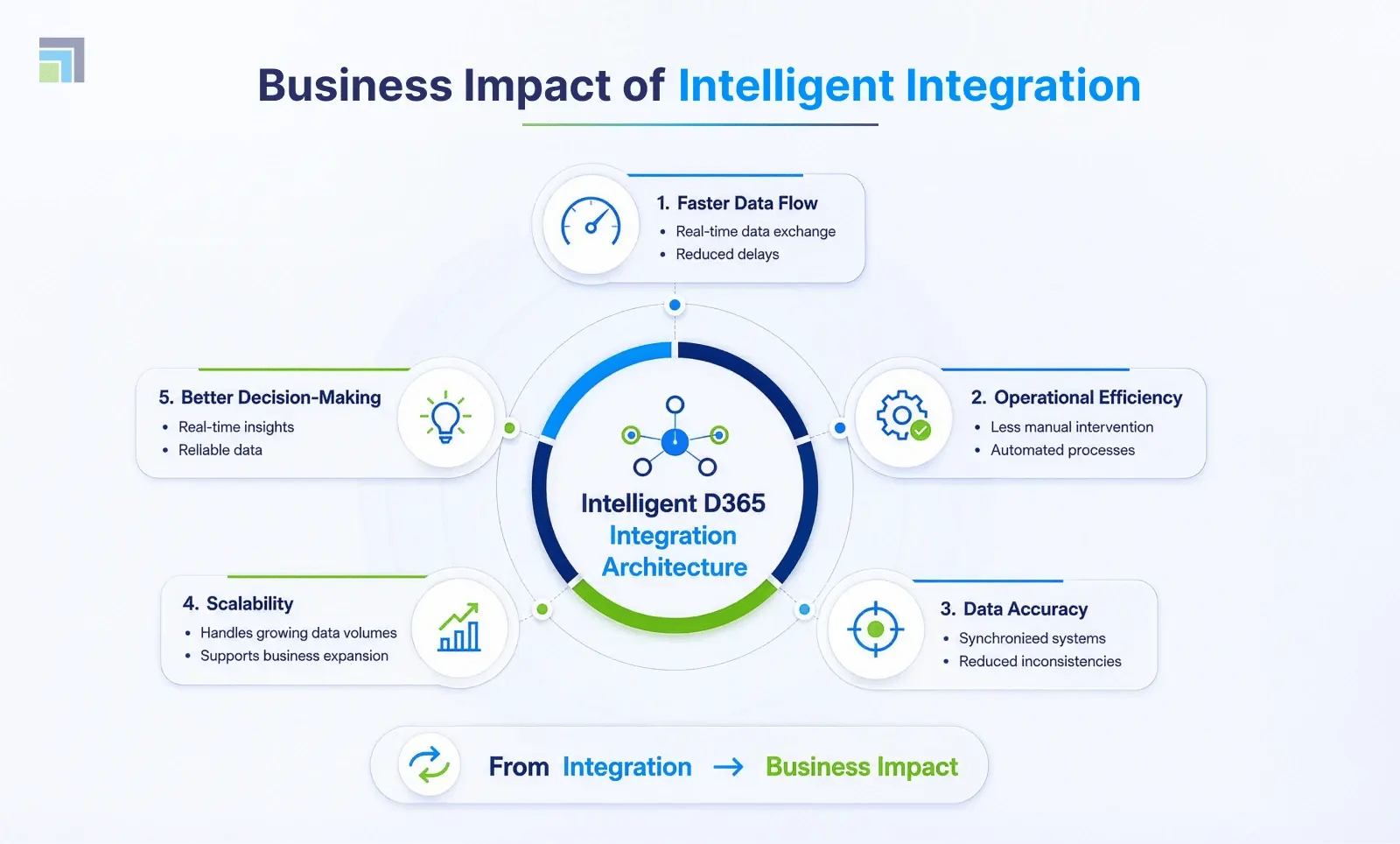
A structured and intelligent integration architecture delivers measurable value across the enterprise.
Organizations can achieve:
- Faster and more reliable data exchange between systems
- Reduced manual intervention in data processes
- Improved accuracy in planning and execution
- Scalable integration frameworks that support business growth
- Enhanced decision-making through real-time insights and stronger Dynamics 365 data insights with Microsoft Fabric capabilities.
In environments where systems like o9 and Dynamics 365 operate together, the ability to maintain data consistency and reliability becomes a key differentiator.
Wrapping Words: From Integration to Intelligent Execution
In most Dynamics 365 environments, integration issues do not fail loudly. They build up over time, small delays, mismatched data, and workarounds that teams start relying on.
That is usually a sign that the architecture is not doing enough.
A well-structured D365 setup changes this. Data moves the way it should; validations happen where they need to, and systems like o9 and Dynamics 365 stay aligned without constant intervention.
At that point, integration stops being something you manage and becomes something you can rely on.

