

 11 Aug 2026
Introduction
A slow-running Dynamics 365 Finance & Operations environment rarely fails without warning. Long-running batch jobs, integration bottlenecks, database latency, or any kind of infrastructure challenges often leave clues long before users raise support tickets. The main challenge isn't collecting those signals. It's turning them into accurate insights before they impact operations.
That's where the Splunk vs Azure Monitor discussion becomes important. Both of them help organizations monitor applications and infrastructure. But they monitor enterprise data in a different way. If your ERP ecosystem is built around Microsoft technologies, choosing the right one depends on more than dashboards or alerting. It comes down to integration, operational visibility, cost, and how quickly your IT team can respond to problems.
This detailed comparison looks specifically at Dynamics 365 Finance & Operations, including the monitoring of F&O application telemetry, batch processing, integrations, databases, and Azure infrastructure, to help IT leaders make an informed decision.
Why Performance Monitoring Matters for D365 Finance & Operations
Dynamics 365 Finance & Operations powers business-critical processes across finance, supply chain, manufacturing, warehousing, procurement, and operations. Even minor performance degradation can affect order processing, production planning, or financial reporting.
Modern Dynamics 365 F&O environments are also far more connected than before. OData APIs, third-party integrations, Power Platform applications, data pipelines, batch processes, and supporting Azure infrastructure all generate telemetry that needs continuous monitoring.
According to Microsoft, Azure Monitor collects and analyzes telemetry from applications, virtual machines, containers, databases, and Azure resources within a unified monitoring platform, helping organizations detect issues before they affect users.
For organizations running D365 F&O in Microsoft Azure, structured Dynamics 365 F&O Performance Monitoring across applications and infrastructure is becoming an operational necessity rather than a nice-to-have.
Consistent monitoring also lays the foundation for effective Dynamics 365 Performance Optimization by helping IT teams identify recurring bottlenecks, optimize resource utilization, and improve overall system responsiveness."
"You can't manage what you can't measure." — Peter Drucker
The quote remains relevant today. Without actionable monitoring, IT teams often discover problems only after business users experience them.
Understanding the Two Platforms
Before comparing features, it's essential to know what each solution is designed to do.
What is Microsoft Azure Monitor?
Microsoft Azure Monitor is Microsoft's native monitoring platform for Azure services and cloud-hosted applications. It combines metrics, logs, distributed tracing, application monitoring, and alerting into a unified service.
Key capabilities include:
- Infrastructure monitoring across Azure resources
- Performance metrics collection
- Log analytics
- Application Insights integration
- Intelligent alerting
- Native integration with Dynamics 365 and Microsoft services
- Built-in dashboards using Azure Workbooks
Organizations running Dynamics 365 F&O alongside Azure services often find Azure Monitor easier to deploy because many of the required monitoring capabilities integrate directly with the existing Microsoft environment.
What is Splunk Enterprise?
Splunk Enterprise is a powerful data platform designed to collect, index, search, and analyze machine-generated data from virtually any environment.
Unlike Azure Monitor, Splunk is cloud-agnostic and supports monitoring across:
- Multi-cloud environments
- On-premises infrastructure
- Hybrid deployments
- Network devices
- Security systems
- Enterprise applications
- Custom log sources
When combined with Splunk Observability, organizations gain infrastructure monitoring, application performance monitoring (APM), distributed tracing, synthetic monitoring, and real-time analytics.
Its biggest advantage lies in bringing together data from hundreds of technologies into a single analytics platform.
What Should You Monitor in Dynamics 365 F&O?
Comparing monitoring platforms only makes sense when the monitoring requirements of Dynamics 365 F&O are clear. An F&O environment generates telemetry across application workloads, batch processing, integrations, databases, and the surrounding Azure infrastructure. A monitoring strategy that focuses only on infrastructure health can therefore miss the signals that explain why an ERP process is slowing down.
LCS Environment Health and Monitoring
Lifecycle Services (LCS) provides organizations with tools to manage and monitor Dynamics 365 F&O environments throughout their lifecycle. LCS environment information can help teams understand deployment status, environment health, diagnostics, and operational activity.
However, organizations often need deeper, continuous observability beyond the management information available through LCS. Connecting relevant telemetry with Azure Monitor and Application Insights can give IT teams greater visibility into application behavior and supporting Azure resources.
This distinction matters when troubleshooting issues that may not immediately appear as infrastructure failures. An environment can be technically available while users are still experiencing slow transactions, delayed processing, or intermittent integration failures.
Application Insights for Dynamics 365 F&O
Application Insights extends application-level observability by collecting telemetry that can help teams investigate application performance and dependencies.
For Dynamics 365 F&O environments, this type of visibility can help IT teams investigate patterns such as:
- Application performance degradation
- Failed or slow dependencies
- Exceptions and application errors
- Transaction-related performance issues
- Service and integration behavior
- Trends that indicate emerging performance problems
When this telemetry is correlated with infrastructure and log data in Azure Monitor, teams gain a more complete view of what is happening across the F&O environment instead of investigating application and infrastructure signals separately.
Batch Job Telemetry
Batch processing is critical to Dynamics 365 F&O. Financial processing, data synchronization, planning activities, reporting workloads, and other recurring operations can depend on batch jobs.
Monitoring should therefore go beyond whether a batch job completed successfully. IT teams may need to identify:
- Long-running batch jobs
- Failed or repeatedly failing jobs
- Increasing execution times
- Processing bottlenecks
- Recurring scheduling issues
- Resource constraints affecting batch execution
Tracking these patterns over time can help organizations identify performance degradation before it becomes a business disruption.
Integration and OData API Monitoring
Dynamics 365 F&O rarely operates in isolation. Integrations with eCommerce platforms, payment systems, CRM applications, warehouses, third-party applications, and data platforms can create additional points of failure.
OData APIs, integrations, and data exchange processes should therefore be monitored for failed requests, latency, unexpected response patterns, and recurring errors.
Azure Monitor can bring relevant Azure telemetry and application signals together, while Splunk can provide broader visibility when F&O integrations form part of a larger heterogeneous technology landscape.
The key requirement is not simply collecting integration logs. It is correlating those signals with the business process they support.
SQL and Database Performance
Database performance can have a direct impact on ERP responsiveness. Slow queries, resource contention, high database utilization, or other database-level issues can contribute to delays in business processes.
For organizations using Azure services alongside Dynamics 365 F&O, monitoring database and infrastructure telemetry can help teams distinguish between an application issue and a resource-level bottleneck.
This becomes particularly valuable when investigating symptoms such as slow transaction processing, delayed reporting, or performance degradation during high-volume processing periods.
Why This Changes the Splunk vs Azure Monitor Decision
These requirements show why the Splunk vs Azure Monitor decision should not be based solely on which platform has more dashboards or broader log collection capabilities.
For a Microsoft-centric Dynamics 365 F&O environment, Azure Monitor can provide a strong foundation because it fits naturally into the surrounding Azure ecosystem. For organizations operating F&O alongside multiple cloud providers, legacy applications, security platforms, network infrastructure, and other enterprise technologies, Splunk's broader data ingestion and observability capabilities can become more valuable.
The right choice ultimately depends on how much of the organization's monitoring strategy needs to be D365 F&O and Microsoft-focused versus enterprise-wide and multi-platform.
Splunk vs Azure Monitor: Feature Comparison
Selecting a platform relies on what you're trying to monitor and not simply which offers more features.
|
Feature |
Microsoft Azure Monitor |
Splunk Enterprise + Splunk Observability |
|
Native Azure integration |
Excellent |
Good |
|
D365 F&O compatibility |
Native Microsoft ecosystem |
Supported through integrations |
|
Infrastructure monitoring |
Excellent |
Excellent |
|
Multi-cloud monitoring |
Moderate |
Excellent |
|
Log analytics |
Azure Log Analytics |
Splunk indexing & search |
|
AI-assisted insights |
Built-in anomaly detection |
Advanced analytics & machine learning |
|
Custom dashboards |
Strong |
Highly customizable |
|
Security analytics |
Microsoft Sentinel integration |
Strong with Splunk Security solutions |
|
Learning curve |
Lower for Microsoft teams |
Higher |
|
Licensing |
Consumption-based |
Data ingestion licensing |
For enterprises using Microsoft technologies, Azure Monitor needs less configuration. Splunk renders better flexibility, but in environments with different technologies and multiple cloud providers.
Infrastructure Monitoring: Where Both Platforms Shine
Reliable infrastructure monitoring is much more than checking server health. Enterprise teams need visibility into virtual machines, storage, networking, APIs, integrations, etc.
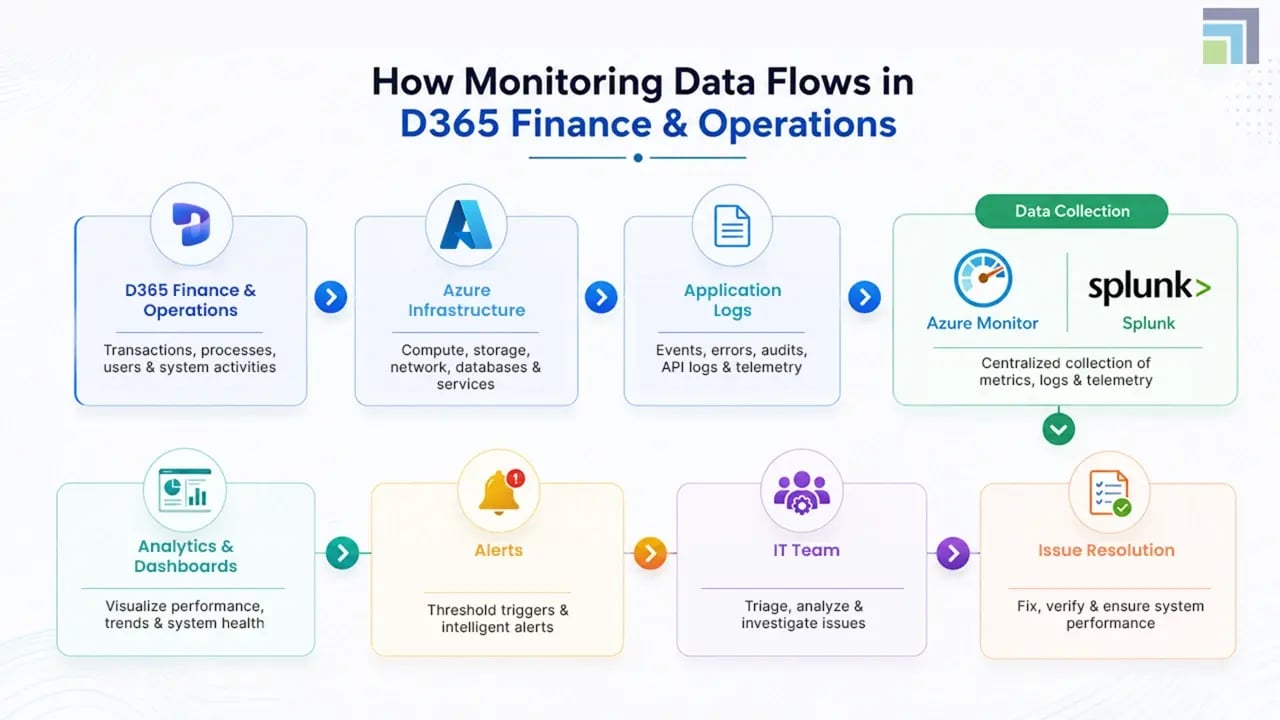
Azure Monitor delivers this through deep integration with Azure infrastructure. Since D365 Finance & Operations runs on Microsoft's cloud platform, Azure resources can be monitored without extensive third-party configuration.
Splunk takes a broader approach.
It doesn’t focus on a single ecosystem. It aggregates telemetry from virtually any technology stack. Organizations running Microsoft alongside AWS, Google Cloud, SAP, Oracle, Kubernetes, or any other legacy systems mostly prefer Splunk because it centralizes monitoring for all environments.
Microsoft reports that Azure Monitor supports monitoring across applications, virtual machines, containers, databases, networking resources, and subscriptions from a single platform, providing unified observability across Azure environments.
Azure Log Analytics vs Splunk Search
One of the biggest differences in the Azure Monitor vs Splunk comparison is how each platform handles operational data.
Azure Log Analytics uses Kusto Query Language (KQL), allowing administrators to analyze telemetry collected across Azure resources, applications, and services.
For D365 Finance & Operations administrators, this means:
- Investigating failed integrations
- Reviewing batch job execution
- Diagnosing service interruptions
- Monitoring application dependencies
- Correlating Azure infrastructure events
Splunk, on the other hand, indexes machine data from nearly any source and provides its own Search Processing Language (SPL).
This makes Splunk particularly attractive for organizations collecting logs from:
- ERP systems
- Security appliances
- Firewalls
- Manufacturing equipment
- IoT devices
- Third-party SaaS platforms
Its search capabilities remain one of the platform's strongest differentiators.
Which Platform Delivers Faster Time to Value?
Implementation effort is often overlooked during product comparisons.
Organizations already using Microsoft Azure, Microsoft Entra ID, Azure Virtual Machines, and Dynamics 365 typically spend less time configuring Azure Monitor because many services integrate natively.
Splunk deployments usually involve additional planning around data onboarding, ingestion policies, indexing, and licensing. While this requires more effort upfront, it also provides greater flexibility when monitoring complex enterprise ecosystems.
For businesses running D365 F&O alongside several non-Microsoft platforms, that flexibility may outweigh the additional implementation effort.
Many organizations are also complementing traditional monitoring with AI-Powered Managed Services that use intelligent analytics to detect anomalies, prioritize incidents, and improve ERP performance without increasing administrative effort.

Looking to Improve Dynamics 365 Performance?
Splunk Observability vs Azure Monitor: Which Offers Better Enterprise Application Monitoring?
For many organizations, the conversation doesn't stop at log collection. Modern IT teams need complete visibility into the performance of the app, infrastructure health, user experience, etc. This is where Splunk Observability and Microsoft Azure Monitor begin to differ.
Azure Monitor brings together metrics, traces, logs, and application telemetry through services such as Application Insights and Azure Log Analytics. For enterprises running Dynamics 365 Finance & Operations, Azure SQL, Azure Virtual Machines, and any kind of other Microsoft services, this simply means a unified monitoring experience with little integration effort.
Splunk Observability is designed for organizations managing highly distributed environments. It renders capabilities such as:
- Application Performance Monitoring (APM)
- Distributed tracing
- Real-time infrastructure monitoring
- Synthetic monitoring
- AI-assisted incident detection
- End-to-end service dependency mapping
Cost and Licensing: A Practical Consideration
Technology decisions aren't made on features alone. Total cost of ownership is just as important.
One of the biggest differences in the Splunk vs Azure Monitor comparison is licensing.
Azure Monitor
Azure Monitor follows a consumption-based pricing model. Organizations typically pay for:
- Data ingestion
- Data retention
- Log queries (in certain scenarios)
- Additional monitoring features where applicable
Many Microsoft services already integrate with Azure Monitor. Hence, enterprises can reduce implementation difficulties and operational charges as well.
Splunk Enterprise
Splunk Enterprise licensing is generally based on data ingestion volume, although workload-based licensing options are also available depending on the deployment model.
This approach offers flexibility but needs careful planning. High log volumes from ERP systems, integrations, network devices, and security tools can increase monitoring costs if data retention and ingestion policies are not well managed.
Which Platform Fits Different Business Scenarios?
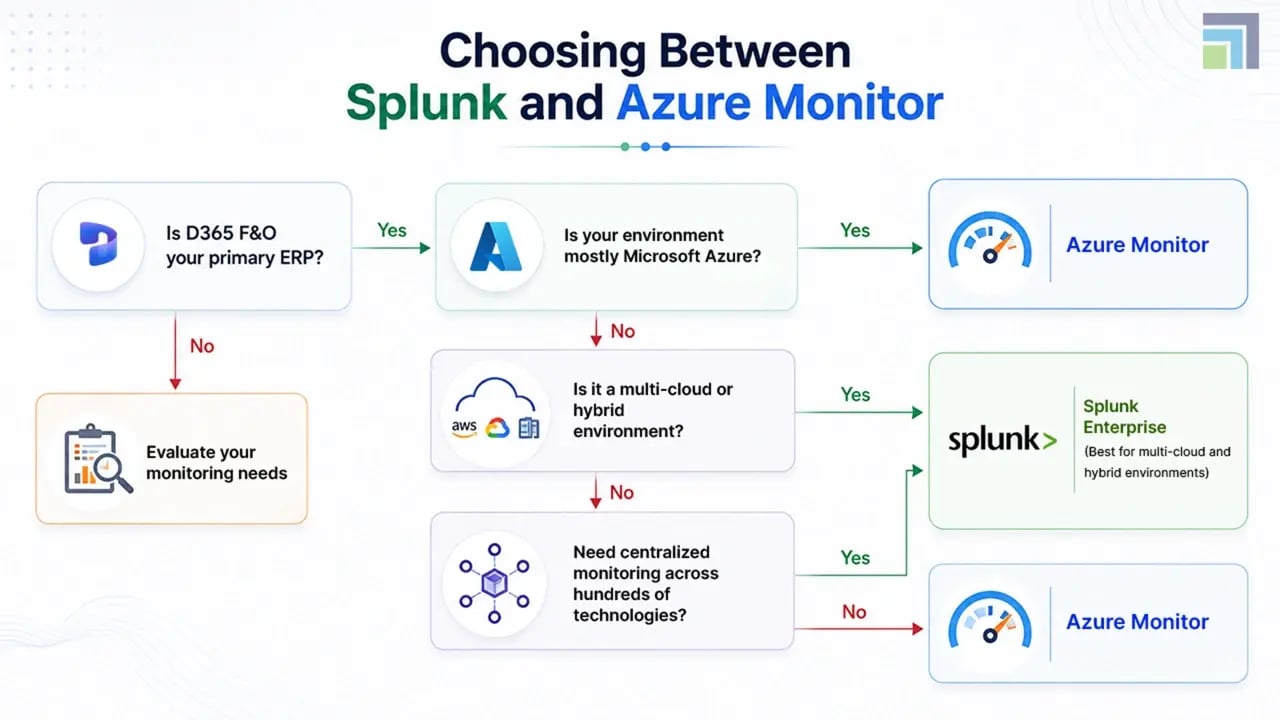
Choosing between Azure Monitor vs Splunk becomes easier when you consider your technology landscape rather than individual features.
|
Business Scenario |
Recommended Platform |
Why |
|
Dynamics 365 F&O hosted entirely in Microsoft Azure |
Azure Monitor |
Native integration, faster deployment, centralized Azure monitoring |
|
Microsoft-first organization using Azure services |
Azure Monitor |
Lower operational complexity and smooth ecosystem integration |
|
Hybrid infrastructure with various cloud providers |
Splunk Enterprise |
Broad data collection across diverse environments |
|
Enterprise requiring centralized monitoring across Microsoft and non-Microsoft platforms |
Splunk Enterprise |
Powerful multi-platform observability capabilities |
|
Organizations prioritizing rapid deployment and lower administration effort |
Azure Monitor |
Native Microsoft experience and simple management |
There isn't a universal winner. The better platform is the one that aligns with your architecture, operational maturity, and long-term monitoring strategy.
Organizations planning new ERP deployments should also consider Dynamics 365 Implementation Services and align them with their long-term monitoring and observability strategy from day one.
How DynaTech Helps Businesses Monitor D365 F&O More Effectively
Choosing the right monitoring platform is only part of the equation. Long-term success depends on how well that platform is configured, maintained, and supported through comprehensive Dynamics 365 Managed Services .
As a leading Dynamics 365 partner, DynaTech helps organizations move from reactive monitoring by designing proactive monitoring strategies for Microsoft Dynamics 365 Finance & Operations environments.
Our experts help businesses:
- Configure Azure Monitor for maximum operational visibility
- Optimize monitoring across Dynamics 365 workloads
- Build dashboards tailored to finance, operations, and IT teams
- Improve alerting to reduce unnecessary incidents
- Identify recurring performance bottlenecks
- Strengthen reporting through Microsoft Fabric and Power BI integrations
Continuous monitoring becomes even more effective when combined with proactive Dynamics 365 Support Services that help identify and resolve issues before they affect business users.
For businesses operating hybrid environments, we also help evaluate whether third-party monitoring platforms such as Splunk complement existing Microsoft investments.
Rather than recommending a tool based on popularity, our approach focuses on choosing the platform that delivers measurable operational outcomes.
Final Thoughts on Splunk vs Azure Monitor: A Quick Verdict
The Splunk vs Azure Monitor debate isn't about which platform has more features; it's about selecting the solution that best fits your business environment.
If your organization is deeply invested in Microsoft Azure and Dynamics 365 Finance & Operations, Microsoft Azure Monitor offers a tightly integrated, cost-effective approach to infrastructure and application monitoring. If your IT landscape spans multiple cloud providers, legacy systems, and enterprise applications, Splunk Enterprise and Splunk Observability provide the flexibility needed to monitor everything from a single platform.
The right decision should support your operational goals today while remaining scalable for tomorrow.
Build a Smarter Monitoring Strategy
Whether you're deploying Dynamics 365 Finance & Operations or looking to improve an existing environment, effective monitoring plays a critical role in performance, reliability, and user satisfaction.

