

 21 Sep 2026
Introduction
Every software release brings a familiar challenge: Can you confidently say every critical business process still works?
For many QA teams, answering that question means updating automation scripts and rerunning regression tests. They also have to document results and chase failures before deployment. As enterprise applications tend to be more complex, traditional testing methods don’t usually keep up with the flow.
That's where AI Testing Automation changes the approach.
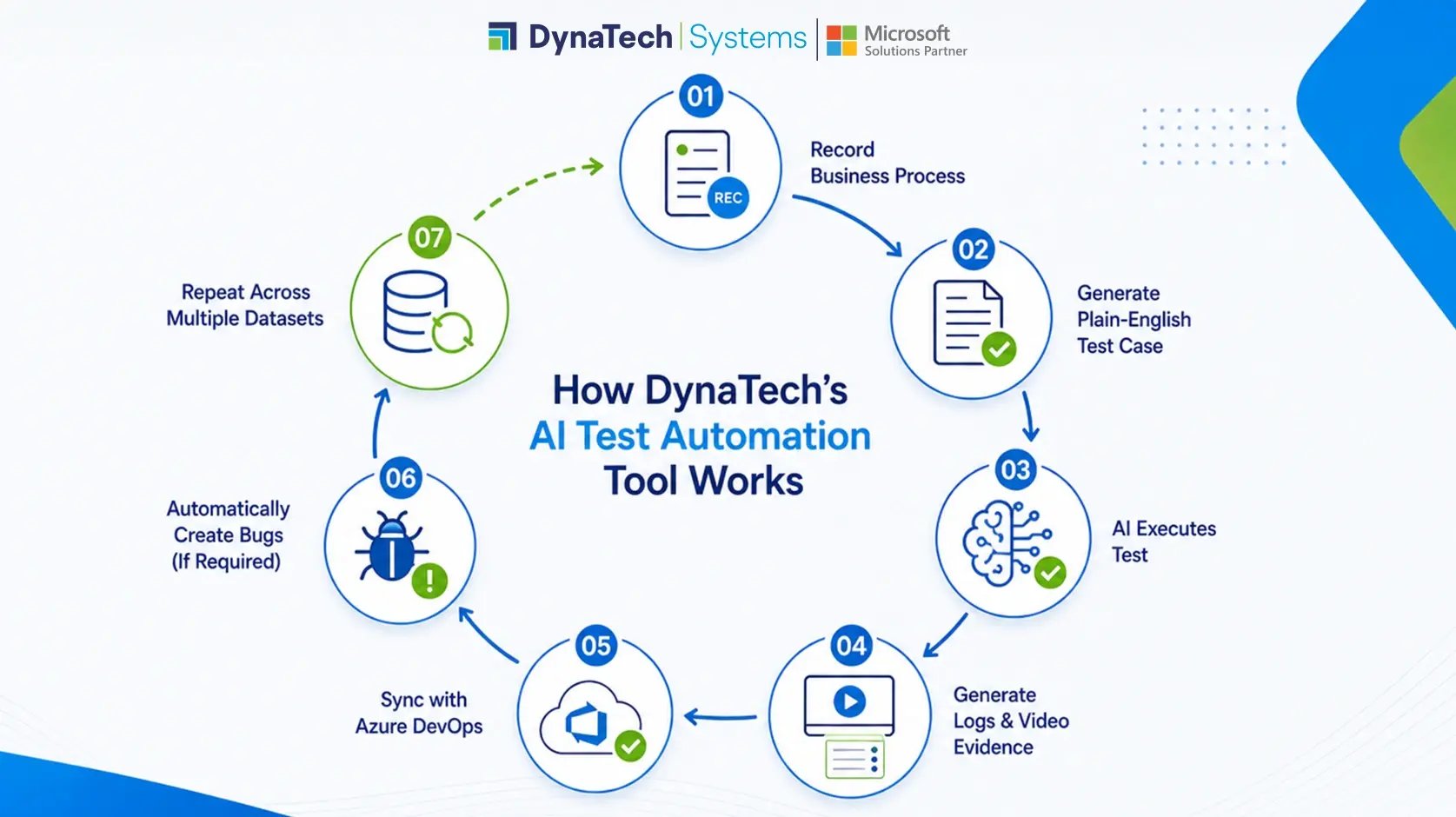
DynaTech's AI Test Automation Tool records real business processes. It can automatically create test cases in plain English and also uses AI to execute validations with little manual effort. The blog examines how AI testing automation is changing software testing by automating test creation, execution, and validation across real-world business processes.
When Automation Needs Too Much Maintenance
Automation was meant to reduce manual work. However, many organizations still rely on conventional Test Automation Services that require constant script maintenance whenever applications evolve. Ironically, maintaining automation has become one of the biggest challenges for many QA teams.
A small UI update or workflow change can break multiple scripts, forcing testers to spend hours fixing automation before they can even begin validating the application. For organizations running enterprise platforms like Microsoft Dynamics 365, that effort multiplies across modules, legal entities, and environments.
This is where AI-powered Testing offers a different path, especially for organizations adopting AI-native testing for Dynamics 365 environments. By capturing business processes instead of depending entirely on scripts, testing becomes easier to maintain and far more adaptable to change.
"AI has the potential to improve productivity across the software development lifecycle, including testing and quality assurance."
Traditional Testing vs. AI Testing Automation
|
Traditional Testing |
AI Testing Automation |
|
Manual scripting |
Record business processes |
|
Frequent script maintenance |
AI-assisted execution |
|
Separate documentation |
Plain-English test cases |
|
Duplicate tests for different data |
Reusable, data-driven testing |
|
Manual reporting |
Automated execution evidence |
Record Once. Test Smarter.
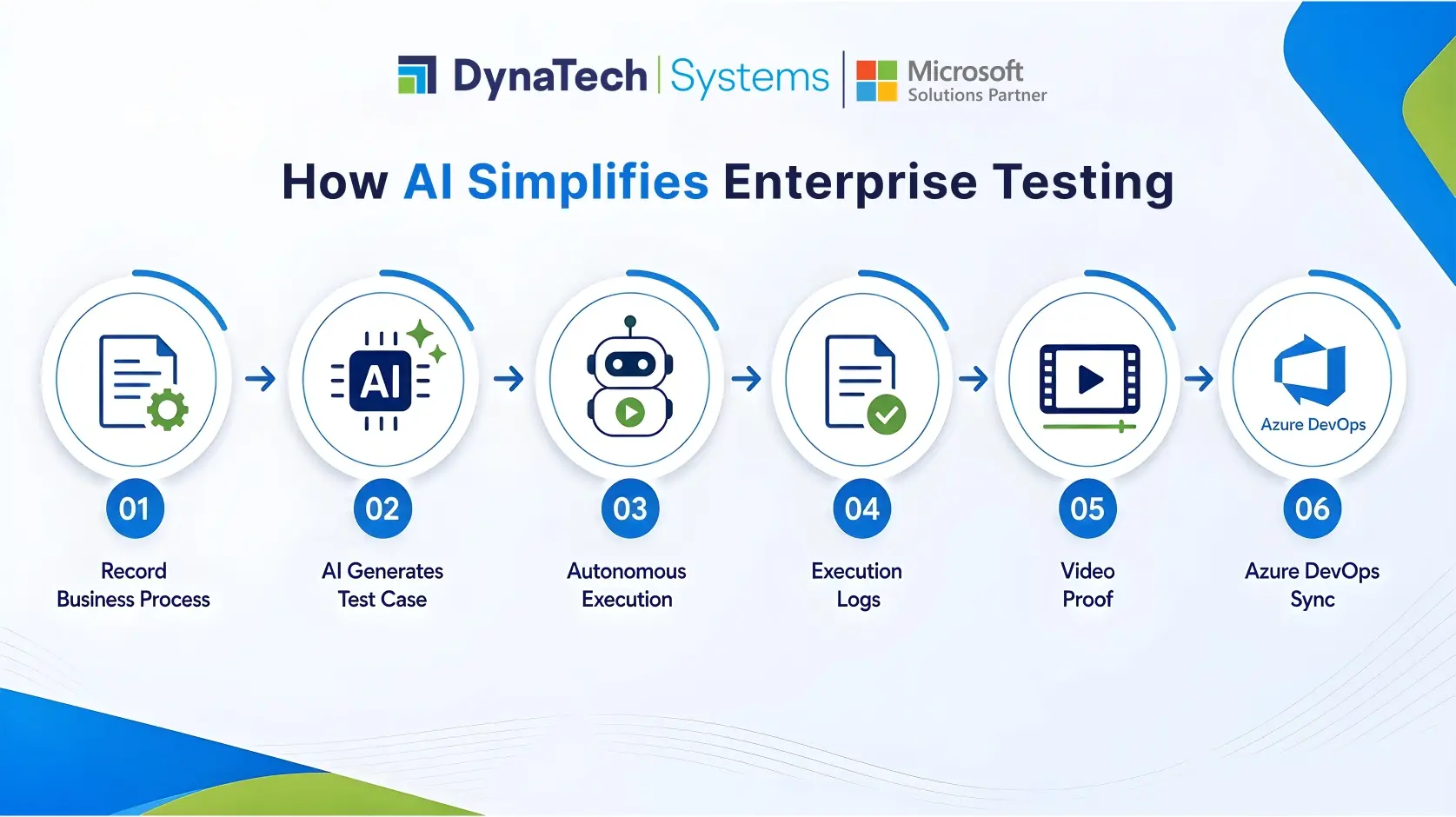
One of the biggest strengths of DynaTech's AI Test Automation Tool is that it can convert daily business activities into reusable test assets.
Users simply perform a business process while the browser extension records each interaction behind the curtains. Once uploaded, the platform directly converts every recorded step into a structured test case automatically.
That means less time documenting scenarios and more time validating business outcomes.
AI Test Case Generation That Everyone Can Read
Automation shouldn't create a gap between business users and other teams. This approach aligns closely with No-code test automation with AI test script generation, making enterprise testing more accessible for both technical and business users.
After recording a process, DynaTech's AI Test Automation Tool automatically fabricates test cases in plain English. Business users can review them, testers can execute them, and consultants can validate workflows; all without interpreting complex scripts.
This shared visibility simplifies collaboration. It also decreases manual effort for maintaining testing documentation.
AI That Does More Than Execute Scripts
Recording a business process is just the first step. The best value comes with AI.
It isn’t like traditional automation that simply follows predefined instructions. DynaTech's AI Test Automation Tool performs recorded business processes autonomously. It goes through the application, enters data, completes transactions, and validates outcomes while following the recorded workflow.
Because the platform knows the context of the application screen, it can perform complex business situations with higher intelligence.
Every Test Comes with Proof
A successful test doesn’t mean passing or failing. Teams also need to know what happened during execution.
DynaTech's AI Test Automation Tool automatically generates detailed execution logs. It captures all actions performed by the AI. Built-in guardrails make sure the platform follows only the approved test steps, giving organizations greater confidence and control.
Once execution is complete, the platform also creates a video recording of the entire test run. Whether you're reviewing a failed scenario, preparing for an audit, or sharing results with stakeholders, the evidence is already available.
One Test Case. Multiple Business Scenarios.
Enterprise testing rarely happens in a single environment.
The same workflow often needs to be validated across different legal entities, datasets, business units, or environments. Creating separate automation for each variation quickly becomes difficult to manage.
DynaTech's D365 Test Automation Tool simplifies this with data-driven testing. A single recorded test can be executed repeatedly using different datasets, helping teams expand test coverage without creating duplicate test cases.
It's a smarter way to scale regression testing while keeping maintenance under control.
Built for Modern DevOps Teams
Testing shouldn't exist in isolation.
Many organizations already use Azure DevOps to manage releases, work items, and defects. Switching between multiple testing platforms only adds unnecessary effort.
That's why DynaTech's AI Test Automation Tool integrates directly with Azure DevOps.
Teams can:
- Push test cases directly to Azure DevOps
- Synchronize updates between both platforms
- Automatically create bugs when a test fails
- Keep testing aligned with existing DevOps workflows
The result is a connected testing process with fewer manual handoffs.
Built for Enterprise-Scale Testing
As applications grow, so does the number of tests.
Running them one at a time isn't practical during large release cycles.
DynaTech's AI Test Automation Tool allows teams to group multiple test cases into execution batches, schedule them for later, or run them immediately. Whether it's overnight regression testing or post-deployment validation, the platform handles execution while teams focus on higher-value work.
For organizations managing large Dynamics 365 environments, this helps shorten release cycles without compromising quality.
Why Organizations Are Turning to AI Testing Automation
The goal of AI isn't to replace QA professionals. It's to eliminate repetitive work that prevents them from focusing on quality, risk, and business outcomes.
With capabilities such as business process recording, AI-generated test cases, autonomous execution, video-based evidence, and Azure DevOps integration, organizations can modernize testing without adding complexity.
For businesses running Microsoft Dynamics 365 and other enterprise applications, DynaTech's AI Test Automation Tool provides a practical way to reduce manual effort, improve release confidence, and build a more scalable testing strategy.
Organizations evaluating traditional RSAT-based automation often compare it with modern AI-powered approaches. If you're assessing both options, our comparison of AI testing vs RSAT for Dynamics 365 explains where each solution fits.
Conclusion
No QA team wants to spend its time fixing broken automation scripts or documenting the same business process over and over again. They want confidence that every release has been tested properly before it reaches users.
That's what AI Testing Automation is really about. It removes much of the repetitive work from the testing process, allowing teams to focus on finding issues, improving quality, and delivering better software. As a leading Microsoft Dynamics 365 Partner, DynaTech renders top-notch AI Test Automation Tool; organizations can build a testing process that's not only faster but also easier to manage as their applications continue to grow.

Experience Smarter Testing Automation
See how DynaTech's AI Test Automation Tool helps QA teams test faster with less manual effort.

