Quick answer
Short on time? If Dynamics 365 is your ERP and your online store is your main sales channel, a D365-focused connector is often the most direct route. If you're juggling lots of applications, a broader integration platform like Celigo may be the better fit. Neither wins every time. It comes down to scope, complexity and who'll own the integration.
Here Are Your Key Takeaways:
- Dynamics 365 e-commerce integration connects your online store to your ERP, so orders, inventory, customers and fulfillment updates move automatically instead of being re-keyed by your team.
- It works through a connector or integration platform that maps and validates the data. A web order becomes a D365 sales order, and stock levels and shipping status flow back to the storefront, so no one types anything twice.
- Orders, inventory and customers are the flows to test. Check duplicate prevention, location-level stock, customer matching and what happens when a sync fails, before you commit to any option.
- Fit beats features. A D365-focused connector suits businesses centered on Dynamics 365 with focused e-commerce needs, while an integration platform like Celigo suits those orchestrating many applications. Neither wins every time.
- Look past the license fee. Judge every option on scope, customization, error handling, scalability, ownership and total cost, because the real price of a bad fit is manual work, errors and oversold stock.
Your online store takes the order, while your ERP manages the inventory, the customer record and the fulfillment. When those two systems don't talk to each other reliably, your team ends up as the integration layer, re-entering orders, checking spreadsheets and apologizing for a stock that was not available there.
As online sales grow, these problems become harder to ignore. According to the U.S. Census Bureau, e-commerce sector reached $340.2 billion in the second quarter of 2026 and accounted for 17.1% of total U.S. retail sales. And bad data is expensive: Gartner estimates that poor data quality costs organizations an average of $12.9 million every year.
So how should you connect Dynamics 365 to your e-commerce platform? The real decision is usually between two approaches: a Dynamics 365-focused e-commerce connector, such as the DynaTech D365 E-Commerce Connector, or a broader integration platform such as Celigo. In this guide, we'll walk through both, compare them on the things that actually matter (orders, inventory and customers) and help you figure out which one fits your business.
What Is Dynamics 365 E-Commerce Integration?
Dynamics 365 e-commerce integration is the automated exchange of data between your online storefront and Microsoft Dynamics 365, so orders, inventory, customers, products and fulfillment details stay consistent in both systems without manual re-entry.
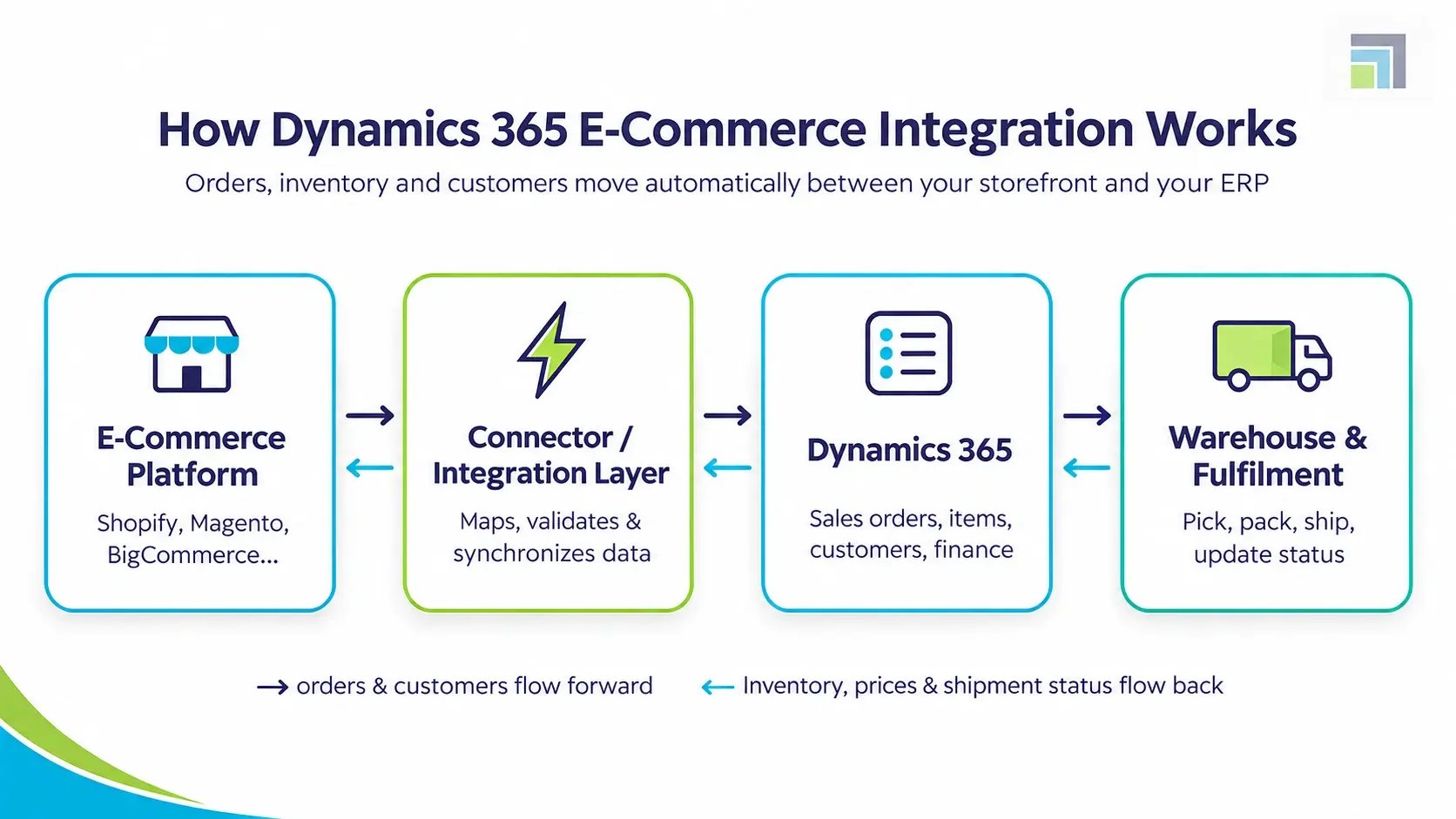
Think of it as a chain: the e-commerce platform captures the sale, an integration or connector layer moves the data, and Dynamics 365 runs the ERP, warehouse, finance and fulfillment processes behind it. For Shopify merchants, this chain is what Shopify integration with Dynamics 365 looks like in practice.
Why Does an E-Commerce Store Need to Connect With Dynamics 365?
Your storefront is where customers buy. Dynamics 365 is where the business actually runs. Connecting them keeps seven kinds of information moving:
|
Data |
What the integration does |
Why it matters |
|
Orders |
Sends web orders to Dynamics 365 as sales orders |
No manual order entry; faster processing |
|
Inventory |
Pushes available stock from D365 to the storefront |
Fewer oversold and cancelled orders |
|
Customers |
Creates or matches customer records and addresses |
One customer, one record |
|
Products |
Keeps items, variants and attributes aligned |
Consistent catalog across systems |
|
Pricing |
Syncs price lists and discounts |
Customers see the right price |
|
Fulfillment |
Returns shipment status, tracking to the store |
Fewer "where is my order?" tickets |
|
Returns & cancellations |
Reflects returns and cancellations where applicable |
Cleaner finance and stock records |
What Happens Without E-Commerce Integration?
When your storefront and ERP don't talk, people fill the gaps. That's slow, costly and error-prone, and it only gets worse as order volume grows.
- Manual order entry: staff re-key web orders into the ERP, delaying fulfillment.
- Inventory discrepancies: the website sells stock the warehouse doesn't have.
- Duplicate customer records: the same buyer appears several times, with different addresses.
- Delayed fulfillment: orders wait in a queue for someone to process them.
- Spreadsheet-based processes: critical workflows depend on fragile files and individual people. See AI use cases for Dynamics 365 for ways to reduce that reliance.
- Reconciliation work: finance and operations spend hours matching totals between systems.
- Data errors: every manual touchpoint is another chance for a typo or mismatch.

Need to connect your e-commerce store with Dynamics 365?
Talk to a DynaTech integration specialist about your orders, inventory, and customer sync requirements.
What Is an E-Commerce Connector?
An e-commerce connector is a pre-built or purpose-built integration that automatically synchronizes data between an online store and a business system such as Dynamics 365. Instead of custom-coding every data flow from scratch, you get mapped, repeatable workflows for the data you need to move.
A simple example: a customer places an order on Shopify. The connector sends the order to Dynamics 365. D365 processes fulfillment. Inventory levels and order status are then sent back to the e-commerce platform, with no one typing anything twice.
What Data Does an E-Commerce Connector Typically Sync?
|
Data type |
Definition |
|
Orders |
Customer purchases captured in the store and created as sales orders in Dynamics 365. |
|
Customers |
Buyer accounts, contact details and addresses, created or matched against existing D365 records. |
|
Products |
Items, variants, descriptions and attributes shared between D365 and the storefront. |
|
Inventory |
Available stock levels, often by warehouse or location, pushed from D365 to the store. |
|
Prices |
Price lists, customer-specific pricing and discounts kept consistent across channels. |
|
Fulfillment |
Shipment confirmations and tracking details returned from D365 to the customer-facing store. |
|
Returns/refunds |
Cancellations, returns and refund information so stock and finance stay accurate. |
Worth knowing: for Shopify, Microsoft already publishes a native connector that supports synchronization of products, inventory, orders and fulfillment; see Microsoft's Shopify connector overview and the Shopify App Store listing. If your setup is straightforward, it can be a great starting point. If you have a more complex Dynamics 365 environment, a different e-commerce platform or specific business rules, you'll probably want to look at a dedicated connector or an integration platform. Explore e-commerce solutions with Dynamics 365 to see what’s possible.
What Is Celigo?
Celigo is an integration platform (iPaaS) that connects applications and automates the movement of data between them. It's built to link many systems, not just one ERP and one storefront.
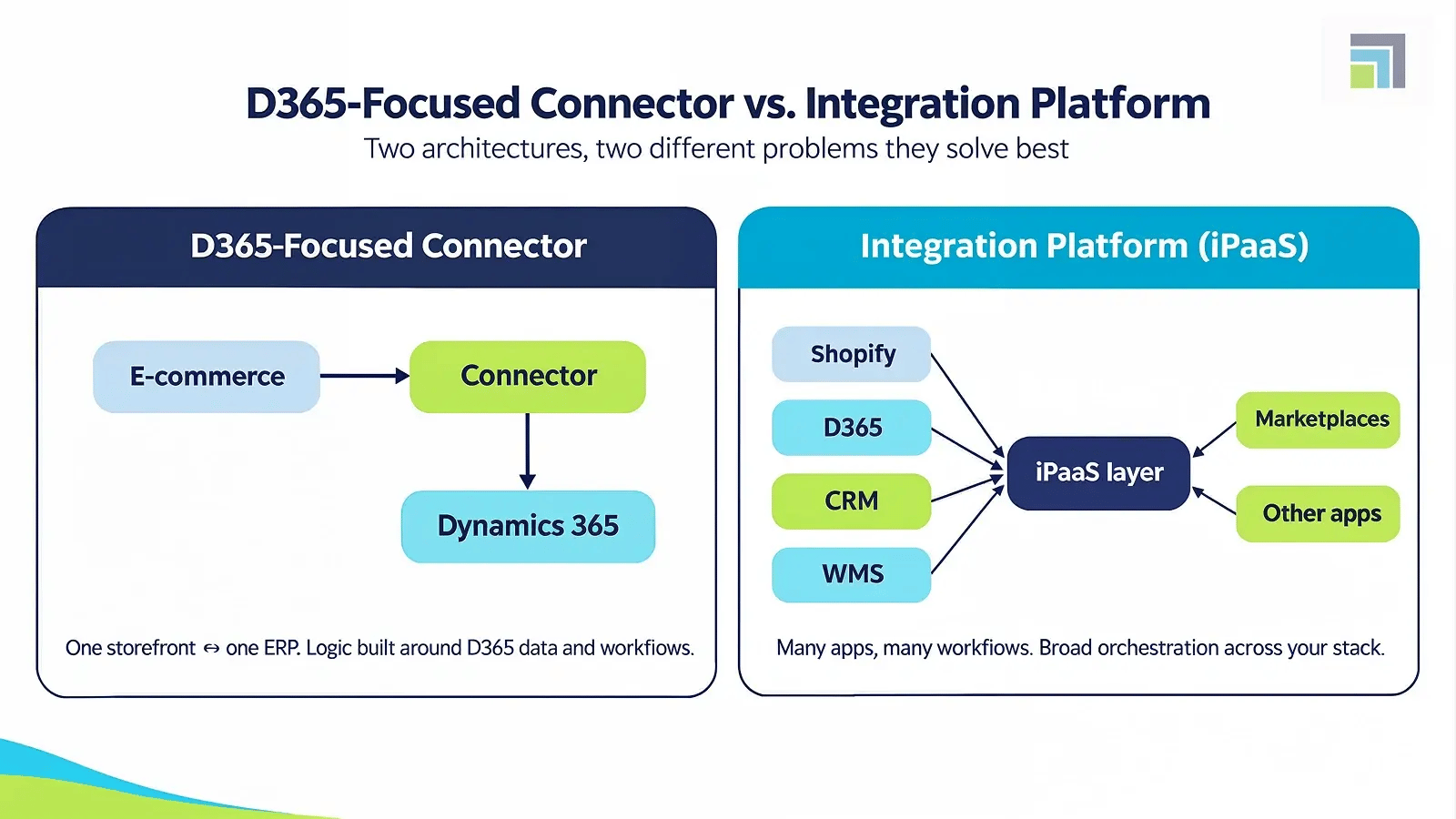
That's the heart of this comparison. A D365-focused connector is built around one pairing, e-commerce and Dynamics 365. A broader integration platform is built to connect many applications. Celigo's published documentation describes e-commerce integration workflows covering orders, customers, inventory and fulfillment, including Shopify–Dynamics 365 Business Central templates.
Where Does Celigo Fit in an E-Commerce Technology Stack?
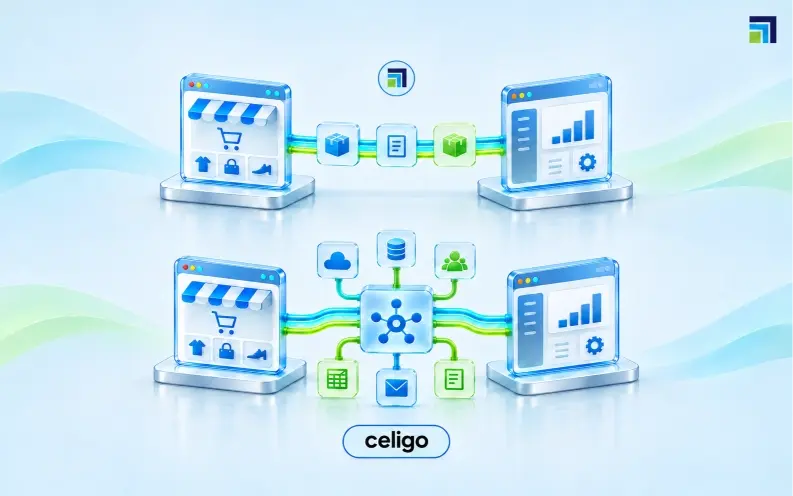
An integration platform sits in the middle of your stack. Shopify connects to the platform, the platform connects to Dynamics 365, and the same layer can also connect your CRM, warehouse system, marketplaces and other business applications. It really earns its keep when lots of applications need to share information.
DynaTech D365 E-Commerce Connector vs. Celigo
Here's the thing: both approaches can automate data exchange between your store and your business systems. The real differences are in how the integration is designed, where the logic lives and how closely it's tied to Dynamics 365.
|
Capability |
DynaTech D365 E-Commerce Connector |
Celigo |
|
Dynamics 365 integration |
Purpose-built around Dynamics 365 |
Supports Dynamics 365 as one of many applications it can connect |
|
E-commerce integration |
Focused e-commerce ↔ D365 workflows |
Documented e-commerce workflows, including Shopify–Business Central templates |
|
Order synchronization |
Orders flow from the storefront into D365 sales orders |
Documented flows for sales orders, customer matching, addresses and line items |
|
Inventory synchronization |
Inventory from D365 to the storefront |
Documented inventory sync between Business Central and Shopify |
|
Customer synchronization |
Customer creation, matching and updates in D365 |
Documented flows to create or update Business Central customers from Shopify data |
|
Fulfillment |
Shipment and status updates back to the store |
Fulfillment workflows documented for e-commerce use cases |
|
D365-specific workflows |
Core design focus |
Possible, depends on templates and configuration |
|
Implementation approach |
D365-aligned implementation |
Configure flows on an integration platform, often with a partner |
|
Best suited for |
Businesses centered on Dynamics 365 with focused e-commerce ↔ ERP needs |
Organizations integrating many applications across the stack |
Where These Integrations Fit in Different Industries
The right integration setup depends on what your business needs to keep in sync. A manufacturer may prioritize accurate available inventory, while a distributor may need visibility across warehouses. Retailers often want to move orders without manual re-entry, and B2B sellers may need customer and account information to carry through to the storefront and ERP.
Manufacturing | Keep storefront stock in step with supply
When products are sold through Shopify or other storefronts, inventory availability can change as production, reservations, and warehouse activity progress in Dynamics 365 Supply Chain Management. Syncing available inventory to the store helps reduce the risk of displaying stock that can no longer be promised.
Distribution | Coordinate inventory across warehouses
For the distributors operating from multiple locations, inventory synchronization can help keep online availability aligned with stock across warehouses. Depending on the business rules and connector setup, teams can decide what inventory is exposed to the storefront and how updates are handled.
Retail | Reduce manual work on incoming orders
Retail teams handling a steady stream of online purchases can automate the transfer of storefront orders into Dynamics 365. That reduces repetitive order entry and gives operations a more consistent starting point for processing, picking, packing, and fulfillment.
B2B commerce | Carry business-account requirements into the online experience
Businesses may shop under negotiated pricing, account-specific terms, and some purchasing structures. An e-commerce integration can help connect customer and order data with Dynamics 365 so these requirements can be managed across the storefront and ERP. Confirm which pricing, account, and terms scenarios are supported before positioning them as out-of-the-box connector functionality.
Which Approach Makes More Sense for Your Business?
If Dynamics 365 is at the center of your order, inventory, customer, and fulfillment processes—and your priority is connecting it to an e-commerce storefront—a connector designed around those workflows may be the more direct fit. If you need to orchestrate data across a wider mix of applications, Celigo’s broader integration-platform approach may be worth evaluating. Compare the specific workflows you need, the systems involved, and how much configuration or partner support each option requires before deciding.
Order Synchronization: DynaTech vs. Celigo
Let's start with orders. It's where most buyers feel integration pain first, and one of the clearest places to test any solution.
How Order Sync Works
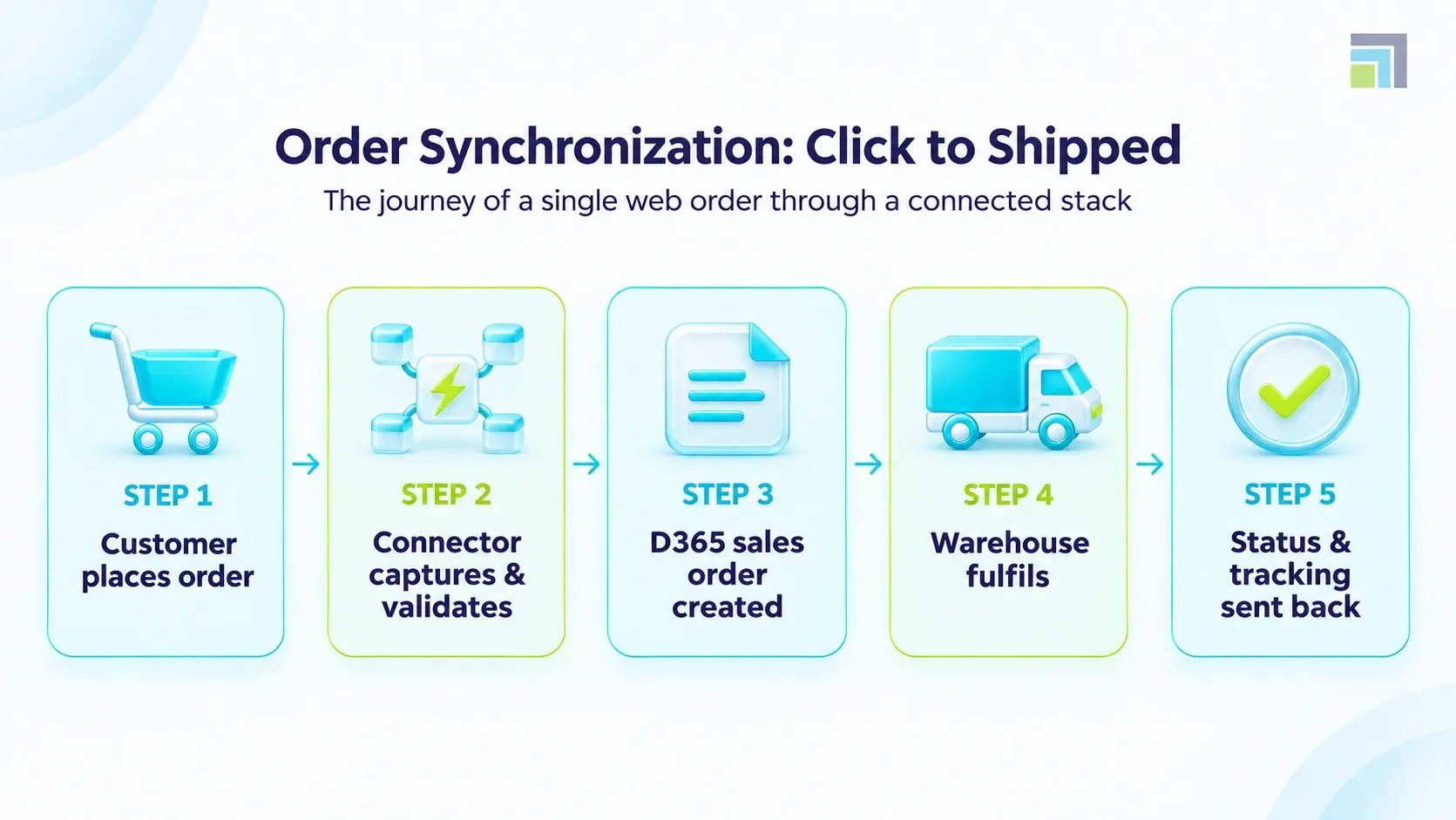
A customer places an order, the connector or integration layer captures it, Dynamics 365 creates the sales order, the warehouse fulfills it, and order and shipping status flow back to the storefront.
Celigo's documentation shows Shopify-to-Business Central flows for sales orders, customer matching, addresses and order line items. To see how this works in real projects, read these Shopify and Dynamics 365 integration success stories. The DynaTech D365 E-Commerce Connector is built to bring the same order data into Dynamics 365, aligned with D365 sales order processing.
What Should You Look for in an Order Integration?
|
Capability |
Question to ask the vendor |
|
Order creation |
Do web orders become D365 sales orders automatically, with all line items? |
|
Order updates |
What happens when an order is edited after placement? |
|
Duplicate prevention |
How does it stop the same order from being created twice? |
|
Customer matching |
Does it match to existing D365 customers or create new ones? |
|
Payment information |
Which payment and tax details are passed to the ERP? |
|
Shipping information |
Are methods, addresses and charges mapped correctly? |
|
Cancellations |
How are cancelled orders reflected in D365? |
|
Returns |
Can returns and refunds be synchronized? |
|
Failed transactions |
Are failures visible, and who is alerted? |
|
Reprocessing |
Can failed orders be fixed and retried without re-keying? |
Inventory Synchronization: DynaTech vs. Celigo
Next up: inventory, where integration gaps become visible to your customers. Imagine Dynamics 365 shows 12 units available while your website shows 20. That's not merely a technical problem. It can mean overselling, cancelled orders and unhappy customers.
Celigo documents inventory synchronisation between Dynamics 365 Business Central and Shopify to keep storefront inventory current and reduce stock discrepancies. A D365-focused connector should do the same, with Dynamics 365 as the source of truth for stock.
What Should an Inventory Integration Handle?
|
Requirement |
Why it matters |
|
Available inventory |
The storefront should show sellable stock, not just on-hand quantity. |
|
Multiple warehouses / locations |
Stock often needs to be aggregated or mapped by location. |
|
Inventory updates |
Changes in D365 must reach the store quickly. |
|
Reserved stock |
Reserved quantities shouldn't be offered to new buyers. |
|
Product / variant mapping |
SKUs must match across systems or updates land on the wrong item. |
|
Stock discrepancies |
The solution should surface mismatches instead of hiding them. |
|
Synchronization frequency |
Real-time, scheduled or hybrid, matched to your sales velocity. |
|
Failed updates |
Failures need alerts and a simple retry path. |
Customer Synchronisation: DynaTech vs. Celigo
Last but not least, customers. The path is simple: the online customer registers or orders on the e-commerce platform, the integration processes the data, and Dynamics 365 holds the customer record for sales, credit, invoicing and service.
Celigo's documentation, for example, describes flows that create or update Business Central customer records based on Shopify customer data. Whichever approach you evaluate, test these scenarios:
- New customer creation: does a first-time buyer become a clean D365 customer automatically?
- Existing customer matching: are repeat buyers matched instead of duplicated?
- Address synchronization: are billing and shipping addresses mapped correctly?
- Duplicate prevention: what rules stop near-identical records from piling up?
- Customer updates: do changes in either system flow through?
- B2B customer scenarios: can it handle company accounts, multiple contacts and customer-specific pricing?
DynaTech vs. Celigo: Which Integration Approach Fits Your Business?
This is the question most buyers are really trying to answer. And the honest answer is that neither approach wins every time. It depends on what you need.
Choose a D365-Focused Connector If...
- Dynamics 365 is your central ERP.
- Your primary integration requirement is e-commerce ↔ D365.
- You want a solution focused on D365 business processes.
- Your integration requirements are relatively focused.
- You want D365-specific workflows.
Consider an Integration Platform Like Celigo If...
- You have many applications to connect.
- You need broader orchestration across ERP, CRM, WMS, marketplaces and other applications.
- You expect integration requirements to expand across multiple systems.
- Your organization wants an integration platform rather than a focused connector.
Choosing on fit, not on feature counts, helps you avoid paying for breadth you won't use or outgrowing a focused tool too early.
What Should You Consider Before Choosing a Dynamics 365 E-Commerce Connector?
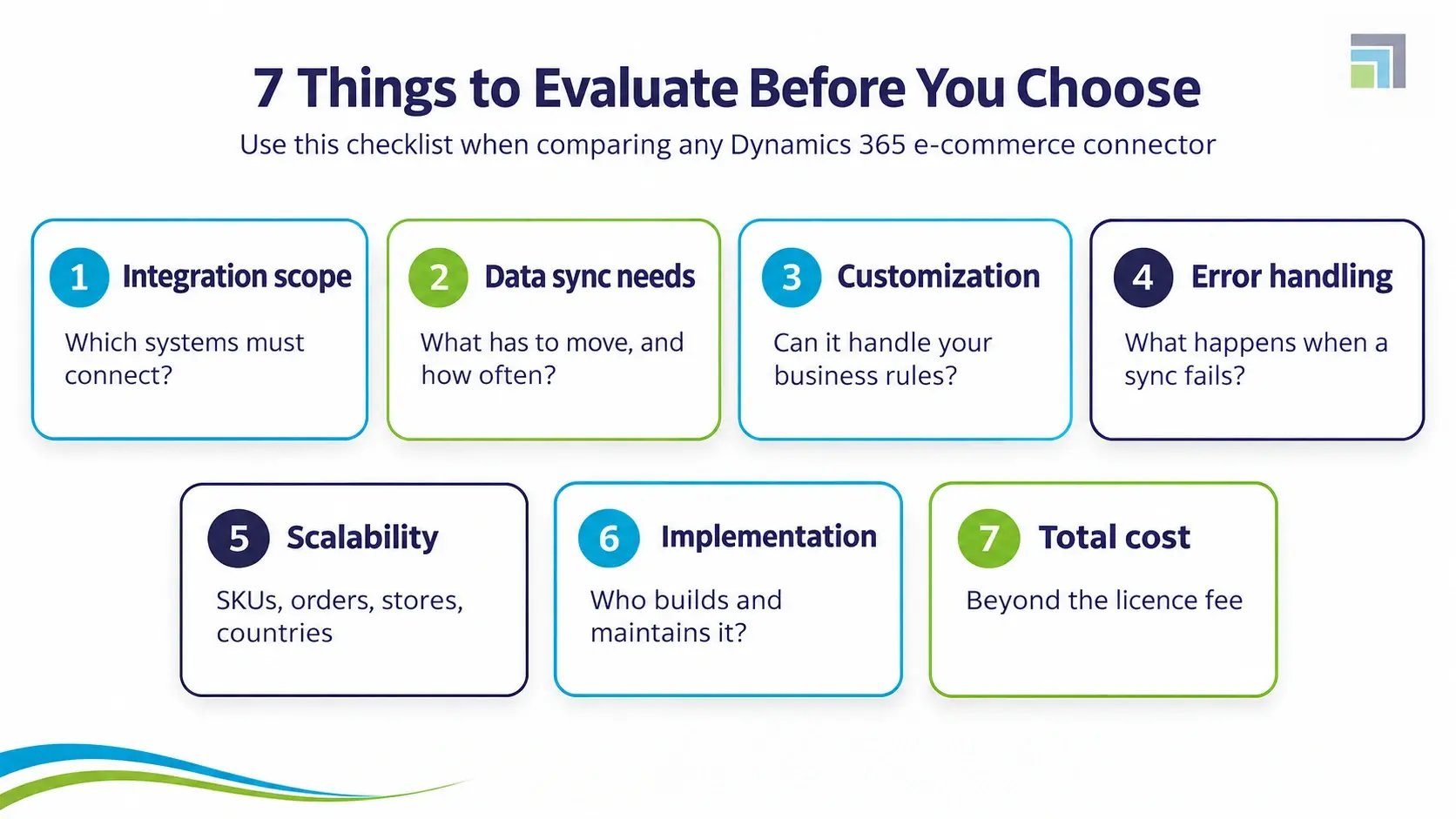
Before you pick a tool, it helps to know what you're actually shopping for. Here are the seven things we'd check, whichever option you're leaning toward.
Integration Scope
List every system that must connect today and in the next two to three years. A scope of "Shopify and Dynamics 365" points one direction; "Shopify, D365, a CRM, a WMS and two marketplaces" points another.
Data Synchronization Requirements
Decide what information needs to move, in which direction and how fast. Orders, inventory, customers, products, prices and fulfillment each have different tolerance for delay.
Customization
Can the solution accommodate your business rules, such as special pricing, order routing or approval steps, without heavy rework every time something changes?
Error Handling and Monitoring
What happens when an order or inventory update fails? Look for clear visibility, alerts and a simple way to correct and reprocess failed transactions.
Scalability
Check whether the solution can grow with you across:
- SKUs
- Orders
- Stores
- Warehouses
- Countries
- Sales channels
Implementation and Maintenance
Who configures the integration, who maintains it when platforms update, and who do you call when something breaks? Ongoing ownership often matters more than the initial setup.
Total Cost of Ownership
Don't compare license costs alone. Include all of the following:
|
Cost area |
What to include |
|
Implementation |
Setup, configuration, data mapping and testing |
|
Customization |
Business rules, custom fields, special workflows |
|
Maintenance |
Updates when D365 or the e-commerce platform changes |
|
Monitoring |
Staff time spent watching and fixing failed syncs |
|
Support |
Response times and who is accountable |
|
Additional integrations |
The cost of adding the next system or sales channel |
DynaTech D365 E-Commerce Connector: When Is It the Better Fit?
The DynaTech D365 E-Commerce Connector is designed for businesses that run on Dynamics 365 and want their online channel to work as a natural extension of the ERP. Here's how that maps to the criteria above.
Built Around Dynamics 365
Because the connector is built around Dynamics 365, its data mapping and workflows follow the way D365 already handles sales orders, customers and inventory. That means less translating between systems.
Focused E-Commerce Integration
Instead of a do-everything toolkit, you get workflows focused on one path: e-commerce to ERP. It's the path that most directly touches revenue and customer experience.
Order, Inventory and Customer Synchronization
The core flows are the ones this guide has focused on: web orders into D365, inventory and status back to the storefront, and customer records created or matched in Dynamics 365.
Integration With Your Existing D365 Processes
E-commerce data doesn't live on its own. It feeds fulfillment, invoicing, finance and reporting. A D365-aligned approach plugs the storefront into the processes you already use.
Support for Business-Specific Requirements
If your business rules go beyond a standard setup, ask DynaTech how the connector adapts to them.
Connect Your E-Commerce Store With Dynamics 365
Operating a disconnected e-commerce storefront limits your growth and drains operational resources. By bridging your front-end store directly with Dynamics 365, your teams can stop firefighting manual sync errors and start focusing on customer retention and revenue. Partnering with a dedicated Microsoft Dynamics 365 Partner helps you deploy a robust, synchronized architecture that grows alongside your business.
Ready to Connect Your
E-Commerce Store With Dynamics 365?
Talk to DynaTech, a Microsoft Dynamics 365 Partner, about your integration requirements.