Microsoft Ignite 2026 took place November 17 to 20 in San Francisco and online. This Microsoft Ignite 2026 recap covers the announcements that matter most to the business and leaders using or planning Dynamics 365 in the USA, and labels each as generally available (GA), preview, Frontier or December. Every fact comes from Microsoft’s Book of News and official blogs. Our Ignite 2025 top announcements post has the Agent 365 background.
Last verified: November 24, 2026. Microsoft can change a status after publishing.
Microsoft Ignite 2026 announcements at a glance
The table lists the main Ignite 2026 announcements, their status on the verified date and what each means for Dynamics 365 customers.
|
Announcement |
What it is |
Status |
Why it matters for Dynamics 365 |
|
Home, Office in Copilot |
One Copilot start page; Word, Excel, PowerPoint inside Copilot |
GA |
Office in Copilot is covered by the seat license |
|
Copilot Managed Runtime |
Hosting for apps and agents you build |
GA |
Governed home for custom apps |
|
Copilot Code |
Build apps in plain language |
Frontier; GA expected December |
Quick internal tools, IT-managed |
|
Autopilot, Workspaces |
Persistent agent; shared team space |
Frontier |
Pilot territory for now |
|
Today |
Daily priority briefing |
Private preview (Frontier) |
Watch it; don’t plan around it |
|
Sales and Customer Service plugins |
CRM skills inside Copilot |
GA |
Sellers and agents stay in their flow of work |
|
ERP apps plugin |
Finance and operations skills in Cowork and Excel |
GA |
Finance teams work from Excel and Copilot |
|
Activate: Salesforce migration |
Agentic CRM migration |
GA |
A switching path from Salesforce |
|
Activate: SAP ECC tools |
Agentic ERP discovery and migration |
Rolling out; private preview per Microsoft’s Dynamics 365 blog |
Early look for SAP ECC users |
|
Microsoft IQ |
Shared business context for agents |
GA |
Agents reflect your business data |
|
Agent 365 Cost Management |
Controls for usage-based AI spend |
Preview |
Limits and alerts before costs surprise you |
|
Agent 365 Business Analytics |
Spend measured against value |
Frontier preview |
Shows the return on AI spend |
|
Agent Accounts |
Persistent Copilot Studio agents |
Public preview, December 2026 |
Agents for shared processes |
|
Microsoft Perception; Microsoft-Decision-1.1 |
Security agents; decision model |
GA |
Security and routing foundations |
|
Cobalt 200, HorizonDB, Rayfin, Fabric apps |
Azure compute, data and app services |
GA |
Platform for custom builds |
|
Salesforce in Copilot |
Salesforce skills inside Copilot |
Preview |
For mixed Salesforce and Microsoft estates |

Ready to Build Your Dynamics 365 AI Roadmap?
Book an AI readiness assessment with DynaTech to review licensing, set cost controls, or plan a legacy CRM and ERP migration.
Microsoft Ignite 2026 keynote: Copilot becomes the operating system for work
The keynote theme was a shift from personal productivity to organizational intelligence, with Copilot as the operating system for work. Home is the single starting point for Chat and Cowork and is rolling out worldwide. Office in Copilot, which brings Word, Excel and PowerPoint into the app, is generally available, as is Copilot Managed Runtime, which hosts the apps and agents your teams build.
Other pieces are early. Copilot Code is in Frontier, with general availability expected in December. Copilot Autopilot, a persistent agent with its own identity, is rolling out to Frontier customers. Copilot Workspaces, the shared team space that evolves Copilot Notebooks, is also Frontier. Today, a prioritized daily briefing, is in private preview, according to both the Book of News and the Copilot blog from Jared Spataro.
Licensing matters here. Microsoft says Office in Copilot is covered by the Copilot seat license, while Cowork, Code and Autopilot are usage-based services that consume credits. That is why cost controls belong in your rollout plan.
Dynamics 365 in Copilot
This is the announcement closest to our audience. Microsoft calls Copilot the new front door to Dynamics 365, with plugins that package the skills and secure access for a job, such as preparing for a customer meeting or approving a purchase order.
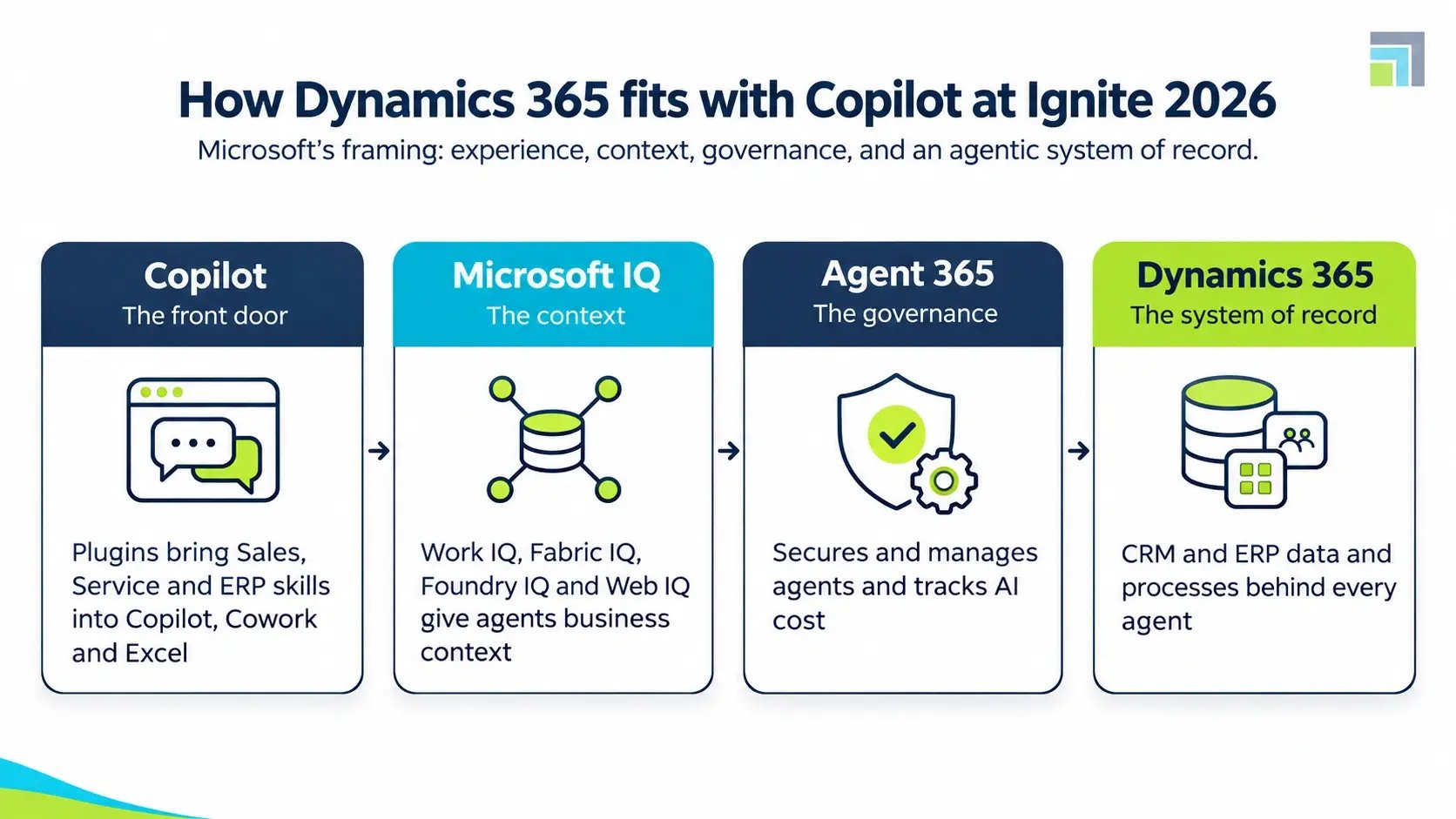
On the CRM side, the updated Dynamics 365 Sales plugin is generally available. Sellers can build account plans, prepare for meetings, catch up on deals and prioritize pipeline, and new deal insights track progress against the quarterly forecast. The Dynamics 365 Customer Service plugin is also generally available. Per Microsoft’s Dynamics 365 blog, these two customer experience plugins together deliver more than 57 business skills.
On the ERP side, the Dynamics 365 ERP apps plugin is generally available for Copilot Cowork and Excel, with more than 39 finance and operations skills. A sourcing lead using Dynamics 365 Finance and Supply Chain Management (F&SCM) can streamline purchase requisitions, requests for quotes and purchase orders in Source-to-Pay. Microsoft documents the setup in its Learn guide to enabling the ERP apps plugin.
Skill counts differ between Microsoft posts and the keynote because each rolls up different plugins. We use only the Dynamics 365 blog figures and tie each to its plugin. Also announced: Dynamics 365 data is natively integrated with Work IQ, and Microsoft Contact Center Intelligence, which layers agents over existing contact center platforms, is generally available. For D365 F&SCM and CRM teams, users can now work with Dynamics 365 data from Copilot, Teams and Excel under existing permissions.
Dynamics 365 Activate: agentic migration
Dynamics 365 Activate is Microsoft’s agentic migration platform for moving off legacy CRM and ERP systems. The Salesforce migration experience is generally available, and Microsoft cites momentum with customers including Comcast and Fusion5. If you are weighing that move, see our guide to a successful Salesforce to Dynamics 365 migration.
For ERP, Activate now targets SAP ECC. Discovery, requirements analysis, configuration and data migration start rolling out over the coming weeks, and the Dynamics 365 blog lists the SAP ECC capabilities as private preview. Microsoft states that implementation project teams review and validate every recommendation, so Activate supports a migration team rather than replacing it. It is built on Success by Design, Microsoft’s implementation methodology.
Microsoft IQ and Work IQ
Microsoft IQ is generally available. It brings together Work IQ, Fabric IQ, Foundry IQ and Web IQ so agents understand how your business works, and Microsoft says it needs no new SKU or subscription. Our FabCon 2026 announcements post covers the Fabric and Fabric IQ details. Business plugins in Microsoft IQ, which let teams share and inherit guidance, are in Frontier.
For Dynamics 365 customers, the key piece is Business Applications in Work IQ. Per the Work IQ post, it brings ERP (preview) and CRM data from Dynamics 365, plus Power Platform data, together with Microsoft 365 context. An agent can then reason across opportunities, emails and meetings while honoring the permissions already set in your CRM and ERP.
Agent 365 and AI cost control
Agent 365 is Microsoft’s control plane for agents, and Ignite added FinOps for AI. Agent 365 Cost Management, in the Microsoft admin center, shows usage-based spend for services such as Cowork, Copilot Studio, Copilot Managed Runtime and Dynamics 365 agents, with policies, limits and alerts. It is in preview, with forecasting and recommendations in Frontier this month and value insights arriving in December. Agent 365 Business Analytics, in Frontier, connects spend to outcomes. Microsoft says most of these arrive in November and December 2026.
This links to the seat license versus credits point above: the dashboards show where usage-based spend goes and what value it returns. For the full governance picture, read our Agent 365 Ignite 2026 post.
Copilot Studio and agents
Copilot Studio gets new ways to build. The Microsoft Copilot harness is generally available, and app creation from Copilot Studio, Cowork or Code now runs on Copilot Managed Runtime, which handles identity and lifecycle inside your tenant. Agent Accounts enter public preview in December 2026, alongside memory and triggers, so agents can work persistently and proactively in shared business processes. To choose between the tools, read our Copilot vs Copilot Studio vs Azure AI Foundry comparison.
Security, models and Azure
Microsoft Perception, previously Project Perception, is generally available. It uses red, blue and green security agents and playbooks to test defenses, investigate attacks and prioritize fixes. Microsoft-Decision-1.1, a model built for routing, classification and workflow decisions, is also generally available, and Copilot uses it to route requests. New MAI models for coding, images and security arrived with mixed availability.
On Azure, Cobalt 200 virtual machines, HorizonDB (a PostgreSQL-compatible database), Rayfin and Fabric apps are generally available. Rayfin and Fabric apps help teams build business apps on governed Fabric data, which may interest teams extending Dynamics 365.
Copilotforce: Salesforce and Microsoft
The keynote showed three connected pieces. Salesforce in Copilot, a preview plugin with more than 38 prebuilt sales skills, lets sellers retrieve customer information and take supported actions within their Salesforce permissions. Sales Cloud in Teams is in pilot. A two-way zero-copy connection links Salesforce Data 360 and Microsoft Fabric, and Microsoft lists the Data Federation piece, which lets Data 360 query Fabric OneLake data, as generally available. It helps companies that keep customer data in Salesforce while using Microsoft 365 and Copilot.
What is ready now and what is not
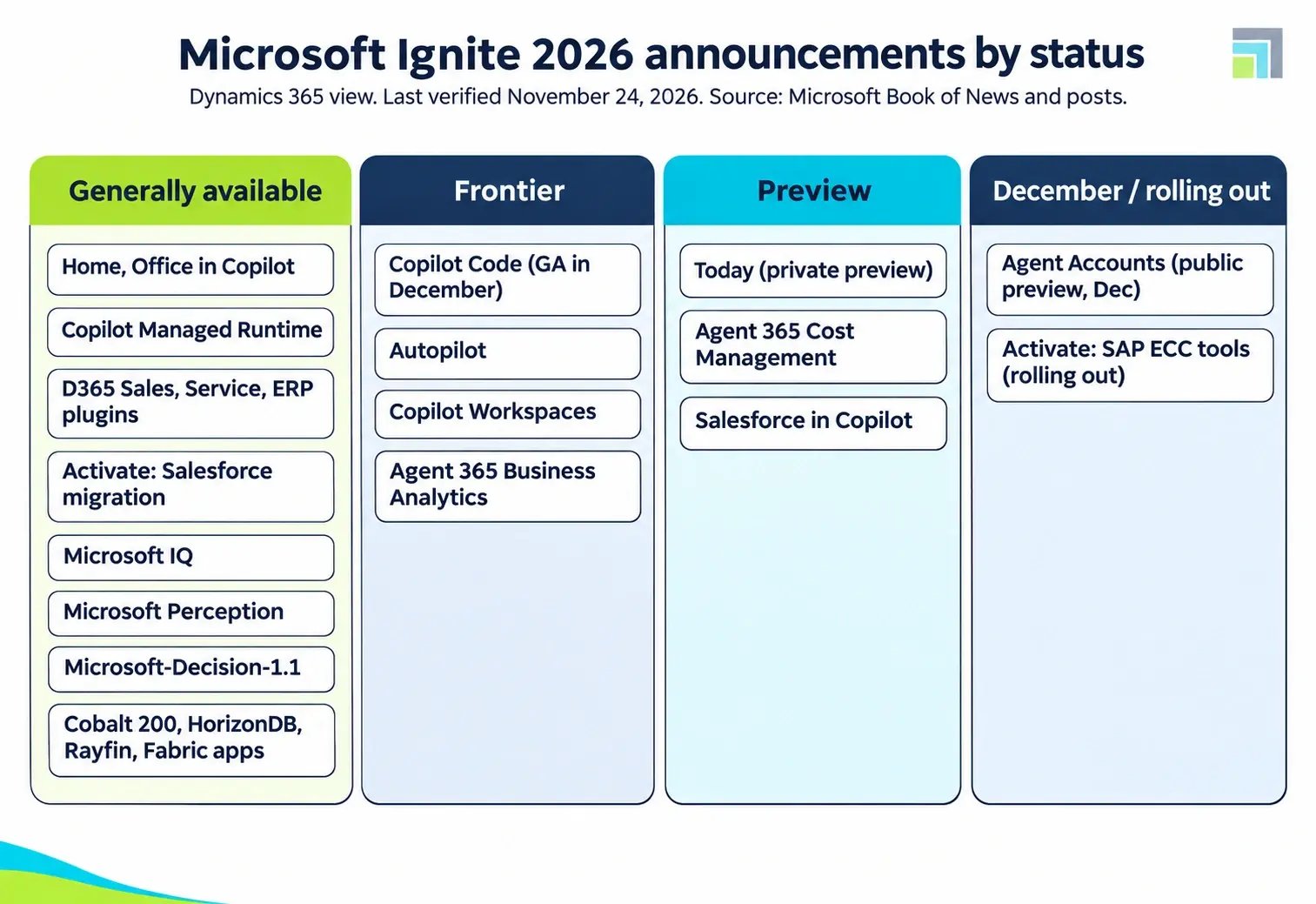
Much of Ignite 2026 is not yet generally available. Ready now: Home, Office in Copilot, Copilot Managed Runtime, the Dynamics 365 Sales, Customer Service and ERP apps plugins, Activate for Salesforce migration, Microsoft IQ, Perception and the Azure services above. Not yet: Copilot Code (December), Autopilot, Workspaces and Business Analytics (Frontier), Today (private preview), Cost Management and Salesforce in Copilot (preview), Agent Accounts (December public preview) and SAP ECC tooling (private preview). Treat Frontier items as pilot territory.
What Dynamics 365 customers should do next
Start with an AI readiness assessment for Dynamics 365, then work through five steps:
- Review current licenses. Map Copilot seats, Dynamics 365 licenses and credits, and note what Office in Copilot already includes.
- Check AI readiness. Confirm data quality, permissions and sensitivity labels, because Copilot and Work IQ inherit them.
- Pilot Dynamics 365 in Copilot. Start one team on the Sales or ERP apps plugin and measure results.
- Set agent governance and cost controls. Use spending policies and limits before usage grows.
- Plan a migration if you run a legacy CRM or ERP. Compare Activate options with your partner, with human review of every recommendation.
Final thoughts on the Microsoft Ignite 2026 top announcements
Ignite 2026 moves Dynamics 365 into Copilot, adds governance and cost tools for agents, and opens migration paths from legacy CRM and ERP. Start small: pilot a generally available plugin, set cost limits and watch which preview items mature. You can review Microsoft Ignite 2026 sessions through the Ignite hub. As a Microsoft Solutions Partner, DynaTech can help you plan your Dynamics 365 roadmap.
Ready to Put Microsoft's AI Innovations to Work?
From Dynamics 365 plugins to AI agent governance and migration planning, our team can help you identify the right opportunities and build a practical roadmap for adoption.