• Home
  • breadcrumb Arrow
  • Blog
  • breadcrumb Arrow
  • What's New in Microsoft Agent 365: Ignite 2026...

What's New in Microsoft Agent 365: Ignite 2026 Updates

Published on November 21, 2026
What's New in Microsoft Agent 365: Ignite 2026 Updates

Microsoft Ignite 2026 runs November 17 to 20 in San Francisco and online. Microsoft opened the week by expanding Microsoft Agent 365 well past where it stood in September, and one number explains the urgency. According to Microsoft, organizations have registered more than 50 million agents in Agent 365 since the platform launched in May 2026. That volume changes the question. Finding agents was last year’s problem. Ignite 2026 is about who owns each one, what risk it carries, what it costs, and whether it earns its keep. Below is every announcement by theme, with Microsoft’s stated status and the admin center screens for each.

The Short Version

  • Management: connected platforms now give agents from eleven more vendors a Microsoft Entra Agent ID; Defender discovers 60-plus local agents; the tools registry hits general availability.

  • Governance: MCP server, plugin and skills control in one pane; a Copilot Cowork plugin for plain-language governance; an Action center for ownerless agents in December.

  • Security: Dynamic agent risk gives every agent one continuously updated risk level, visible across four Microsoft portals.

  • Business value: Agent 365 Business Analytics connects AI spend to outcomes with forecasting and scenario planning.

  • Licensing: Viewing your agents needs no license, only a role. Premium governance still needs Agent 365 or Microsoft 365 E7.

Agent 365 at Ignite 2026, Feature by Feature

Update

Status per Microsoft (November 17, 2026)

Agent 365 Business Analytics

Frontier preview, rolling out

Connected platforms with Entra Agent ID for more platforms

Preview, completes in December

Guided connection wizard, secretless authentication

Preview

Local agent discovery in Microsoft Defender

Generally available

Network-level discovery and shadow AI discovery in the registry

Preview

Entra Agent ID for local agents and Microsoft Autopilot

Preview

Tools registry

Generally available (external catalogs: private preview in December)

Agent map use cases

Preview

Export Agent Activity (Azure Monitor, Application Insights)

Status not stated

Multi-tenant agent management

Public preview

Usage insights for Microsoft agents (core users)

Generally available

Plugins and skills governance / MCP server governance

GA / Preview

Copilot Cowork with Agent 365 plugin

Preview

Action center

Preview in December

Dynamic agent risk

Preview

Conditional Access dynamic controls

Status not stated

Microsoft Purview DLP for agents

Preview

Defender runtime protection for local agents

Generally available on Windows

Defender posture for third-party agents

Preview

Intune and Global Secure Access controls for local agents

Preview

Cost Management updates

Status not stated

Scope Your Agent Estate

Most tenants hold more agents than anyone on the IT team can name.

Management: one inventory across every platform

Connect your agent estate across platforms

A sales team builds in Salesforce Agentforce, a data team in Databricks Genie, developers in Amazon Bedrock; each with its own console and its own record. Connected platforms collapse that. Link a supported platform once and Agent 365 syncs its agents into the registry alongside Microsoft agents, with no change to agent code. Connected agents carry real context: what the agent is, where it was built, who owns it, and which tools it calls. On supported platforms you also see activity; what the agent was asked, what it did, which models or tools it called, and whether it succeeded.
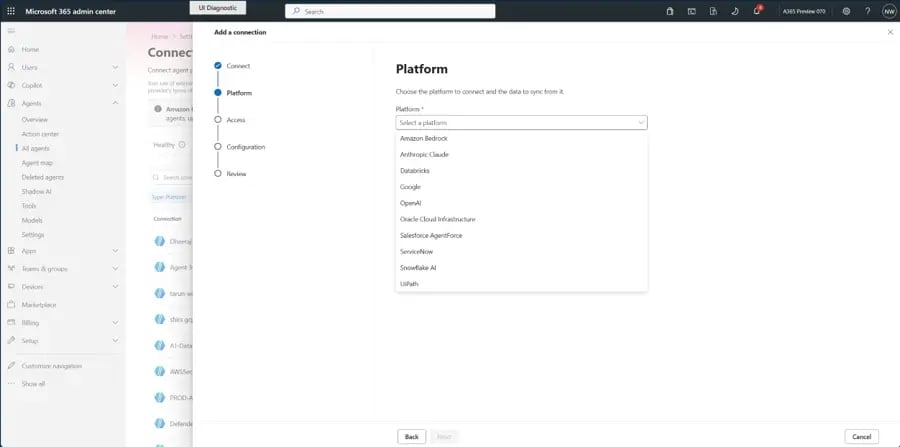
Agent 365 connected platforms view showing Salesforce Agentforce, Amazon AgentCore, Google Vertex AI, Databricks and Snowflake agents with Entra Agent IDs

Credit Image: Microsoft

Three updates build on that. Entra Agent ID for more platforms is rolling out across Salesforce Agentforce, Amazon AgentCore, Google Vertex AI, Databricks, Snowflake, Anthropic Claude Managed Agents, OpenAI, Oracle, SAP, ServiceNow, and UiPath, completing in December. Once an agent holds an identity, it falls under lifecycle management, supported Conditional Access policies, identity risk assessment, and revocation. A guided setup wizard walks admins through connecting a platform, tools registry, or gateway. Secretless authentication uses Microsoft Entra workload identity federation, removing long-lived credentials to create, store, and rotate.

Local and shadow agent discovery

Some agents never passed through IT at all. Microsoft Defender and Microsoft Entra Global Secure Access now discover more than 60 local AI agents, including Claude Code and GitHub Copilot CLI, along with their configured MCP servers. Defender covers managed Windows and macOS devices and ties each agent to its device and user. Global Secure Access adds network-level visibility into each agent’s destinations and resources. Agent 365 pulls both signal sets into the registry. Local agent discovery in Defender is generally available; network-level and registry shadow AI discovery are in preview.
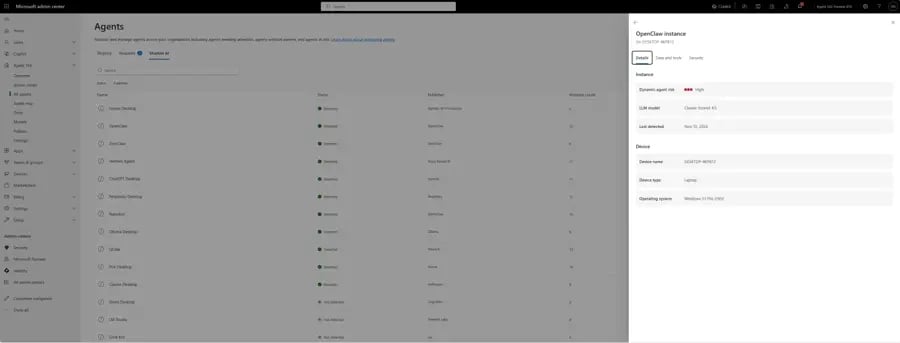
Agent 365 registry showing local and shadow agents including Claude Code and GitHub Copilot CLI discovered by Defender and Global Secure Access

Credit Image: Microsoft

Secure local agents with Entra Agent ID

Microsoft Entra Agent ID now automatically assigns an identity to supported local agents discovered on managed devices and on the network, starting with GitHub Copilot CLI and Claude Code. A distinct agent identity separates agent activity from human activity, which is what makes access control possible without punishing the employee whose machine the agent runs on. This capability is in preview. Entra Agent ID also extended to Microsoft Autopilot, building on existing support for Copilot Studio and Microsoft Foundry agents, also in preview.
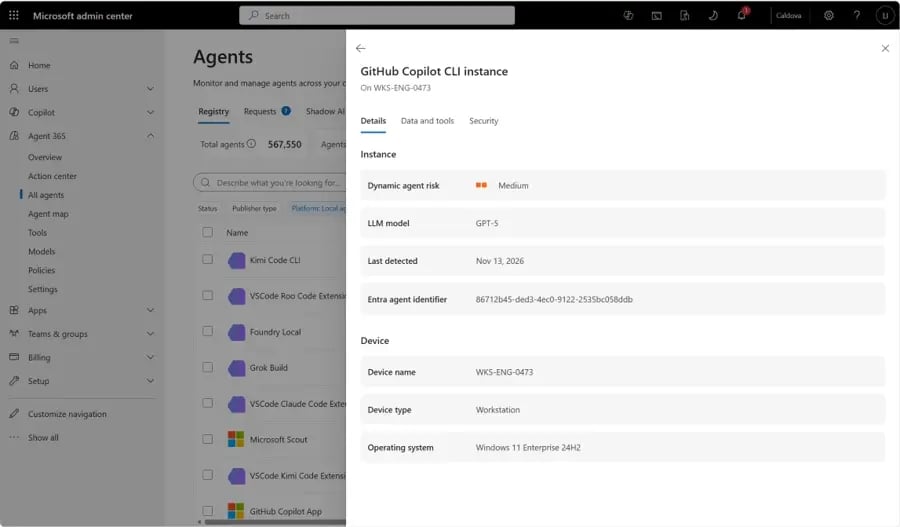
Microsoft Entra Agent ID assigning separate identities to local agents GitHub Copilot CLI and Claude Code

Credit Image: Microsoft

Export Agent Activity

Debugging agent behavior means traces in the tools your team already watches. Export Agent Activity continuously syncs agent traces from Agent 365 into your own Azure Monitor and Application Insights. That too with filters by agent or platform and control over which prompts and responses are included. Developers and SRE teams debug agent runs, model calls, and tool calls using existing dashboards and queries. This is a straightforward addition if you already run Dynamics 365 performance monitoring through the same workspaces.
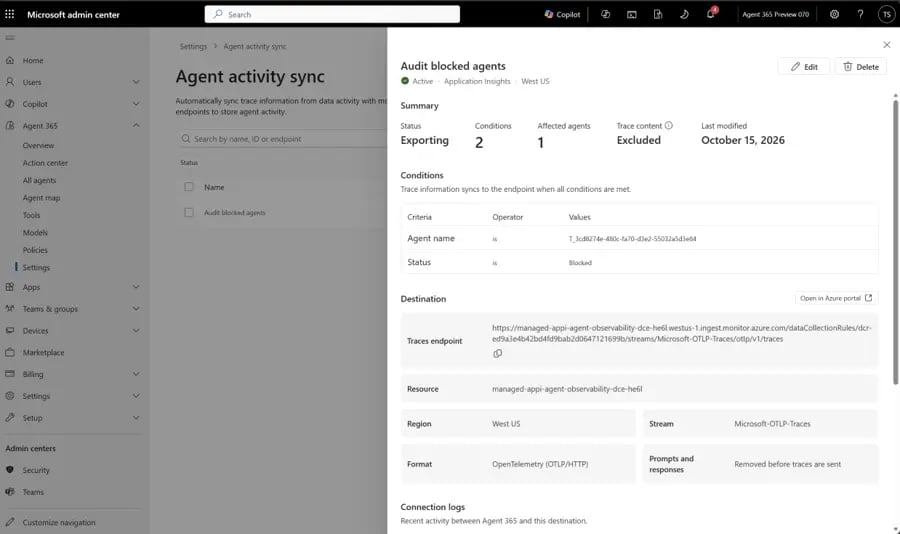
Export Agent Activity configuration syncing Agent 365 traces into Azure Monitor and Application Insights

Credit Image: Microsoft

Tools registry

Agents are only as safe as what they can reach. The Agent 365 tools registry gives IT one view of the tools agents use and the resources they connect to, surfacing both commonly used tools and potentially risky connections. IT can also connect external catalogs including GitHub and Unity Catalog so Microsoft and non-Microsoft tools appear together. The tools registry is generally available; external catalog connections enter private preview in December.
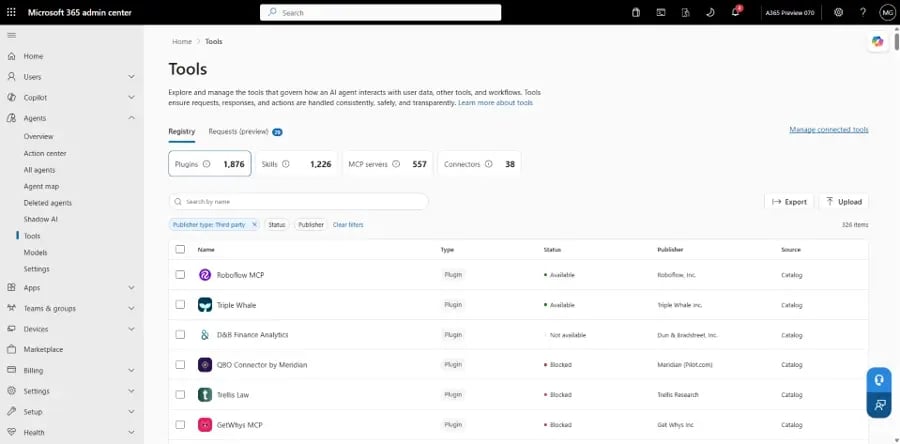
Agent 365 tools registry showing tools agents use with risk indicators for connections

Credit Image: Microsoft

Agent map use cases

As agent counts climb, knowing what work agents actually do becomes the difference between investment and duplication. Agent map use cases classify agent sessions by the type of work performed. Admins see adoption patterns, spot overlapping agents doing the same job twice, and identify where agents deliver the most value. In preview.
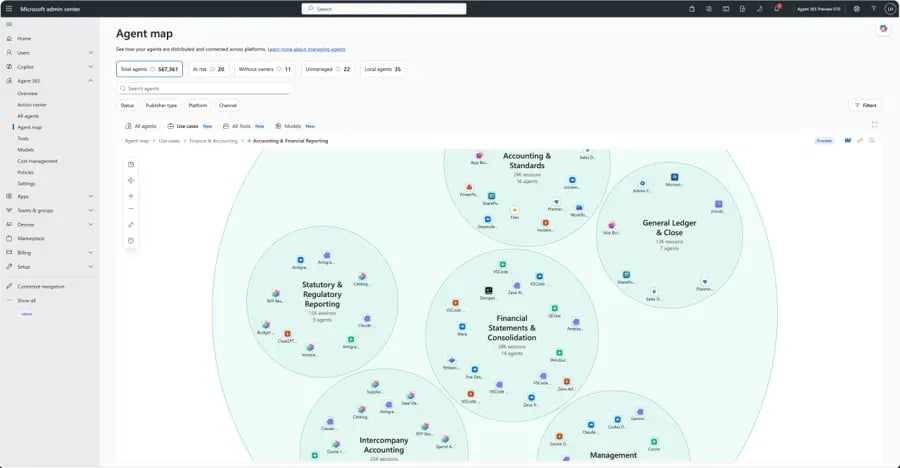
Agent 365 tools registry showing tools agents use with risk indicators for connections

Credit Image: Microsoft

Multi-tenant agent management

Partners manage many customer tenants, and some enterprises run separate tenants per subsidiary, region, or acquisition. Governing agents one tenant at a time does not scale. Multi-tenant agent management provides one view of Microsoft and non-Microsoft agents across managed tenants inside the Microsoft 365 admin center. Deploy an agent to several tenants, compare its configuration and access across them, review security and risk wherever it runs, and approve or block at scale. In public preview.
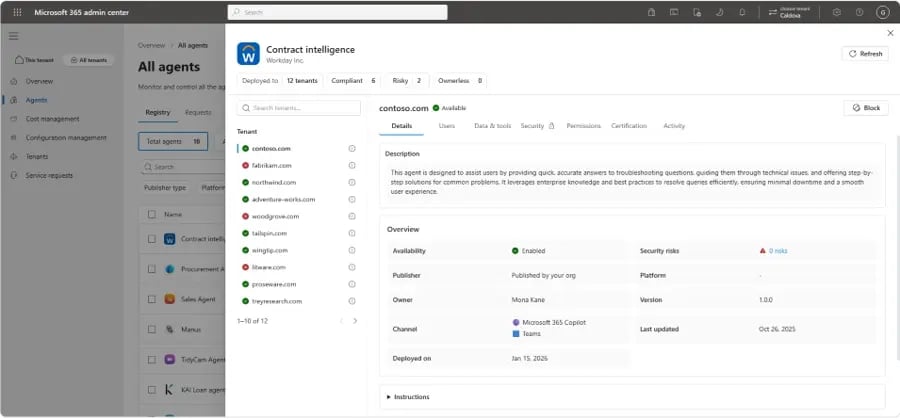
Multi-tenant agent management showing agents across several tenants with configuration comparison and bulk approve or block

Credit Image: Microsoft

Usage insights for Agent 365 core users

Microsoft widened access to usage and activity insights for Microsoft pre-built agents and agents built on Microsoft platforms. Agent overview, active users, and advanced usage metrics covering activity, sessions, exception rate, and run time are now available to users with qualifying Microsoft 365 subscriptions. This gives admins foundational visibility without a premium purchase. Generally available.
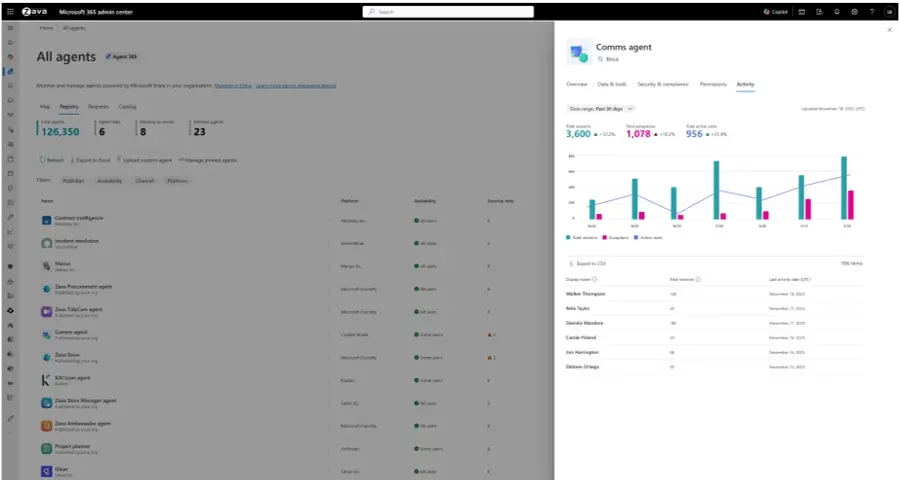
Multi-tenant agent management showing agents across several tenants with configuration comparison and bulk approve or block

Credit Image: Microsoft

Governance: approve faster, clean up continuously

As more AI agents and tools enter the workplace, keeping track of what each one can access and do becomes harder. These updates make that easier by giving organizations better control over agent permissions and setting clear boundaries for their actions.

Plugins, skills, and MCP server governance

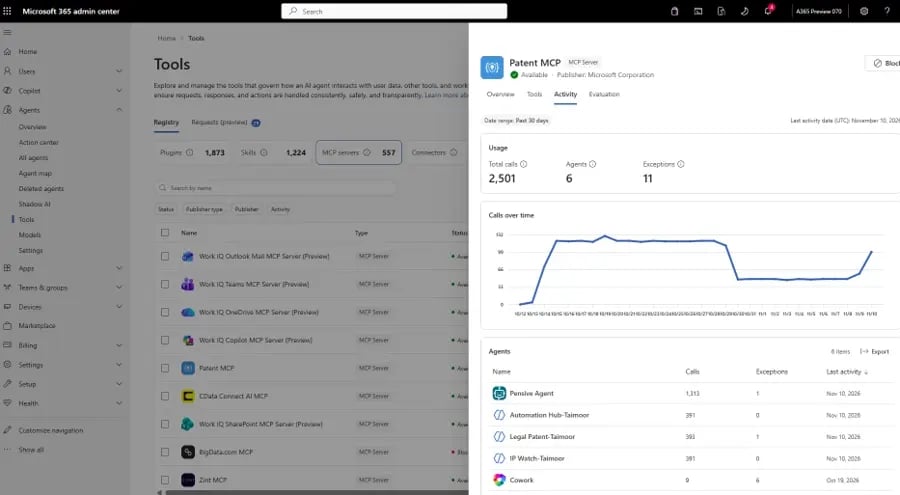
Administrators already controlled which plugins and skills were available in Microsoft 365 Copilot and assigned them to specific users and groups. That now pulls in MCP servers from Azure AI Gateway and third-party gateways such as LiteLLM. The practical detail: before blocking an MCP server, admins see which agents use it and which plugins depend on it, so a block does not quietly break something a team relies on. Plugins and skills governance is generally available; gateway support is in preview.
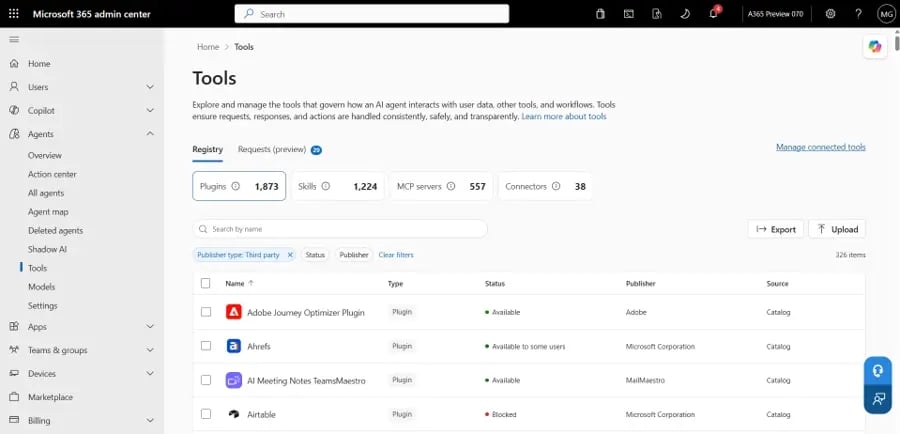
Microsoft 365 admin center tool registry listing plugins, skills, MCP servers and connectors together

Credit Image: Microsoft

MCP server detail view showing usage, dependent agents, exceptions and call volume over time

Credit Image: Microsoft

Local and shadow agent governance

Admins review discovered local agents and their MCP connections, then allow, restrict, or investigate each one. Unsanctioned local agents can be blocked from the registry using Microsoft Intune, Microsoft Defender, and Microsoft Entra Global Secure Access. For approved agents, Intune policies and Microsoft Execution Containers on Windows constrain tool execution, while Microsoft Entra supplies task-scoped permissions and risk-based access controls. In preview.

Copilot Cowork with the Agent 365 plugin

Governance can now start with a plain-language request. With the Agent 365 plugin for Copilot Cowork, admins describe the outcome they want; keep a departing employee’s agents running, contain agents exposed to a compromised connector; and Cowork works the steps. It pauses for approval before anything consequential, so admins skip the manual clicks without losing control of the change. In preview.
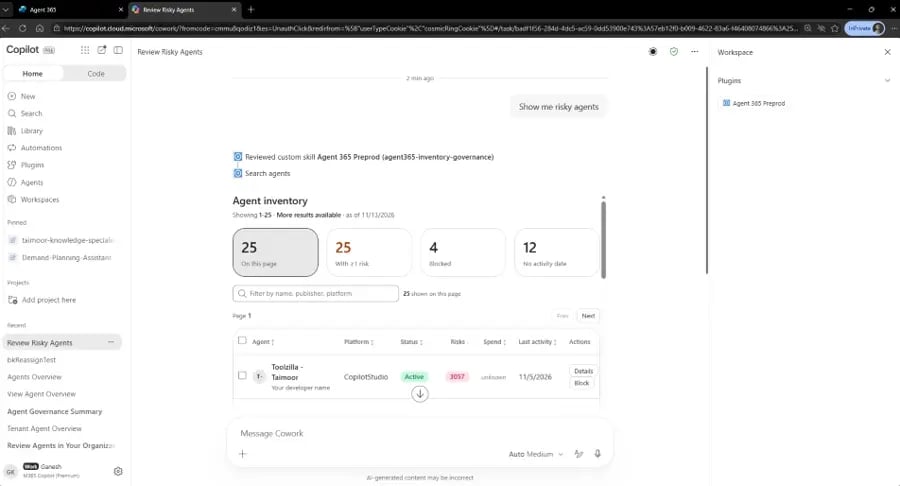
Copilot Cowork returning an agent inventory through the Agent 365 plugin with the option to block an agent

Credit Image: Microsoft

Action center

An agent without an owner has nobody accountable for it. An inactive agent keeps access it no longer needs. Action center pulls governance tasks into one focused queue so admins start with the agents that need attention rather than searching the full registry, beginning with inactive and ownerless agents. Available in preview in December.
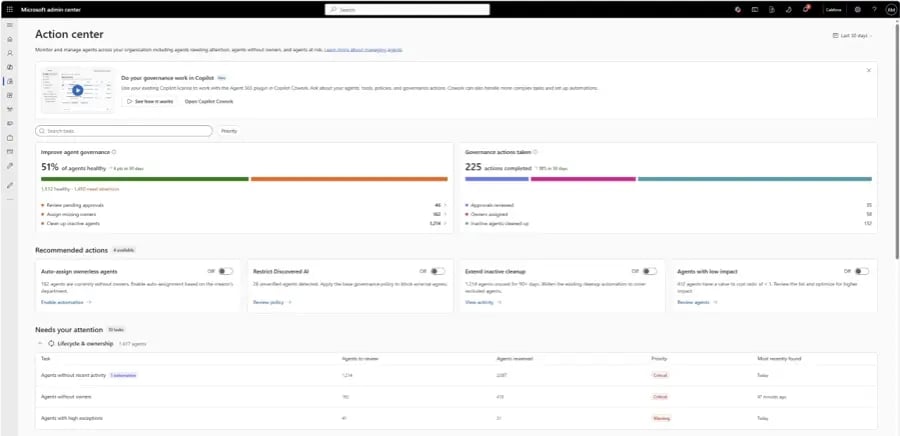
Agent 365 Action center surfacing an ownerless agent alongside tool registry dependency view

Credit Image: Microsoft

Security: Managing Risk as Agents Take Action

Microsoft is treating AI agents with access to company data, tools, and systems as a new kind of insider. The concern is not just what an agent can access when it starts working, but also what it does along the way. Four announcements address this challenge.

Dynamic agent risk gives organizations a way to track changes in an agent's risk level as it operates. It brings together signals from identity, access, data, endpoints, cloud, and network activity, along with potential exposure and blast radius. The risk level changes when an agent takes new actions, becomes a target, or receives code or model updates.

IT and security teams can view the same risk rating across the Microsoft 365 admin center, Microsoft Defender, Microsoft Entra, and Microsoft Purview. This gives them a shared view when identifying and prioritizing potential threats. Microsoft is also working with Check Point, Cyera, Darktrace, and Zenity to bring partner signals into Microsoft Sentinel. This capability is currently in preview.

Conditional Access dynamic controls add another layer of protection by checking risk and context when an agent performs an action, rather than relying only on the initial sign-in. If the risk changes, organizations can restrict sensitive operations or ask for human approval while allowing routine, lower-risk tasks to continue.

Conditional Access also introduces support for policies governing agents that act on behalf of users. This allows organizations to set separate access rules for an agent without automatically applying the same policies that govern the user it represents.

Microsoft Purview DLP can detect and block sensitive information before Microsoft agents and key local agents process, expose, or transmit it. Covered local agents include Claude Code, Claude Desktop, GitHub Copilot CLI, the GitHub Copilot app, and the Visual Studio Code extensions for both. Policies scope to a single agent, a group, or the whole organization. In preview.

Microsoft Defender runtime protection for local agents is generally available on Windows. Defender inspects critical points in the agent loop and blocks malicious instructions before the agent acts, raising an alert with agent and session context correlated into SOC incidents. Configure Audit or Block mode in the Defender portal or Intune. Defender also extended security posture assessment to agents on Amazon Bedrock, Google Gemini, Google Vertex AI, and Anthropic Claude, in preview.

Intune and Global Secure Access define the file and network boundaries that Microsoft Execution Containers enforce on Windows. Those boundaries sit outside the agent’s control, so the agent cannot widen its own access. Intune can separately mark devices running unapproved agents as noncompliant. In preview.
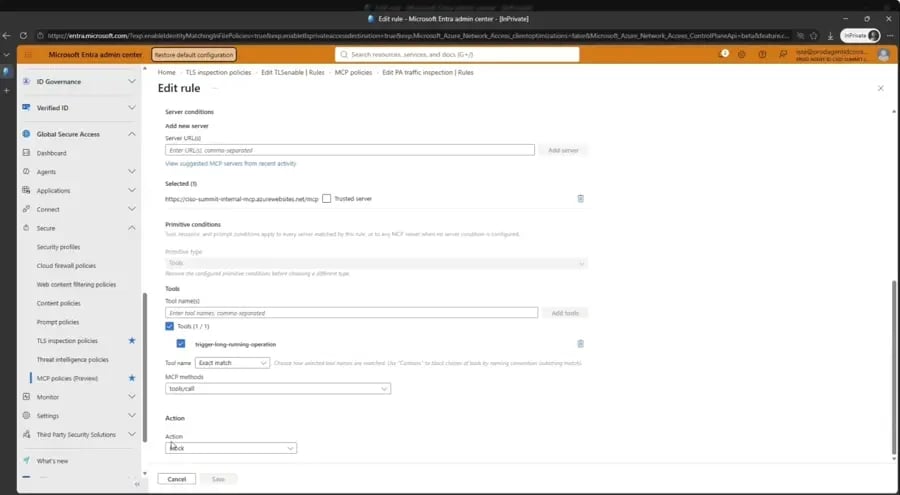
Intune and Global Secure Access policy view setting file and network boundaries for local agents and MCP servers

Credit Image: Microsoft

Business value: connecting AI spend to outcomes

AI cost stopped being an IT-only conversation some time ago. According to BCG, more than 80% of AI spend now sits outside the enterprise IT budget, which means the people paying for agents and the people governing them are rarely the same people.

Agent 365 Business Analytics

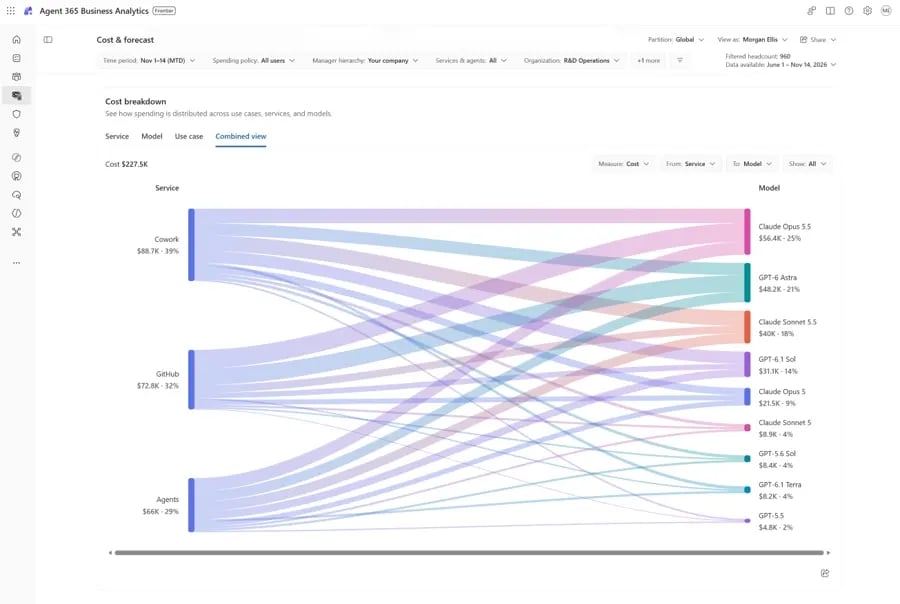
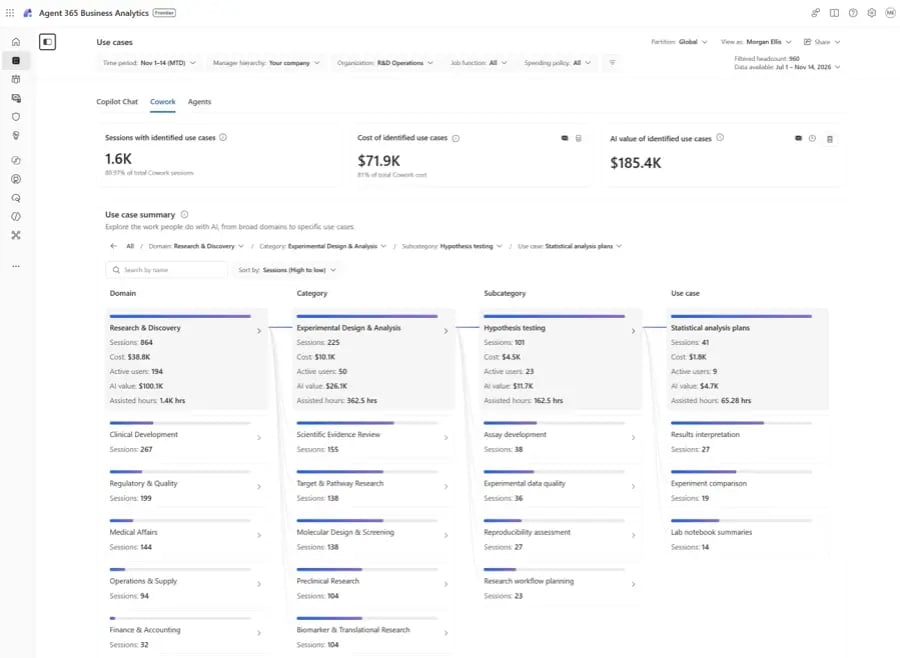
Business Analytics brings AI spend, usage, and value into one place across Microsoft and non-Microsoft AI. Three views matter. Understand AI spend shows what drives cost in dollars and where spend concentrates, with in-app employee surveys alongside usage data. Identify value breaks usage into specific use cases with signals including assisted hours, assisted value, success rate, and satisfaction. Turn insight into decisions adds spend forecasting and scenario planning, shareable through Outlook or Teams. Rolling out in Frontier preview. Analytics for Microsoft services require at least one Microsoft 365 Copilot license in the tenant; non-Microsoft AI analytics require Agent 365 or Microsoft 365 E7.
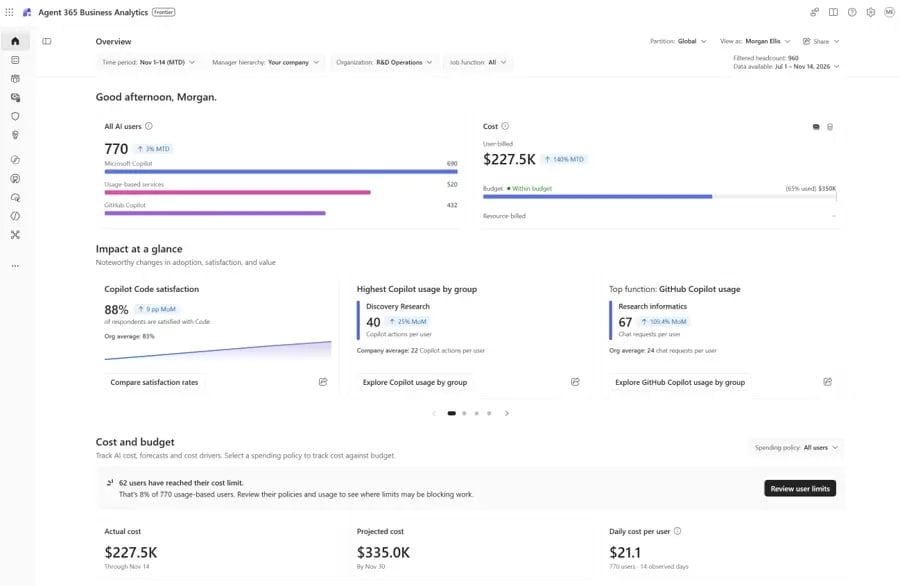
Agent 365 Business Analytics overview combining AI spend, usage and value in one view

Credit Image: Microsoft

Agent 365 Business Analytics cost and forecast page showing AI spend drivers in dollars

Credit Image: Microsoft

Agent 365 Business Analytics use cases page showing assisted hours, assisted value, success rate and satisfaction

Credit Image: Microsoft

A caution worth stating plainly: assisted-value figures rest on assumptions about task duration that your organization did not set. Treat them as a directional signal for a steering committee and reconcile against actual billing before any ROI number reaches a board deck.

Cost Management

Alongside Business Analytics, Microsoft continued building IT-side spend controls. Track consumption across users, services, agents, and models. Apply spending limits and alerts at user, group, organization, or resource level. Control which models each team can reach, reserving premium intelligence for work that needs it. Delegate budget management to business leaders. Integrate AI spend into existing reporting through Microsoft Graph APIs, data exports, and Fabric connectors.
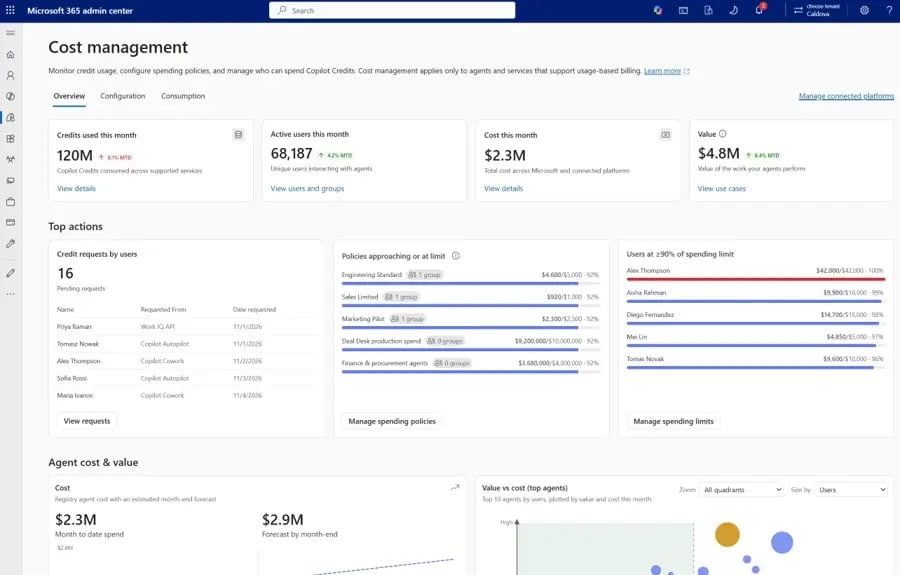
Agent 365 Cost Management showing AI spend across users, services, agents and models with budget limits and alerts

Credit Image: Microsoft

Microsoft Agent 365 licensing after Ignite 2026

Agent 365 licensing moved in a direction that favors most organizations. Viewing your agents costs nothing. According to Microsoft Learn, seeing the complete agent inventory in the Microsoft 365 admin center requires no specific license; only an appropriate role, with AI Reader named as the recommended least-privilege option and AI Administrator available for day-to-day management.

Ignite extended that further. Core usage and activity insights for Microsoft pre-built agents and agents built on Microsoft platforms are now generally available with qualifying Microsoft 365 subscriptions. Premium capabilities still require a paid license: non-Microsoft agent management insights, advanced governance, and the security controls above all need Agent 365 or Microsoft 365 E7.

How DynaTech Helps You Act on the Ignite 2026 Updates

For organizations running Dynamics 365 alongside agents from other platforms, managing visibility, access, and security can quickly become complicated. DynaTech helps bring these elements together through a structured approach to AI agent management.

  • Start with an agent inventory. Before introducing security controls, we identify agents across Microsoft and connected platforms, document their purpose, and assign ownership. This helps avoid unnecessary disruptions when access restrictions are introduced.

  • Bring monitoring into existing workflows. DynaTech integrates agent activity data with Application Insights workspaces already used for Dynamics 365 monitoring. This allows IT and SRE teams to track agent performance and issues alongside their existing workloads.

  • Make informed licensing decisions. Not every team needs the same level of agent visibility. We assess usage and licensing requirements to help organizations choose between core insights and premium options without paying for capabilities they may not need.

We also help reconcile Agent 365 consumption with actual Microsoft 365 and Azure costs, giving decision-makers a clearer picture of AI investment and its returns.

Build Your Agent Roadmap

Inventory first, owners second, controls third.

In a Nutshell

Fifty million registered agents in six months settles the adoption question. What Ignite 2026 settles is accountability: every agent now gets an identity, a risk level, an owner, and a cost line, whether it was built in Copilot Studio or Salesforce. The decision in front of you is narrower than it looks. Not whether to govern agents, but whether core usage insights cover your estate or whether crossing platform boundaries justifies the paid tier. Count your agents, count the platforms they run on, and count how many carry a named owner. If that third number is smaller than the first, you have your answer. As a certified Microsoft Solutions Partner for Business Applications and AI, DynaTech runs that inventory and plans the rollout against what is generally available today rather than what was demoed on stage.

FAQs

What is Microsoft Agent 365?

Agent 365 gives IT teams one place to see and manage the AI agents running across their organization. It helps track who owns each agent, what it can access, and how it is being used. It became generally available on May 1, 2026.

Which Agent 365 features announced at Ignite 2026 are generally available and which are in preview?

Local agent discovery, the tools registry, plugins and skills governance, and core usage insights are generally available. Dynamic agent risk, connected platforms, multi-tenant management, and Purview DLP for agents are still in preview.

Do I need an Agent 365 license to see my agents?

No. You can view your agent inventory in the Microsoft 365 admin center with the right permissions. However, managing third-party agents and using advanced security features requires Agent 365 or Microsoft 365 E7.

What is the Agent 365 tools registry?

Think of it as a list of all the tools your AI agents rely on, including plugins, skills, MCP servers, and connectors. It helps administrators understand these connections and check dependencies before blocking access to a tool.

Can Agent 365 manage agents built on other platforms?

Yes. It can bring agents from platforms such as Salesforce Agentforce, Databricks, Google Vertex AI, OpenAI, and ServiceNow into the same registry as Microsoft agents. This is handled through connected platforms and Microsoft Entra Agent ID.

Recent Blog

Navigate topics that matter most to your Dynamics 365 CRM journey.

What's New in Microsoft Agent 365: Ignite 2026 Updates

What's New in Microsoft Agent 365: Ignite 2026 Updates

AI Solutions

AI Agent Governance

Microsoft Agent 365

Microsoft Ignite 2026


Dynamics 365 Role Governance: How to Prevent Access Sprawl at Scale

Dynamics 365 Role Governance: How to Prevent Access Sprawl at Scale

Dynamics 365 Security

D365 Access Control

Role Governance

Access Sprawl


Managing Dynamics 365 Updates: A Practical Guide to Safer Production Releases

Managing Dynamics 365 Updates: A Practical Guide to Safer Production Releases

Dynamics 365

D365 Managed Services

Release Management


Dynamics 365 vs Best-of-Breed ERP: TCO, Integration and Governance

Dynamics 365 vs Best-of-Breed ERP: TCO, Integration and Governance

Dynamics 365

D365 F&SCM

ERP Integration

ERP Strategy


Ready to Turn Insights into Real Business Impact?

What's New in Microsoft Agent 365: Ignite 2026 Updates

What's New in Microsoft Agent 365: Ignite 2026 Updates

Published on November 21, 2026

Microsoft Ignite 2026 runs November 17 to 20 in San Francisco and online. Microsoft opened the week by expanding Microsoft Agent 365 well past where it stood in September, and one number explains the urgency. According to Microsoft, organizations have registered more than 50 million agents in Agent 365 since the platform launched in May 2026. That volume changes the question. Finding agents was last year’s problem. Ignite 2026 is about who owns each one, what risk it carries, what it costs, and whether it earns its keep. Below is every announcement by theme, with Microsoft’s stated status and the admin center screens for each.

The Short Version

  • Management: connected platforms now give agents from eleven more vendors a Microsoft Entra Agent ID; Defender discovers 60-plus local agents; the tools registry hits general availability.

  • Governance: MCP server, plugin and skills control in one pane; a Copilot Cowork plugin for plain-language governance; an Action center for ownerless agents in December.

  • Security: Dynamic agent risk gives every agent one continuously updated risk level, visible across four Microsoft portals.

  • Business value: Agent 365 Business Analytics connects AI spend to outcomes with forecasting and scenario planning.

  • Licensing: Viewing your agents needs no license, only a role. Premium governance still needs Agent 365 or Microsoft 365 E7.

Agent 365 at Ignite 2026, Feature by Feature

Update

Status per Microsoft (November 17, 2026)

Agent 365 Business Analytics

Frontier preview, rolling out

Connected platforms with Entra Agent ID for more platforms

Preview, completes in December

Guided connection wizard, secretless authentication

Preview

Local agent discovery in Microsoft Defender

Generally available

Network-level discovery and shadow AI discovery in the registry

Preview

Entra Agent ID for local agents and Microsoft Autopilot

Preview

Tools registry

Generally available (external catalogs: private preview in December)

Agent map use cases

Preview

Export Agent Activity (Azure Monitor, Application Insights)

Status not stated

Multi-tenant agent management

Public preview

Usage insights for Microsoft agents (core users)

Generally available

Plugins and skills governance / MCP server governance

GA / Preview

Copilot Cowork with Agent 365 plugin

Preview

Action center

Preview in December

Dynamic agent risk

Preview

Conditional Access dynamic controls

Status not stated

Microsoft Purview DLP for agents

Preview

Defender runtime protection for local agents

Generally available on Windows

Defender posture for third-party agents

Preview

Intune and Global Secure Access controls for local agents

Preview

Cost Management updates

Status not stated

Scope Your Agent Estate

Most tenants hold more agents than anyone on the IT team can name.

Management: one inventory across every platform

Connect your agent estate across platforms

A sales team builds in Salesforce Agentforce, a data team in Databricks Genie, developers in Amazon Bedrock; each with its own console and its own record. Connected platforms collapse that. Link a supported platform once and Agent 365 syncs its agents into the registry alongside Microsoft agents, with no change to agent code. Connected agents carry real context: what the agent is, where it was built, who owns it, and which tools it calls. On supported platforms you also see activity; what the agent was asked, what it did, which models or tools it called, and whether it succeeded.

Agent 365 connected platforms view showing Salesforce Agentforce, Amazon AgentCore, Google Vertex AI, Databricks and Snowflake agents with Entra Agent IDs

Credit Image: Microsoft

Three updates build on that. Entra Agent ID for more platforms is rolling out across Salesforce Agentforce, Amazon AgentCore, Google Vertex AI, Databricks, Snowflake, Anthropic Claude Managed Agents, OpenAI, Oracle, SAP, ServiceNow, and UiPath, completing in December. Once an agent holds an identity, it falls under lifecycle management, supported Conditional Access policies, identity risk assessment, and revocation. A guided setup wizard walks admins through connecting a platform, tools registry, or gateway. Secretless authentication uses Microsoft Entra workload identity federation, removing long-lived credentials to create, store, and rotate.

Local and shadow agent discovery

Some agents never passed through IT at all. Microsoft Defender and Microsoft Entra Global Secure Access now discover more than 60 local AI agents, including Claude Code and GitHub Copilot CLI, along with their configured MCP servers. Defender covers managed Windows and macOS devices and ties each agent to its device and user. Global Secure Access adds network-level visibility into each agent’s destinations and resources. Agent 365 pulls both signal sets into the registry. Local agent discovery in Defender is generally available; network-level and registry shadow AI discovery are in preview.

Agent 365 registry showing local and shadow agents including Claude Code and GitHub Copilot CLI discovered by Defender and Global Secure Access

Credit Image: Microsoft

Secure local agents with Entra Agent ID

Microsoft Entra Agent ID now automatically assigns an identity to supported local agents discovered on managed devices and on the network, starting with GitHub Copilot CLI and Claude Code. A distinct agent identity separates agent activity from human activity, which is what makes access control possible without punishing the employee whose machine the agent runs on. This capability is in preview. Entra Agent ID also extended to Microsoft Autopilot, building on existing support for Copilot Studio and Microsoft Foundry agents, also in preview.

Microsoft Entra Agent ID assigning separate identities to local agents GitHub Copilot CLI and Claude Code

Credit Image: Microsoft

Export Agent Activity

Debugging agent behavior means traces in the tools your team already watches. Export Agent Activity continuously syncs agent traces from Agent 365 into your own Azure Monitor and Application Insights. That too with filters by agent or platform and control over which prompts and responses are included. Developers and SRE teams debug agent runs, model calls, and tool calls using existing dashboards and queries. This is a straightforward addition if you already run Dynamics 365 performance monitoring through the same workspaces.

Export Agent Activity configuration syncing Agent 365 traces into Azure Monitor and Application Insights

Credit Image: Microsoft

Tools registry

Agents are only as safe as what they can reach. The Agent 365 tools registry gives IT one view of the tools agents use and the resources they connect to, surfacing both commonly used tools and potentially risky connections. IT can also connect external catalogs including GitHub and Unity Catalog so Microsoft and non-Microsoft tools appear together. The tools registry is generally available; external catalog connections enter private preview in December.

Agent 365 tools registry showing tools agents use with risk indicators for connections

Credit Image: Microsoft

Agent map use cases

As agent counts climb, knowing what work agents actually do becomes the difference between investment and duplication. Agent map use cases classify agent sessions by the type of work performed. Admins see adoption patterns, spot overlapping agents doing the same job twice, and identify where agents deliver the most value. In preview.

Agent 365 tools registry showing tools agents use with risk indicators for connections

Credit Image: Microsoft

Multi-tenant agent management

Partners manage many customer tenants, and some enterprises run separate tenants per subsidiary, region, or acquisition. Governing agents one tenant at a time does not scale. Multi-tenant agent management provides one view of Microsoft and non-Microsoft agents across managed tenants inside the Microsoft 365 admin center. Deploy an agent to several tenants, compare its configuration and access across them, review security and risk wherever it runs, and approve or block at scale. In public preview.

Multi-tenant agent management showing agents across several tenants with configuration comparison and bulk approve or block

Credit Image: Microsoft

Usage insights for Agent 365 core users

Microsoft widened access to usage and activity insights for Microsoft pre-built agents and agents built on Microsoft platforms. Agent overview, active users, and advanced usage metrics covering activity, sessions, exception rate, and run time are now available to users with qualifying Microsoft 365 subscriptions. This gives admins foundational visibility without a premium purchase. Generally available.

Multi-tenant agent management showing agents across several tenants with configuration comparison and bulk approve or block

Credit Image: Microsoft

Governance: approve faster, clean up continuously

As more AI agents and tools enter the workplace, keeping track of what each one can access and do becomes harder. These updates make that easier by giving organizations better control over agent permissions and setting clear boundaries for their actions.

Plugins, skills, and MCP server governance

Administrators already controlled which plugins and skills were available in Microsoft 365 Copilot and assigned them to specific users and groups. That now pulls in MCP servers from Azure AI Gateway and third-party gateways such as LiteLLM. The practical detail: before blocking an MCP server, admins see which agents use it and which plugins depend on it, so a block does not quietly break something a team relies on. Plugins and skills governance is generally available; gateway support is in preview.

Microsoft 365 admin center tool registry listing plugins, skills, MCP servers and connectors together

Credit Image: Microsoft

MCP server detail view showing usage, dependent agents, exceptions and call volume over time

Credit Image: Microsoft

Local and shadow agent governance

Admins review discovered local agents and their MCP connections, then allow, restrict, or investigate each one. Unsanctioned local agents can be blocked from the registry using Microsoft Intune, Microsoft Defender, and Microsoft Entra Global Secure Access. For approved agents, Intune policies and Microsoft Execution Containers on Windows constrain tool execution, while Microsoft Entra supplies task-scoped permissions and risk-based access controls. In preview.

Copilot Cowork with the Agent 365 plugin

Governance can now start with a plain-language request. With the Agent 365 plugin for Copilot Cowork, admins describe the outcome they want; keep a departing employee’s agents running, contain agents exposed to a compromised connector; and Cowork works the steps. It pauses for approval before anything consequential, so admins skip the manual clicks without losing control of the change. In preview.

Copilot Cowork returning an agent inventory through the Agent 365 plugin with the option to block an agent

Credit Image: Microsoft

Action center

An agent without an owner has nobody accountable for it. An inactive agent keeps access it no longer needs. Action center pulls governance tasks into one focused queue so admins start with the agents that need attention rather than searching the full registry, beginning with inactive and ownerless agents. Available in preview in December.

Agent 365 Action center surfacing an ownerless agent alongside tool registry dependency view

Credit Image: Microsoft

Security: Managing Risk as Agents Take Action

Microsoft is treating AI agents with access to company data, tools, and systems as a new kind of insider. The concern is not just what an agent can access when it starts working, but also what it does along the way. Four announcements address this challenge.

Dynamic agent risk gives organizations a way to track changes in an agent's risk level as it operates. It brings together signals from identity, access, data, endpoints, cloud, and network activity, along with potential exposure and blast radius. The risk level changes when an agent takes new actions, becomes a target, or receives code or model updates.

IT and security teams can view the same risk rating across the Microsoft 365 admin center, Microsoft Defender, Microsoft Entra, and Microsoft Purview. This gives them a shared view when identifying and prioritizing potential threats. Microsoft is also working with Check Point, Cyera, Darktrace, and Zenity to bring partner signals into Microsoft Sentinel. This capability is currently in preview.

Conditional Access dynamic controls add another layer of protection by checking risk and context when an agent performs an action, rather than relying only on the initial sign-in. If the risk changes, organizations can restrict sensitive operations or ask for human approval while allowing routine, lower-risk tasks to continue.

Conditional Access also introduces support for policies governing agents that act on behalf of users. This allows organizations to set separate access rules for an agent without automatically applying the same policies that govern the user it represents.

Microsoft Purview DLP can detect and block sensitive information before Microsoft agents and key local agents process, expose, or transmit it. Covered local agents include Claude Code, Claude Desktop, GitHub Copilot CLI, the GitHub Copilot app, and the Visual Studio Code extensions for both. Policies scope to a single agent, a group, or the whole organization. In preview.

Microsoft Defender runtime protection for local agents is generally available on Windows. Defender inspects critical points in the agent loop and blocks malicious instructions before the agent acts, raising an alert with agent and session context correlated into SOC incidents. Configure Audit or Block mode in the Defender portal or Intune. Defender also extended security posture assessment to agents on Amazon Bedrock, Google Gemini, Google Vertex AI, and Anthropic Claude, in preview.

Intune and Global Secure Access define the file and network boundaries that Microsoft Execution Containers enforce on Windows. Those boundaries sit outside the agent’s control, so the agent cannot widen its own access. Intune can separately mark devices running unapproved agents as noncompliant. In preview.

Intune and Global Secure Access policy view setting file and network boundaries for local agents and MCP servers

Credit Image: Microsoft

Business value: connecting AI spend to outcomes

AI cost stopped being an IT-only conversation some time ago. According to BCG, more than 80% of AI spend now sits outside the enterprise IT budget, which means the people paying for agents and the people governing them are rarely the same people.

Agent 365 Business Analytics

Business Analytics brings AI spend, usage, and value into one place across Microsoft and non-Microsoft AI. Three views matter. Understand AI spend shows what drives cost in dollars and where spend concentrates, with in-app employee surveys alongside usage data. Identify value breaks usage into specific use cases with signals including assisted hours, assisted value, success rate, and satisfaction. Turn insight into decisions adds spend forecasting and scenario planning, shareable through Outlook or Teams. Rolling out in Frontier preview. Analytics for Microsoft services require at least one Microsoft 365 Copilot license in the tenant; non-Microsoft AI analytics require Agent 365 or Microsoft 365 E7.

Agent 365 Business Analytics overview combining AI spend, usage and value in one view

Credit Image: Microsoft

Agent 365 Business Analytics cost and forecast page showing AI spend drivers in dollars

Credit Image: Microsoft

Agent 365 Business Analytics use cases page showing assisted hours, assisted value, success rate and satisfaction

Credit Image: Microsoft

A caution worth stating plainly: assisted-value figures rest on assumptions about task duration that your organization did not set. Treat them as a directional signal for a steering committee and reconcile against actual billing before any ROI number reaches a board deck.

Cost Management

Alongside Business Analytics, Microsoft continued building IT-side spend controls. Track consumption across users, services, agents, and models. Apply spending limits and alerts at user, group, organization, or resource level. Control which models each team can reach, reserving premium intelligence for work that needs it. Delegate budget management to business leaders. Integrate AI spend into existing reporting through Microsoft Graph APIs, data exports, and Fabric connectors.

Agent 365 Cost Management showing AI spend across users, services, agents and models with budget limits and alerts

Credit Image: Microsoft

Microsoft Agent 365 licensing after Ignite 2026

Agent 365 licensing moved in a direction that favors most organizations. Viewing your agents costs nothing. According to Microsoft Learn, seeing the complete agent inventory in the Microsoft 365 admin center requires no specific license; only an appropriate role, with AI Reader named as the recommended least-privilege option and AI Administrator available for day-to-day management.

Ignite extended that further. Core usage and activity insights for Microsoft pre-built agents and agents built on Microsoft platforms are now generally available with qualifying Microsoft 365 subscriptions. Premium capabilities still require a paid license: non-Microsoft agent management insights, advanced governance, and the security controls above all need Agent 365 or Microsoft 365 E7.

How DynaTech Helps You Act on the Ignite 2026 Updates

For organizations running Dynamics 365 alongside agents from other platforms, managing visibility, access, and security can quickly become complicated. DynaTech helps bring these elements together through a structured approach to AI agent management.

  • Start with an agent inventory. Before introducing security controls, we identify agents across Microsoft and connected platforms, document their purpose, and assign ownership. This helps avoid unnecessary disruptions when access restrictions are introduced.

  • Bring monitoring into existing workflows. DynaTech integrates agent activity data with Application Insights workspaces already used for Dynamics 365 monitoring. This allows IT and SRE teams to track agent performance and issues alongside their existing workloads.

  • Make informed licensing decisions. Not every team needs the same level of agent visibility. We assess usage and licensing requirements to help organizations choose between core insights and premium options without paying for capabilities they may not need.

We also help reconcile Agent 365 consumption with actual Microsoft 365 and Azure costs, giving decision-makers a clearer picture of AI investment and its returns.

Build Your Agent Roadmap

Inventory first, owners second, controls third.

In a Nutshell

Fifty million registered agents in six months settles the adoption question. What Ignite 2026 settles is accountability: every agent now gets an identity, a risk level, an owner, and a cost line, whether it was built in Copilot Studio or Salesforce. The decision in front of you is narrower than it looks. Not whether to govern agents, but whether core usage insights cover your estate or whether crossing platform boundaries justifies the paid tier. Count your agents, count the platforms they run on, and count how many carry a named owner. If that third number is smaller than the first, you have your answer. As a certified Microsoft Solutions Partner for Business Applications and AI, DynaTech runs that inventory and plans the rollout against what is generally available today rather than what was demoed on stage.
FAQs

What is Microsoft Agent 365?

Agent 365 gives IT teams one place to see and manage the AI agents running across their organization. It helps track who owns each agent, what it can access, and how it is being used. It became generally available on May 1, 2026.

Which Agent 365 features announced at Ignite 2026 are generally available and which are in preview?

Local agent discovery, the tools registry, plugins and skills governance, and core usage insights are generally available. Dynamic agent risk, connected platforms, multi-tenant management, and Purview DLP for agents are still in preview.

Do I need an Agent 365 license to see my agents?

No. You can view your agent inventory in the Microsoft 365 admin center with the right permissions. However, managing third-party agents and using advanced security features requires Agent 365 or Microsoft 365 E7.

What is the Agent 365 tools registry?

Think of it as a list of all the tools your AI agents rely on, including plugins, skills, MCP servers, and connectors. It helps administrators understand these connections and check dependencies before blocking access to a tool.

Can Agent 365 manage agents built on other platforms?

Yes. It can bring agents from platforms such as Salesforce Agentforce, Databricks, Google Vertex AI, OpenAI, and ServiceNow into the same registry as Microsoft agents. This is handled through connected platforms and Microsoft Entra Agent ID.


Get In Touch Get In Touch

Get In Touch