

 30 Jul 2026
The Lifecycle Services era is over for new Dynamics 365 Finance & Operations projects. Starting January 2026, Microsoft mandated PPAC as the sole provisioning platform. If your pipelines still reference LCS asset libraries, build VMs, or manual deployable package uploads, you are already carrying technical debt. This blog explains exactly what changed, reason it matters for your pipeline architecture, and how to build a governance-grade ALM flow around UDE, USE, and UPE environments. But before that, it’s necessary to understand the strategic reasons behind the LCS to PPAC transition and Microsoft’s long-term roadmap.
The LCS Model and Its Structural Limitations
For nearly a decade, Dynamics 365 Finance & Operations development followed a predictable but labor-heavy cycle. Developers worked inside Cloud-Hosted Environments (CHEs)—dedicated Azure VMs provisioned through Lifecycle Services. A separate build VM compiled X++ code nightly, generating a deployable package. That package was manually uploaded to LCS, reviewed in the Asset Library, and pushed through portal-driven environment actions to Sandbox Tier 2, then to Production. Each step required a human clicking through a browser.
The problems were structural, not incidental. Build VMs sat idle between builds but continued billing against your Azure subscription. Environment provisioning took four to eight hours. There was no native integration between the LCS deployment surface and the Power Platform ALM model used by Customer Engagement, so teams building cross-stack solutions maintained two entirely separate deployment strategies. Source control existed, but the handoff from source to environment was a series of manual stitches rather than an automated flow. Governance was largely trust-based: there was no pipeline gate enforcement before a package reached production.
Why this mattered at scale: In enterprise environments with multiple ISV layers and parallel feature branches, the LCS model created serialized deployment queues. A single failed package could block an entire sprint's worth of work from reaching Sandbox, delaying UAT cycles by days. The absence of environment-as-code meant disaster recovery relied on documentation rather than repeatable scripts.
What the Unified Developer Experience Actually Changes
Calling the Unified Developer Experience (UDE) a replacement for Cloud Hosted Environments (CHE) doesn't tell the whole story. If you're still becoming familiar with the Unified Developer Experience, our guide What Is Unified Developer Experience (UDE) in Dynamics 365? explains how UDE works, why Microsoft introduced it, and what developers should expect from the new architecture.
What Microsoft has introduced is a different way of managing Finance and Operations development environments. Previously, teams spent considerable time provisioning, maintaining, and troubleshooting infrastructure.
With UDE, much of that complexity moves into the Power Platform ecosystem, where environments are managed through the Power Platform Admin Center (PPAC) and governed through a capacity-based model. This tighter Power Platform integration with Dynamics 365 enables organizations to standardize development, governance, and deployment practices across business applications.
The new approach revolves around three environment types.
- Unified Developer Environment (UDE)
Think of UDE as the new home for day-to-day development work. It replaces the traditional Tier 1 environment and provides developers with a cloud-hosted, single-AOS setup. Using Visual Studio 2022 and the Power Platform Tools extension, Developers can build, test, and deploy their work as managed Dataverse solutions using AI-generated Dataverse plugin code without dealing with many of the infrastructure tasks that were previously required. - Unified Sandbox Environment (USE)
Once development is complete, solutions move into the Unified Sandbox Environment. This environment takes over the role previously served by Tier 2 sandboxes and is typically used for integration testing, user acceptance testing, and business validation. Unlike older deployment models that often relied on manual intervention, changes are promoted through Azure DevOps pipelines, creating a more controlled and repeatable release process. - Unified Production Environment (UPE)
The final destination is the Unified Production Environment. Managed through PPAC, this environment is designed to ensure that only validated and approved changes reach production. Solutions progress through the deployment pipeline, pass approval checkpoints, and are promoted from the sandbox stage before becoming available to end users.
For organizations familiar with traditional Finance and Operations lifecycle management, the biggest change is not the environment names. It is the shift toward a standardized, pipeline-driven deployment model that reduces manual administration and aligns Finance and Operations development more closely with the broader Power Platform ecosystem.
Before & After: LCS-Era vs. UDE/PPAC Deployment Flow
The operational difference between the two models is easier to understand as a direct comparison. The table below maps the same deployment lifecycle event across both paradigms, from environment provisioning through production release.
|
LCS-Era Flow (Legacy) |
UDE / PPAC Flow (Modern) |
|
Provision Cloud-Hosted Environment via LCS portal. 4–8 hrs, Azure subscription required, manual VM sizing |
Provision UDE from PPAC or PowerShell script. ~1 hr, capacity-based billing, no Azure sub needed |
|
Develop X++ inside CHE VM, no local tooling parity; remote desktop dependency |
Develop locally in Visual Studio 2022; deploy models to cloud UDE via VS extension menu |
|
Dedicated build VM compiles code nightly; VM billed 24/7 regardless of usage |
Azure DevOps Microsoft-hosted agent compiles X++ via Compiler Tools NuGet; no persistent build VM |
|
Download deployable package (.zip) from build VM; manually upload to LCS Asset Library |
Pipeline generates unified package in Power Platform format; artifact versioned in DevOps feed |
|
Apply package to Sandbox via LCS portal action; environment offline during deployment |
CD pipeline imports managed solution to USE; zero-downtime deployment via Dataverse solution framework |
|
Submit ServiceNow/LCS change request for production; Microsoft-scheduled downtime window |
Dual approval gates in Azure DevOps Release Pipeline enforce promotion to UPE; full audit trail |
|
No native pipeline gate enforcement; governance relies on human process adherence |
DLP policies, environment group RBAC, and compliance tags applied via PPAC; governance is code |
While this comparison focuses on deployment workflows, infrastructure decisions extend beyond ALM. For a detailed comparison of provisioning costs, administrative overhead, scalability, and operational complexity, explore UDE vs Cloud Hosted Environments: Cost, Control & Complexity.
The Unified Package: What It Contains and Why It Matters
The unified package is the core deployment artifact in the UDE ALM model. Understanding its structure is essential before you design your pipeline. When the Azure DevOps task Create Deployable Package runs with the Power Platform format option selected, it produces a package that bundles two distinct payload categories:
- X++ binaries: Compiled assembly files from your F&O models, ISV modules, and third-party binaries present in the /bin/ subfolder of each module directory on the build agent.
- Dataverse solution components: Any Power Platform components; tables, flows, model-driven app customizations, connection references that ship alongside your X++ extension.
The implication for multi-ISV environments is significant. If your source control repository includes third-party binary modules, the packaging task will incorporate those assemblies into the unified package automatically. This means your package composition must be explicitly declared, and your pipeline's artifact versioning strategy must account for ISV version dependencies, not just your own model versions. Failing to manage this creates the same "works on dev, breaks on sandbox" problems the old deployable package model suffered from just with a different artifact format.
Solution Layering in the UDE Environment Chain
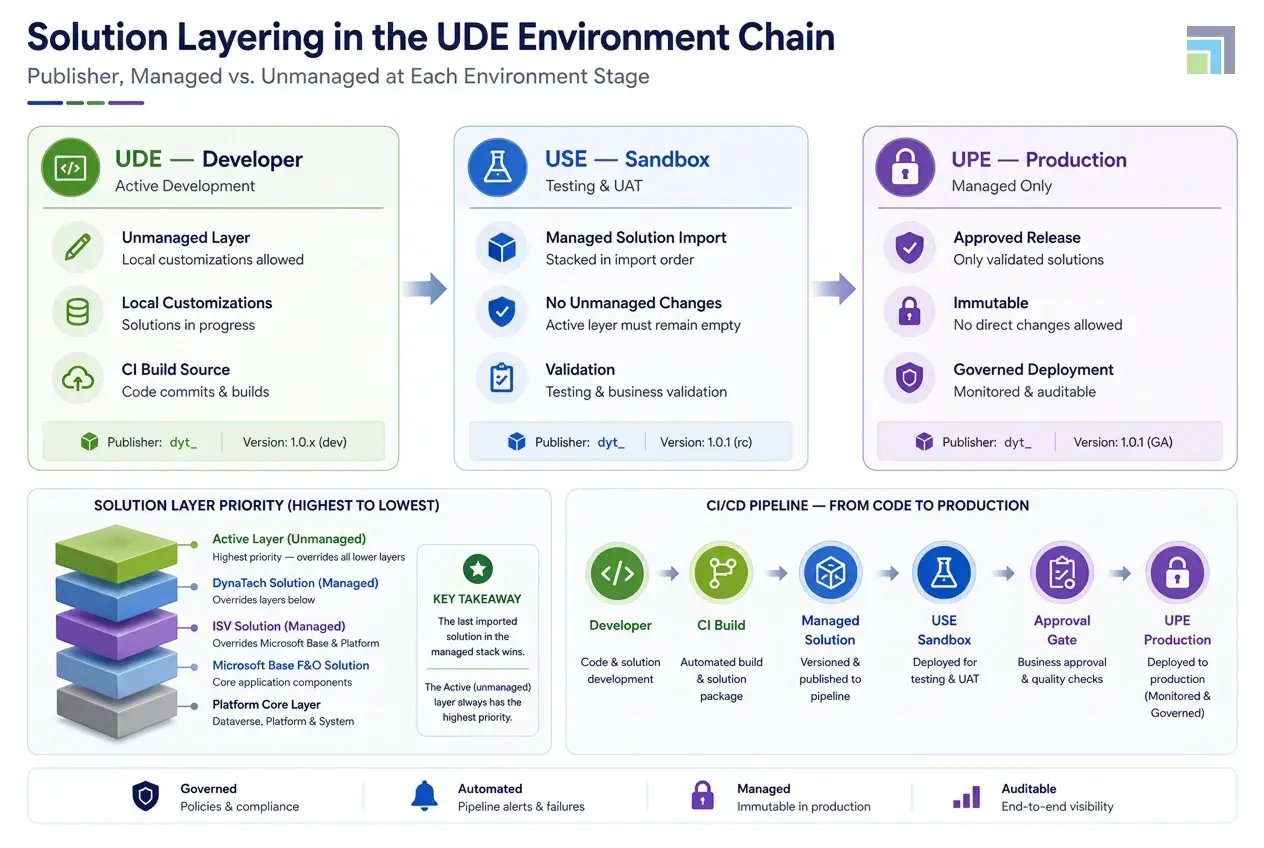
One of the more nuanced aspects of UDE ALM is how solution layers behave differently across UDE, USE, and UPE environments. In the Dataverse model, managed solutions stack in import order; last import wins within the managed layer while the unmanaged (active) layer sits above all managed layers and overrides them. This layering architecture determines how customizations from multiple publishers coexist, and how your own extensions interact with Microsoft base solutions.
Pipeline Architecture: Building CI/CD for UDE ALM
A successful UDE ALM strategy depends on a well-defined CI/CD pipeline in Azure DevOps. Rather than treating deployment as a single event, the process is typically divided into four stages that move changes from development to production in a controlled and repeatable manner.
Stage 1: Continuous Integration (Build)
The process begins when code is merged into the main branch. Azure DevOps automatically compiles the solution, validates dependencies, runs code analysis, and creates a versioned unified package. Any ATL tests that can run without a live Finance and Operations environment are also executed at this stage. Once validation is complete, the build artifact is stored and prepared for deployment.
Stage 2: Deployment to USE
The next step is deploying the package to the Unified Sandbox Environment (USE). Before deployment, the pipeline verifies policy compliance and confirms that the target environment is ready. Automated testing, including RSAT and regression testing in D365 F&O, is then performed. Most organizations require a high test pass rate before allowing the release to move forward.
Stage 3: Approval and Release Control
Even with automation in place, production deployments should not happen without oversight. Before a release can move from USE to UPE, designated stakeholders review and approve the deployment. This approval step ensures that tested changes align with business and governance requirements before reaching production.
Stage 4: Deployment to UPE
After approval, the same validated package is deployed to the Unified Production Environment (UPE). Since the exact artifact tested in USE is used in production, deployment outcomes are highly predictable. Hence, it becomes easier to audit. Automated smoke tests run after deployment. This is done to verify important business processes, while monitoring tools confirm overall environment health. If an issue is detected, the previous stable version can be easily restored through the established rollback process.
Governance and the End of Trust-Based Deployment
The single most underappreciated shift in the UDE ALM model is governance. Under LCS, production deployments could be initiated by anyone with the right LCS role and a right formatted package. Audit trails existed, but enforcement was procedural. Under PPAC, governance is architectural. Environment group RBAC restricts which service principals and user identities can trigger deployment actions at each environment tier. DLP policies define which connector combinations are permissible and can be enforced at the environment group level, meaning a misconfigured flow cannot propagate from a development UDE to a USE or UPE environment.
For enterprise teams managing multiple geographies or business units, PPAC environment groups allow differentiated governance profiles. Organizations adopting UDE often leverage Power Platform consulting services to establish governance frameworks, environment strategies, security controls, and deployment standards that align with enterprise compliance requirements. A UPE for European operations may have stricter data residency policies applied than a UDE used by a developer in a non-regulated region, and those policies are enforced by the platform rather than by a checklist. Update window policies allow teams to manage F&O quality updates with internal change freeze periods.
Perhaps most consequential for DevOps teams: because environments can now be created, copied, and configured entirely from Azure DevOps YAML pipelines using PowerShell and the Power Platform admin module, infrastructure review becomes part of the pull request process. An environment configuration change gets the same code review, the same approval gate, and the same audit trail as an X++ feature change. That is not an incremental improvement over LCS. It is a different operating model entirely.
What You Should Do Before Your Next Sprint
If your team is still operating under the LCS deployment model for existing implementations, the deprecation timeline means you have a finite runway. For new implementations after January 2026, PPAC is not optional; it is the only path.
Businesses planning the transition from legacy LCS-based deployments should consider Dynamics 365 F&O migration services to accelerate modernization while minimizing risks associated with environment provisioning, deployment automation, and governance changes.
Once you've identified the pipeline changes required, the next step is preparing your organization for the broader platform transition. Our LCS to PPAC Migration Checklist: Are You Ready for 2026? walks through the technical, governance, licensing, and readiness activities organizations should complete before Microsoft's migration deadline.
The practical steps to begin the transition are:
- Audit your existing Azure DevOps pipelines for LCS-specific tasks and identify which stages need to be rebuilt with Power Platform Build Tools tasks.
- Evaluate whether your build VM can be decommissioned in favor of Microsoft-hosted agents with the Compiler Tools NuGet package; in most cases, it can.
- Establish a publisher prefix strategy and solution naming convention before your first UDE deployment, because renaming publishers' post-deployment in Dataverse is non-trivial.
- Define your environment group structure in PPAC and document the RBAC model before provisioning USE and UPE environments, so access control is correct from day one rather than retrofitted.
- Configure your approval gates and deployment window policies as pipeline YAML, not as portal settings, so they are version-controlled and auditable.
In A Nutshell
Modernizing D365 Finance & Operations ALM requires more than adopting new tools—it requires the right implementation strategy, governance framework, and DevOps expertise. As a trusted Microsoft Dynamics 365 partner, DynaTech helps organizations transition from legacy LCS-based deployments to fully automated UDE environments, enabling faster releases, stronger governance, and a future-ready development lifecycle. With deep experience across Dynamics 365, Azure DevOps, and the Power Platform, DynaTech empowers businesses to accelerate modernization with confidence.

Ready to Modernize Your D365 ALM Pipeline?
DynaTech's DevOps practice helps Dynamics 365 teams move from LCS-era deployments to fully automated, governance-grade UDE pipelines; without disrupting active development cycles.

